Io
SENSOR
Section 2 SMT-200 Operations
SMT-200 Operations and Technical Manual 2.00/R1
13
2.4 Switching off the SMT-200
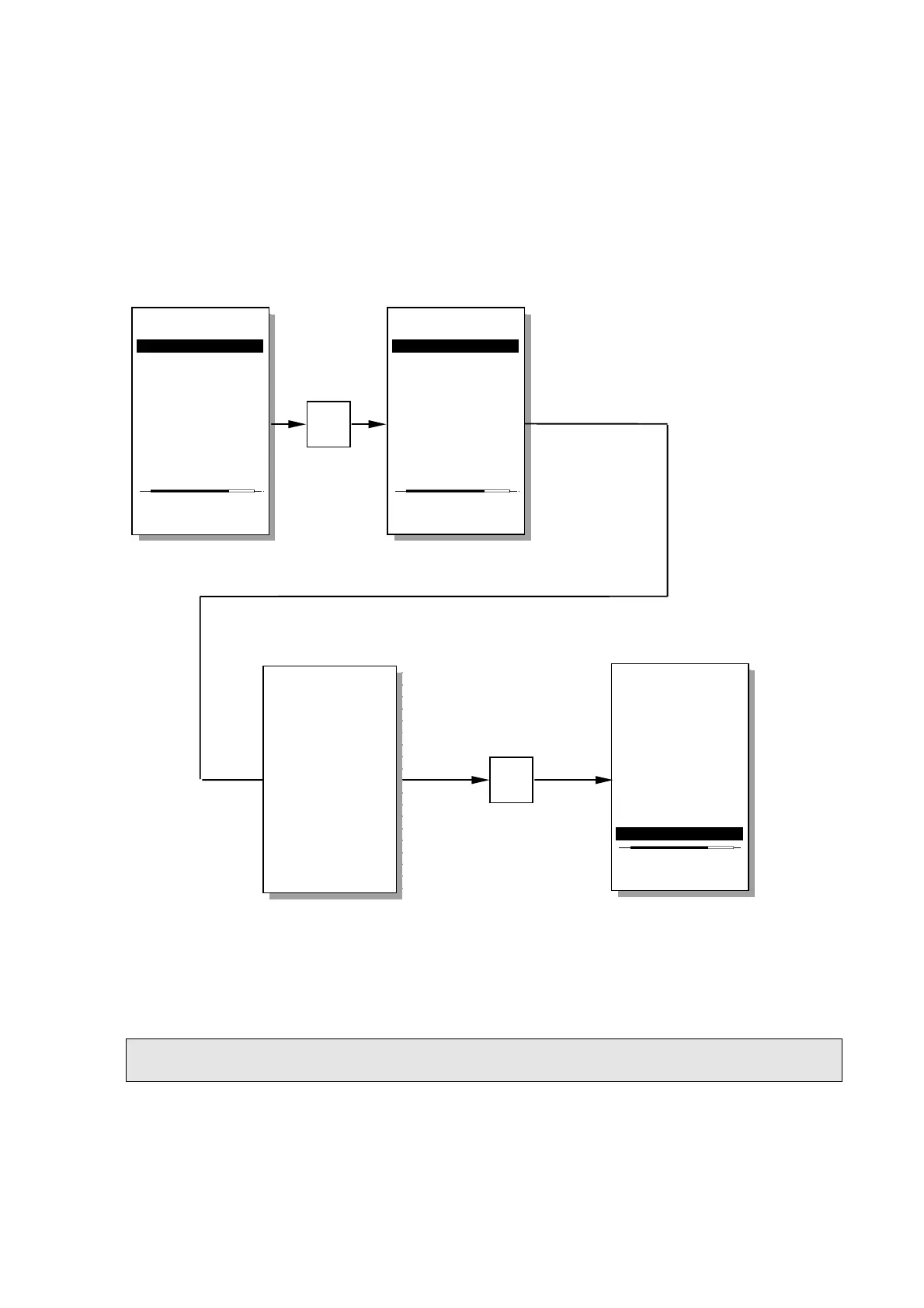
To shut the SMT-200 down return to the main menu then select 0. This will begin the shut down
sequence. Firstly the SMT-200 configuration file is saved. Then Log Off delay count begins (set in
menu item [2-7-5]). During this time period the shut down sequence can be aborted by hitting the 0
key. Once the count down timer expires the SMT-200 will be safely shut down.
The SMT-200 will shut down automatically if left unattended for a time period set in [2-7-4] or if the
battery voltage drops below 10.7 volts.
NOTE: In the rare case that the SMT-200 locks up and cannot be shut down at all then the only way to
reset the tester is to remove the battery pack. USE ONLY AS A LAST RESORT.
Main menu
----------------
1>Do a test...
2 Setup menu...
3 Temp. menu...
4 File menu...
5 Tag menu...
6 About...
0 Shut down
Enter test mode
Main menu
----------------
1>Do a test...
2 Setup menu...
3 Temp. menu...
4 File menu...
5 Tag menu...
6 About...
0 Shut down
Saving config
0
Main menu
----------------
1 Do a test...
2 Setup menu...
3 Temp. menu...
4 File menu...
5 Tag menu...
6 About...
0>Shut down
Save Config and
switch off power
0
During the Log Off period
(0 to 20 seconds)
If no key is pressed the
system will shutdown at the
end of the Lof Off period
Shut down aborted
SENSOR
SMT-200
GEOPHONE TESTER
Version 2.00
System shutdown
about 3 seconds
0 – Cancel


 To Next Page