Section 4 RF/ID Tag Reader Io
SENSOR
52
SMT-200 Operations and Technical Manual 2.00/R1
4.3.3 Transfer data file
Upon completion of testing, test data can be downloaded to the PC via the Docking Station program.
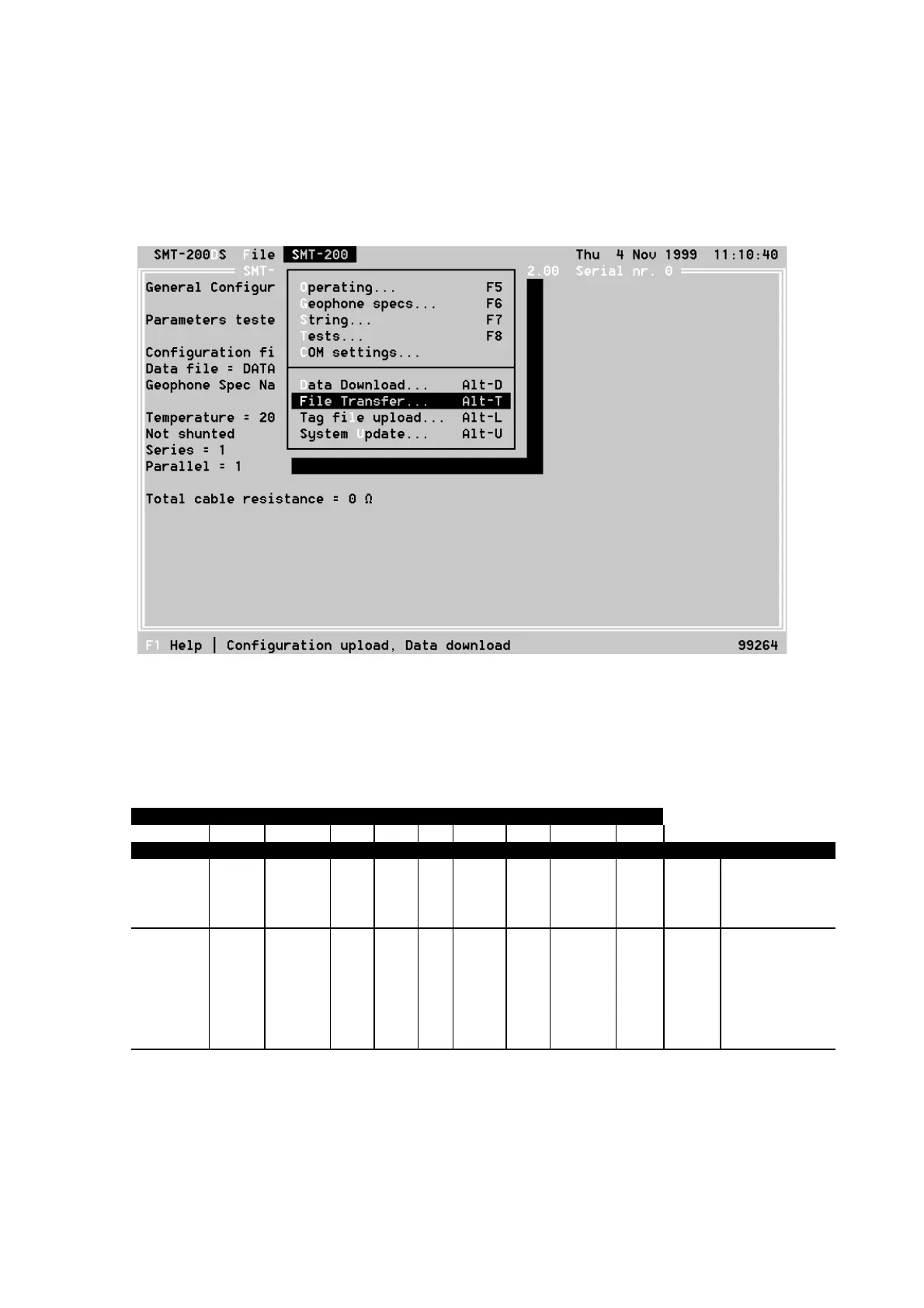
Connect the SMT-200 to the PC and start the Docking Station program. Select the menu option
SMT-200, File Transfer. The SMT-200 now downloads the data file to the PC.
The data file is a text file that can be opened using any text editor. It is also possible to open the file
using a spreadsheet program. In the Docking Station program you can select the menu File,
View File…. A form is displayed where you can select the data file you want to view. The data will be
displayed in columns.
Starting at 26-11-99 12:36:21 NoNA
SMT-200 Geophone Tester Version 2.00 Serial nr. 2001
Spec Ser Par Shunt Mass Fdist VelDist Excur DataCorr Tests
Sensor-SM4 6 2 1000 11 12 0.7 0 1 ABC
Tested: Res Freq Damp Sens Dist Imp RC Reject: Temp Time Tag Number
Min: 777 9.50 0.652 119.4 0.00
Nom: 818 10.00 0.686 125.7 2143 @20.0
Max: 859 10.50 0.721 132.0 0.20
Num: ohm Hz V/m/s % ohm øC
1 793 9.90 0.706 167.2 0.19 2097 23 Test OK 21.6 12:37:06
2 854 10.52 0.662 166.9 0.10 2260 23 Test OK 21.6 12:37:21
3 842 9.80 0.667 161.7 0.08 2227 23 Test OK 21.6 12:37:34 1,000,103,287,679
4 821 10.28 0.668 165.8 0.22 2171 23 Test OK 21.6 12:37:47 1,000,002,268,681
5 788 10.31 0.707 170.8 0.06 2084 23 Test OK 21.6 12:38:02 1,000,103,287,512
6 787 10.25 0.660 164.5 0.13 2081 23 Test OK 21.6 12:38:15 1,000,105,222,156
7 804 9.84 0.710 167.2 0.12 2127 23 Test OK 21.6 12:38:28 1,000,103,555,668
Ended at 26-11-99 12:39:49
The only difference between the normal format and the one with the tag reader is the column Tag
Number. If the test was initiated by the tag reader the tag number is displayed in this column. If the
string number was entered manually, no tag number appears in the last column.


 To Next Page