11436 Sorrento Valley Road • San Diego, CA 92121 • www.sequal.com • 858.202.3100
18
Troubleshooting Guide
Troubleshooting Guide
7. System Malfunction
Eclipse has a RED LED FLASHING and ALARMING CONTINUOUSLY, and the unit is
NOT running
Å Continued from Previous Page
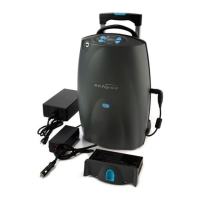
D. Plug in the AC or DC power cord into the Eclipse power connector (on the side of the Eclipse).
i. A 3 second “Test Beep” should be heard and all 3 LED’s should light up, for 3 sec’s and
the Green LED will remain on.
E. If alarm continues then repeat Step A (to shut off alarm). If not then proceed to Step F
F. Turn on the Eclipse, by holding down the Power button for 3 seconds, then release.
G. If Eclipse continues to alarm then “Exchange out the unit for evaluation and possible repair.”
H. Go to Step A to shut down the unit and also to shut off the alarm.
I. If Eclipse does NOT alarm and continues to run then Insert the Power Cartridge into Eclipse
i. How many bars are there in the Power Cartridge Icon (1 or greater than 1)
ii. If “1” then there is a fully discharged Power Cartridge. Eclipse may have shut down due to
loss of power from a fully discharged Power Cartridge. Switch to an external power
source (if available). “Contact your provider for further instructions ”
iii. If Greater than 1 bar, then you had a temporary malfunction, that has rest itself
*NOTE: Continue to use the Eclipse, if Eclipse alarms again
contact your provider for further instructions.


 To Next Page