11436 Sorrento Valley Road • San Diego, CA 92121 • www.sequal.com • 858.202.3100
21
Troubleshooting Guide
Troubleshooting Guide
10. Power Cartridge Re-Calibration
Power Cartridge will not charge fully.
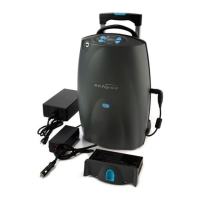
A. Make sure that the Power Cartridge is plugged into the Eclipse.
i. Remove external power source (AC or DC Adapter) if present.
ii. Continue to run Eclipse on the Power Cartridge until the Eclipse STOPS RUNNING,
with a LONG CONTINUOUS ALARM and the Red LED “Flashing”
NOTE: Approximately approx 10 min’s before the Eclipse Power Cartridge is completely discharged,
the Low Battery alarm will sound and a Yellow Flashing LED will be displayed
iii. Once the Power Cartridge is completely discharged, plug in the AC Adapter into the
Eclipse’s power connector,.
iv. Allow Eclipse to charge the Power Cartridge until the Power Cartridge Indicator is
full.
** NOTE: By powering down or reducing the liter flow the Eclipse will charge the Power Cartridge more
rapidly.


 To Next Page