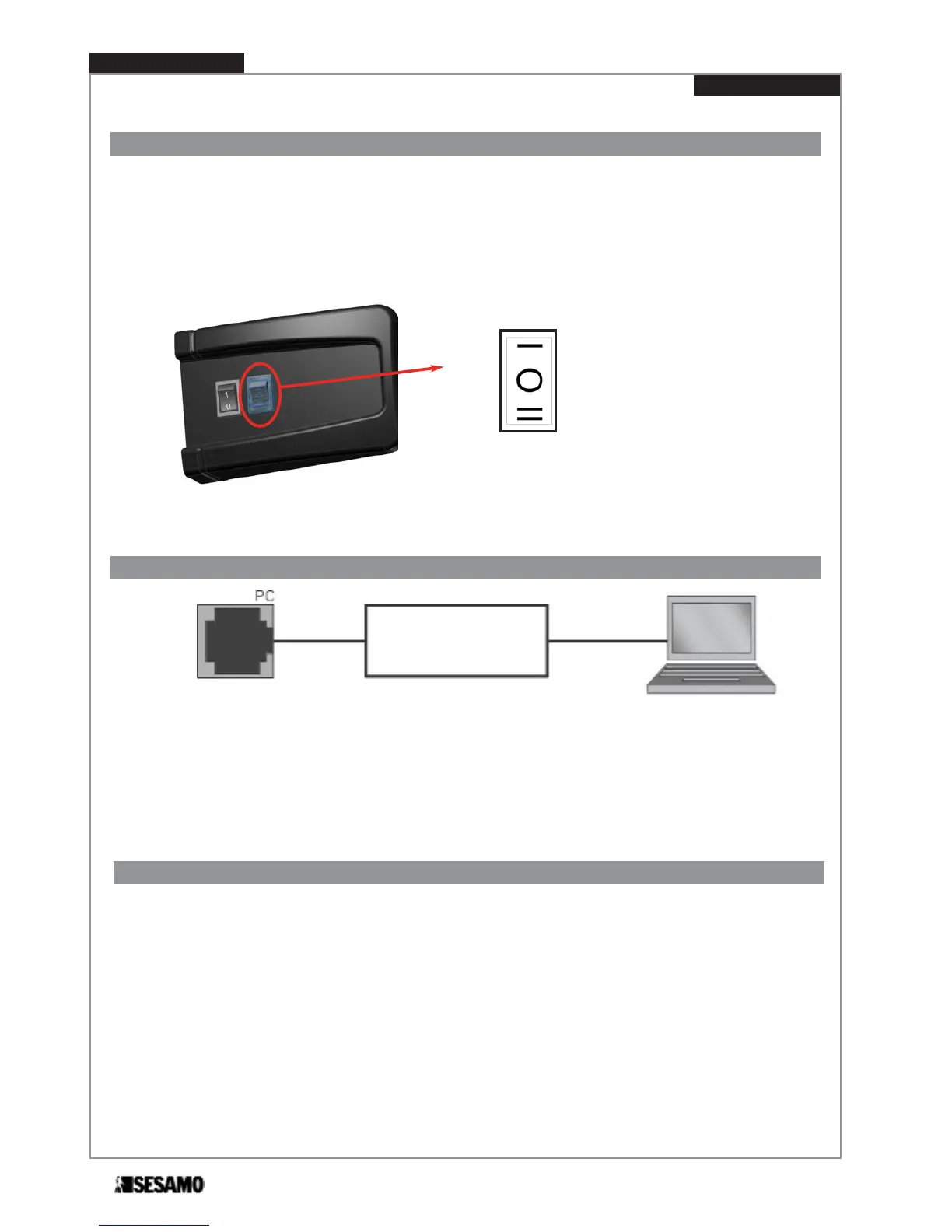
Logic switch
STOP CLOSE
AUTOMATIC
STOP OPEN
Fig. 45
In addiction to base or advanced selectors it is possible to connect a switch selector.
This switch selector has its place near ON-OFF switch, and it is directly wired to control board o it allows three logics:
- STOP CLOSE
- AUTOMATIC
- STOP OPEN
If base or advanced selector is connected, switch selector is excluded.
For PC connection board (optional) is required to connect the PROSWING unit to a Personal Computer. The following is pos-
sible with MILLENNIUM WARE software:
• Advanced adjustments of some operating parameter
• Diagnostic and advanced information on status
• Microprocessor programming
PC connection board
Connector for PC - unit connections
Close the automatism’s cover and tight screws.
Hand the guarantee and test certificate over filled according to the instructions shown in the certificate.
The certificates must be sent to SESAMO in 8 days from the positive test date. Hand the technical documentations over to
the client .
Delivery modality
PROSWING(M)
Operating instruction
42
Fig. 46


 To Next Page