Double extruder prints using “breakaway” support material
The models that require support material to be made can use the second extruder with a
specific filament for the realization of the support structures.
This material is called “breakaway” due to his behaviour: during the printing binds with the
material of the object, but at the end of printing, if it is mechanically solicited, it separates
itself in a clear manner from the surfaces to which it adhered supporting them.
This means that the support structures must be reachable to be mechanical removed at
the end of the printing process.
The first extruder (0.4mm diameter) is used to print the object while the second one,
(0.8mm diameter) is used for the support structures.
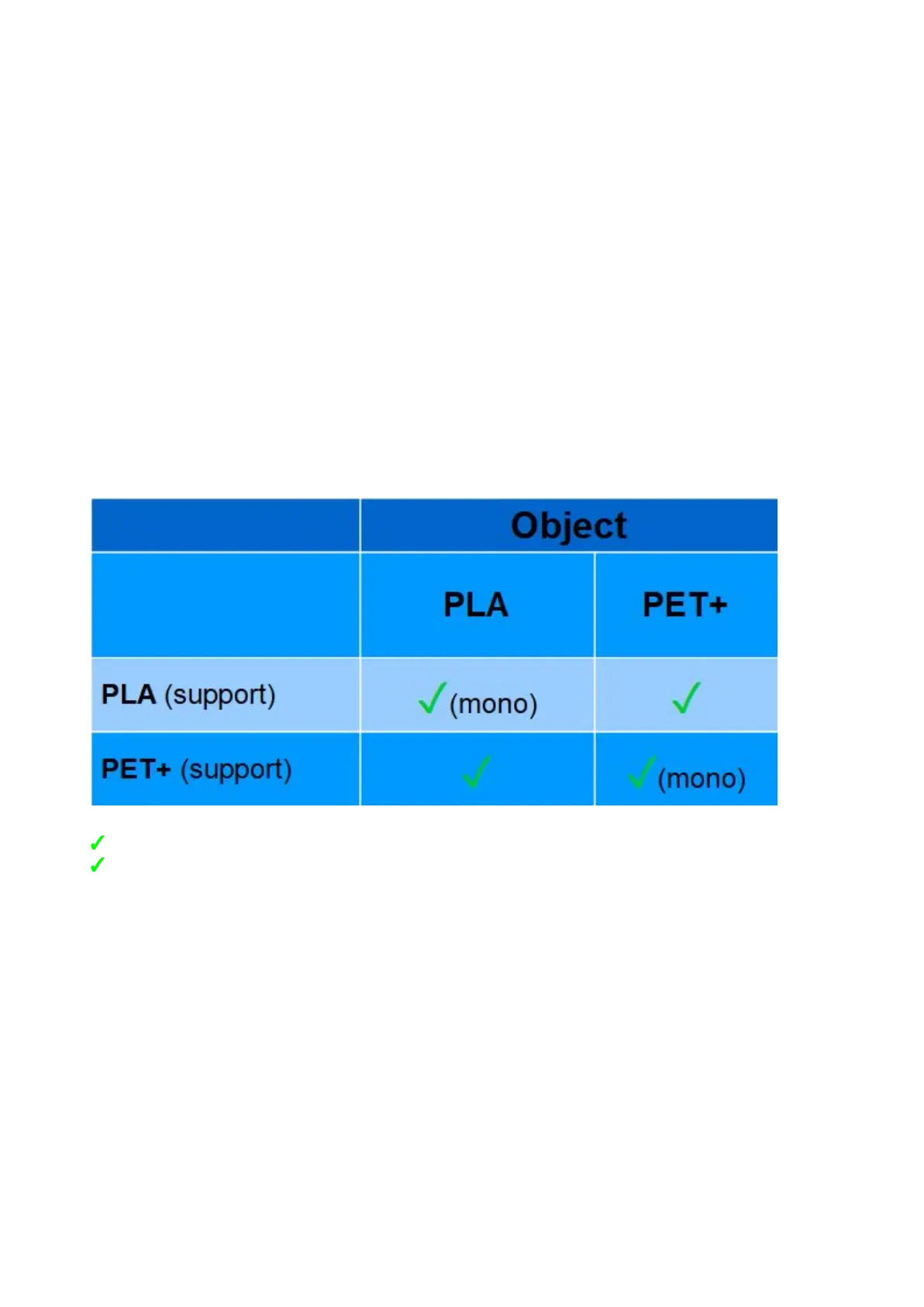
The current compatibility of the filaments and their “breakaway filaments” is shown in the
table below.
✓ : compatible
✓(mono) : compatible (same material for object and support)
x : not compatible
Removing support structures
Once the printing process is ended, wait until the printing surface cools down, and remove
the printed part from the printing surface. Apply a new thin layer of Magigoo.
Now you can remove the supports structures from the model, using plier and nipper,
always wearing protective gloves.
13


 To Next Page