14
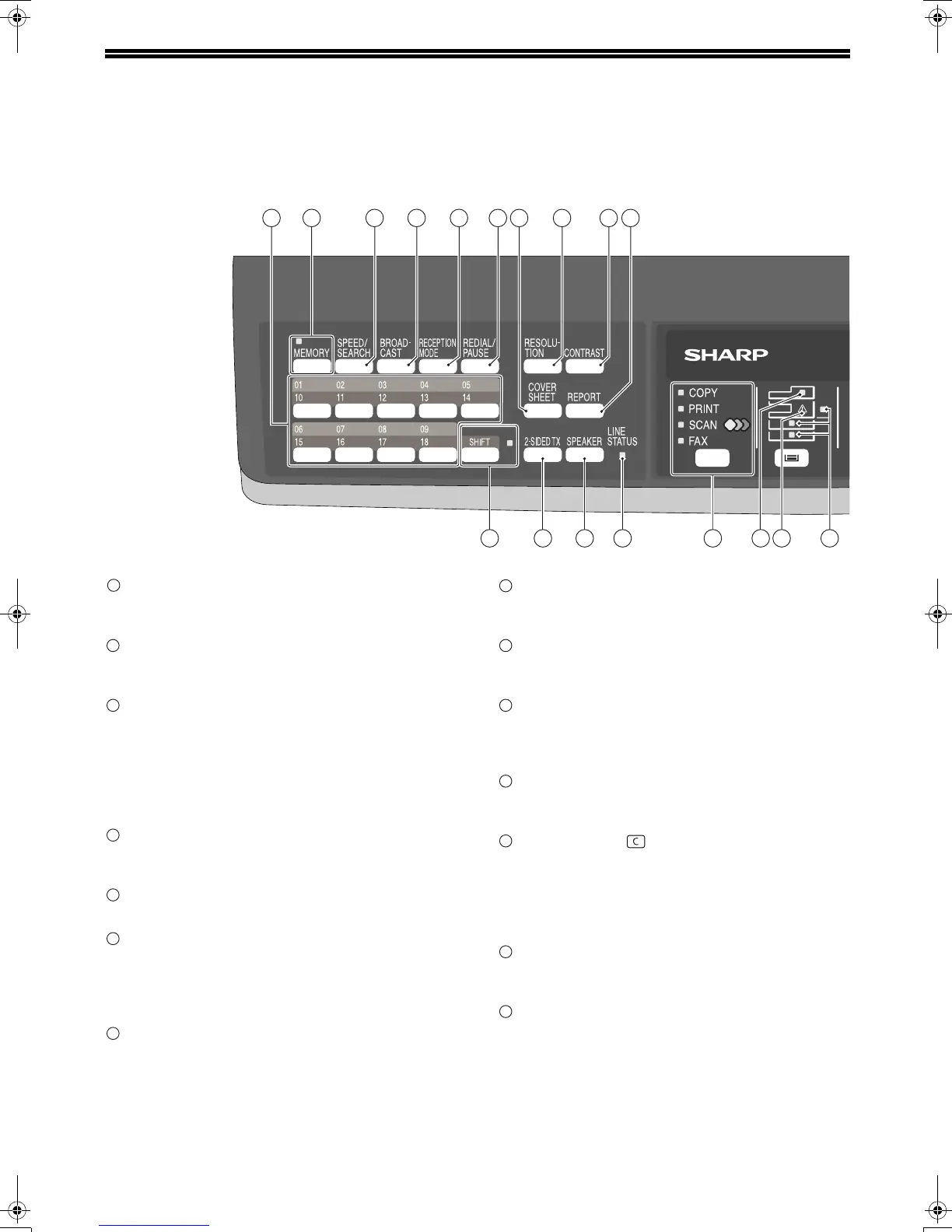
A LOOK AT THE FAX OPERATION PANEL
Rapid keys
Press one of these keys to dial a fax or telephone
number automatically.
[MEMORY] key / indicator
Used for sending faxes in memory (indicator is lit)
or direct sending (indicator is not lit).
[SPEED/SEARCH] key
Press this key to dial a two digit Speed Dial
number.
During character inputting, use this key to delete
an incorrect entry.
Also, press this key twice to search for an
automatic dialing number.
[BROADCAST] key
Press this key to send originals to a group of
receiving fax machines.
[RECEPTION MODE] key
Press this key to select the mode of reception.
[REDIAL/PAUSE] key
Press this key to automatically redial the last
number you dialed.
Also, press this key to insert a pause when
entering numbers.
[COVERSHEET] key
Press this key to automatically add a cover sheet
and message to a fax.
[RESOLUTION] key
Press this key to adjust the resolution before
sending faxes.
[CONTRAST] key
Press this key to adjust the contrast before sending
faxes.
[REPORT] key
Press this key to print out a report of a fax
transaction and also when receiving a confidential
fax.
Display
Shows various messages during fax operation and
programming.
[CLEAR] key ( )
Press this key to stop an operation before it is
completed, or to delete the number that was last
input.
When a setting menu appears, use this key to
move back to the previous menu level.
[SHIFT] key / indicator
Press this key to switch between upper and lower
case.
[2-SIDED TX] key
Press this key to fax a two-sided original.
1
2
17
3
4
5 6 8 9
10
7
1918 20
16151413
1
2
3
4
5
6
7
8
9
10
11
12
13
14
!AR-FX13_sec.book 14 ページ 2009年5月11日 月曜日 午後2時24分









 To Next Page