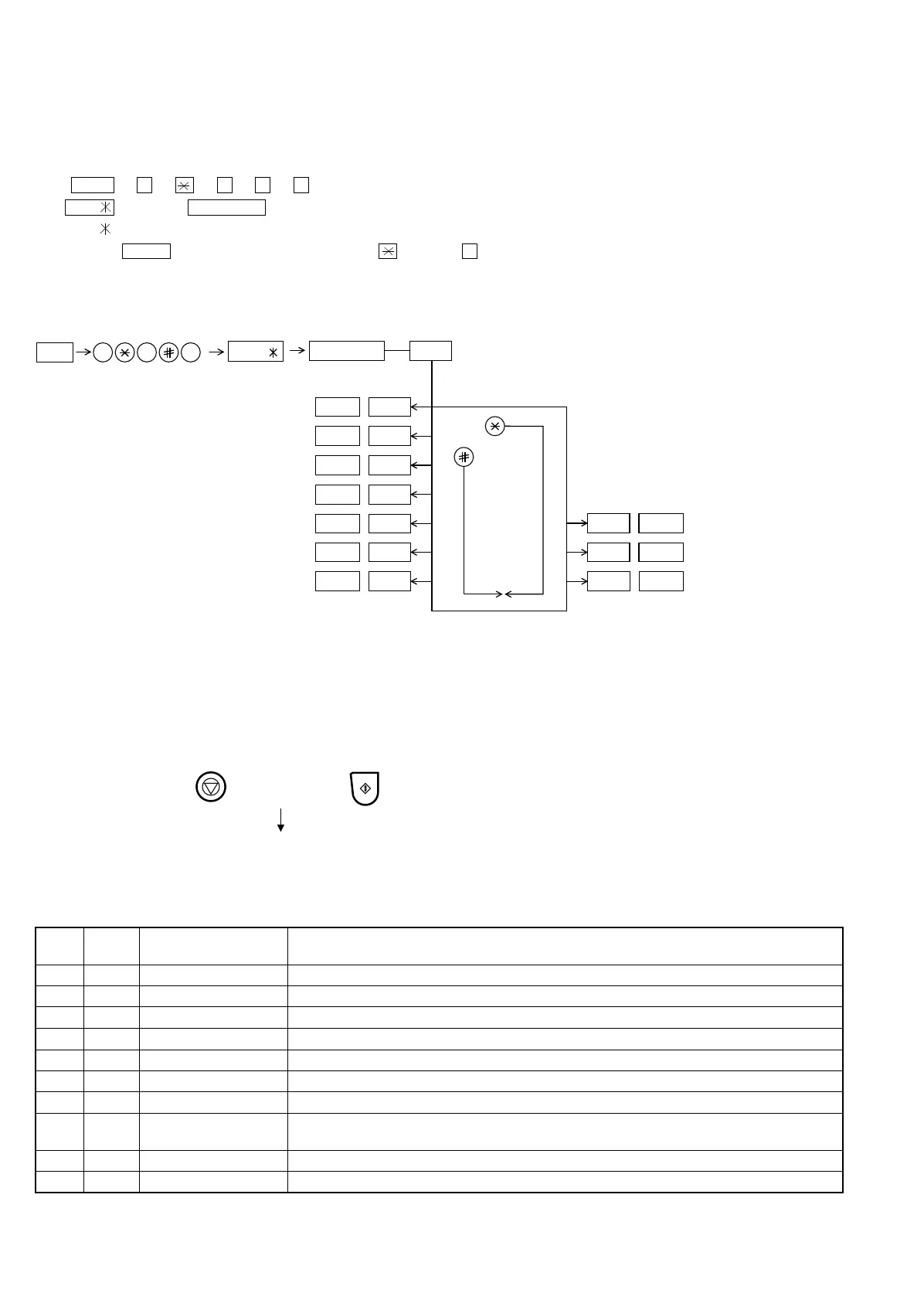
[2] Diagnostics and service soft switch
2. Diagnostic items
ITEM
No.
RAPID
key
Contents Function
1 01 Soft switch setting mode Display soft SW contents, and changes the setting.
2 02 ROM & RAM check mode Checks program ROM (128KByte) and work RAM (32KByte).
3 03 Aging mode Prints the check pattern at the speed of 1 sheet/5 minutes.
4 04 Panel check mode Displays the name of key depressed on the operation panel.
5 05 Check pattern mode Prints 2 sheets of check pattern.
6 06 Signal send mode Sends modem signals sequentially.
7 07 Memory clear mode Clears the backup memory contents to reset it to the initial state.
8 08 CCD adjust mode Used for CCD adjustment. Executes copy operation. When the STOP key is pressed, the unit goes
into the wait state. When the START key is pressed again, the unit starts operation again.
9 09 All black copy Performs all-dot printing (2m). (Check thermal head operation)
10 10 Auto feeder mode Feeds the original documents.
1. Operating procedure
(1) Entering the diagnostic mode
Press FUNC → 9 → → 8 → # → 7 , and the following display will appear.
FVL0 After 2 sec: DIAG MODE
FVL0 Identical
Then press the START key. Select the desired item with the key or the # key or select with the rapid key. Enter the mode with the START
key.
(Diag•specifications)
FUNC
DIAG MODE
9 8 7
START 01Soft switch setting mode
START
02ROM & RAM check mode
START
03Aging mode
START
04Panel check mode
START
05Check pattern mode
START 06Signal send mode
START
07Memory clear mode
CCD adjust mode
All black copy
START
10
Auto feeder mode
START
09
START
START08
START
KEY
STOP
KEY
+
+
"Power ON"
Memory clear
(Work + Backup)
"Power ON" keep the STOP key pressed
while "WAIT A ...." is indicated.
Press the START key when "MEMORY CLEAR?" appears.
FVL0
If the dial mode cannot be set, repeat the dial mode operation, per-
forming the following operation.
After the power is turned on and "WAIT A MOMENT" is indicated,
press the STOP key.
UX-177H
2 – 2



 To Next Page