95(108)
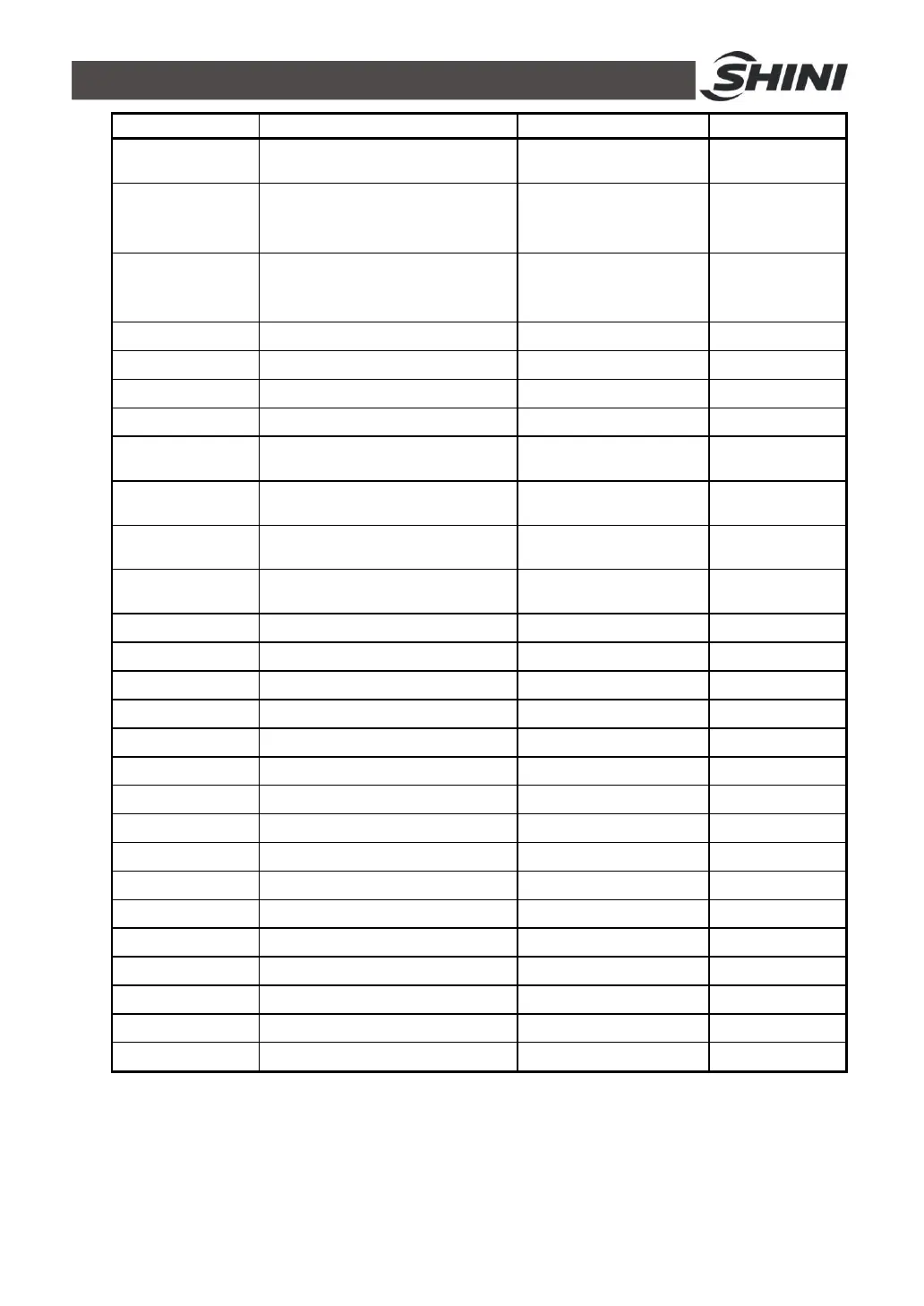
English Name
Description Range Default
Heater alarm
Alarm for not reaching to the
setting temp.
0~3600s(0=off) 0=off
Output mode
Select between heating and
heating/cooling control
Heating
Heating/cooling
Heating/cooling
Sub heating
Set “off temperature” in sub
heating output
0~550℃
(0=off)
0=off
Cooling temp Set compulsory cooling -50~500℃ 35℃
H.limit temp High(upper) limit temp. -50~500.0℃ 500℃
L.limit temp Low(lower) limit temp. 50~500.0℃ -50℃
Temp unit Swlect ℃/
o
F ℃/
o
F ℃
Temp. degreen
Select the decimal point position
0.1/1
0.1, 1 1
Ctl temp bias
Control temp. bias
(compensation)
-550~550.0℃ 0℃
Ret temp bias
Retrieved water temp. bias
(compensation)
-550~550.0℃ 0℃
Ent temp bias
Entered water temp. bias
(compensation)
-550~550.0℃ 0℃
Current time Year/month/date/day/hour/minute
99/12/31/mo~su/24/59
-
Auto st. week Mon/tue/wed/thur/fri/sat/sun Mo~Su -
Auto st. time Hour/minute 24/59 0
Protocol Proto col Modbus-rtu Modbus-rtu
Address Communication address 0~99 1
Bps Communication speed 4800, 9600, 19200 9600
Data length Data length 7, 8 8
Stop bit Stop bit 1, 2 1
Parity bit Parity bit None, even, odd None
Language Selsct language Chinese, English Chinese
Remote Remote control Use, unused Unused
Password Password setting 0~9999 0
Ret/ent disp Display ret/ent water temp. Off, on Off
w-fill tm t1 Water fill time t1 0~6000sec 0
w-fill tm t2 Water fill time t2 0~60sec 0
version Display its version - -
4.5 Stop the Machine
1) Press COOL key to shut down heating output and cooling process will be on.
2) Wait until temp. drops to below 50℃, press COOL key to shut down forced
cooling, then press RUN/RESET key to stop operation.



 To Next Page