- 73 -
How to perform AT/Auto-reset
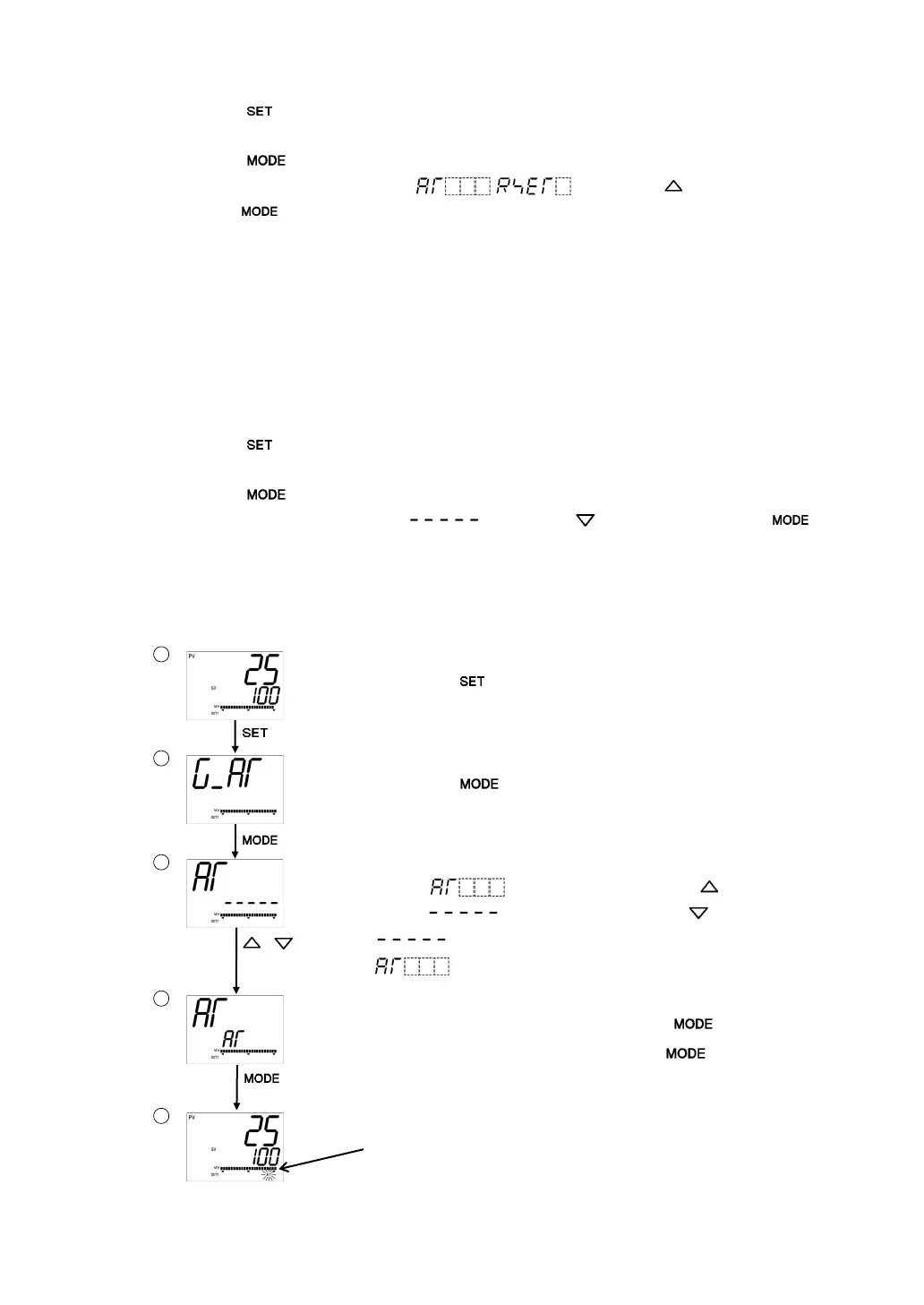
(1) Press the
key 3 times in PV/SV Display Mode.
The unit proceeds to the AT group.
(2) Press the
key. The unit proceeds to [AT/Auto-reset].
(3) Select AT/Auto-reset “Perform [
/ ]” with the key, and
press the
key.
The unit returns to PV/SV Display Mode, and AT/Auto-reset will initiate.
While performing AT/Auto-reset, the AT indicator is flashing.
AT will be forced to stop if it has not been completed within 4 hours.
If Direct/Reverse action is switched during AT (by selecting ‘003 Direct/Reverse action’
in [Event input allocation]), the AT stops.
Auto-reset is cancelled in approximately 4 minutes. It cannot be released while
performing this function.
How to cancel AT
(1) Press the
key 3 times in PV/SV Display Mode.
The unit proceeds to the AT group.
(2) Press the
key. The unit proceeds to [AT/Auto-reset].
(3) Select AT/Auto-reset “Cancel [
]” with the key, and press the
key for 3 seconds. AT will stop, and the unit will revert to PV/SV Display Mode.
If AT is cancelled during this process, each value of P, I, D and ARW reverts to
the values before the AT was performed.
AT Perform/Cancel (PID control):
to the AT group.
Press the key 3 times in PV/SV Display Mode.
The unit proceeds to the AT group.
Proceed to [AT/Auto-reset].
Press the key.
The unit proceeds to [AT/Auto-reset].
Select AT Perform/Cancel.
Select “ (AT Perform)” with the , or
select “
(AT Cancel)” with the .
: AT Cancel
: AT Perform
m AT Perform/Cancel.
If “AT Perform” is selected, press the key.
If “AT Cancel” is selected, press the key for 3
seconds. The unit reverts to PV/SV Display Mode.
erform/Cancel
While AT is performing, the AT indicator flashes.
If AT is cancelled. the AT indicator turns off.


 To Next Page