SBG 00185 Copyright 2015 10
Quick-Start Guide for PRSalpha and PRSstandard tools
Double-click on “PRS ShopBots”, and choose “Standard”, “Alpha”, or “Desktop”, depending on your
model. Choose the correct table size for your machine, and this will bring you back to the main screen.
Note: Custom tools will not have a default seng preprogrammed in the soware. Chose the correct
type (Alpha or Standard), and the size closest to your tool. Edit the table limits for your table size using
“Values” and “Limits for table”. Save the new seng as a custom sengs le in the “Ulies” menu.
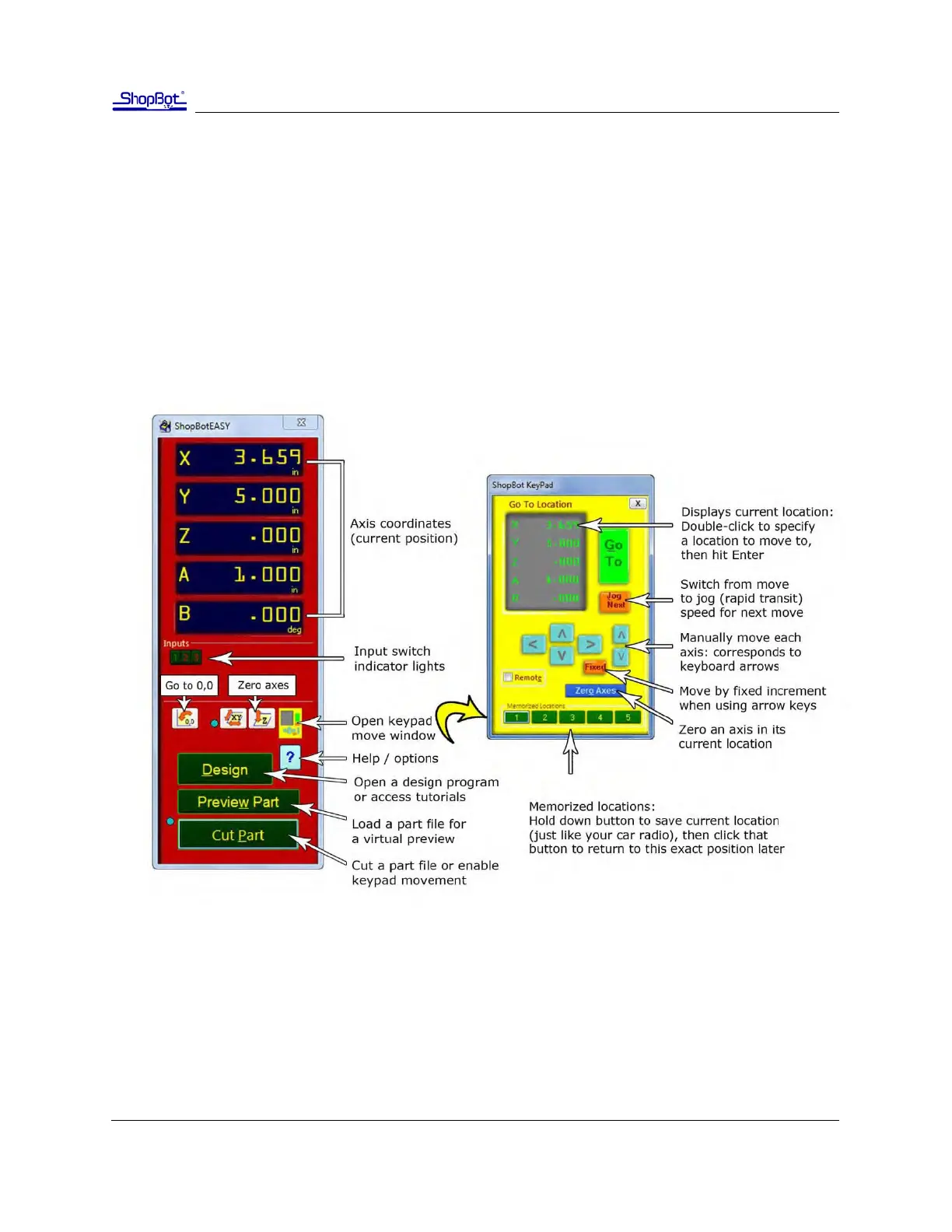
ShopBot control soware
The ShopBot control soware works in two modes: “Easy mode” (by default) shows only the necessary
funcons to set up and run a cut le. “Full mode” shows all available funcons and sengs. Switch be-
tween the two modes by clicking on the Help/opons buon in the red posion window.



 To Next Page