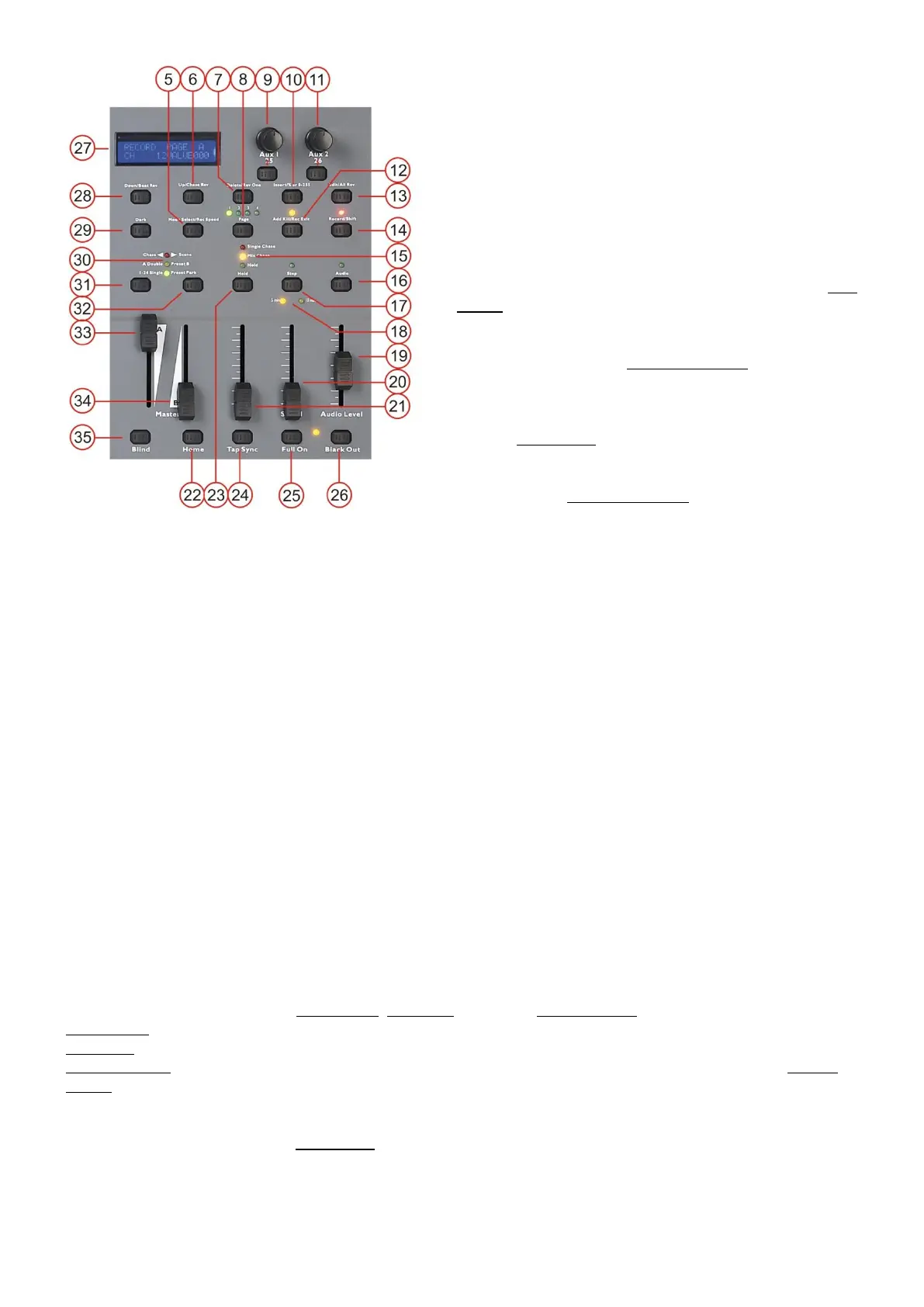
5. Park button
Allows you to select either single chase mode or mix
chase mode. In single chase mode you are only able
to playback a single scene. In mix mode you are
able to playback several scenes simultaneous. Fader
13-25 can be used to set the master intensity for the
according scene (fader 13: scene 1, fader 14: scene
2 etc.) The chase mode is indicated by the Chase
mode Indicator(16).
6. Up/chase rev
This button allows you to modify a scene while in edit
mode.
In combination with the record/shift (15) button, this
button allows you to reverse the direction of a chase
while in the chase is in playback mode.
7. Delete/rev one
This button allows you to delete a step or chase
while in edit mode.
In combination with the record/shift (15) button, this
button allows you to reverse the direction of a single
chase while in playback mode.
8. Page/record clr button + page LEDs
Each page can contain 12 scene/chases. So you can store up to 48 scenes/chases.
9. Aux 1 control + button
The aux control and button can be assigned to any DMX channel. Each aux control can be set up in
three modes:
Mode 1: The control is not assigned to a DMX channel.
Mode 2: The control and control button work as a normal channel fader and flash button (max.
brightness).
Mode 3: The control is used to adjust the brightness of the flash button.
10. Insert/% or 0-255
This button allows you to insert one or more steps (scenes) into a chase.
While pushing and holding the rec/shift (15) button, this button allows you to switch the DMX output value
in the display as either 0-100% or 0-255.
11. Aux 2 control + button
The aux control and button can be assigned to any DMX channel. Each aux control can be set up in
three modes:
Mode 1: The control is not assigned to a DMX channel.
Mode 2: The control and control button work as a normal channel fader and flash button (max.
brightness).
Mode 3: The control is used to adjust the brightness of the control button.
12. Add kill/rec exit
This button allows you to enter Add mode, kill mode or exit the record mode.
Add mode, this button allows you to activate multiple scenes or flash buttons.
Kill mode, selecting a scene or flashbutton will kill any other active scene program.
Record mode, in combination with the record/shift (15) button, this button allows you to exit the record
mode.
13. Edit/all rev
Use this button to activate the edit mode.
Pushing this button while holding the record/shift (15) button will reverse the direction of all chases.



 To Next Page