Shure Incorporated
31/55
1.
2.
3.
1.
Templates
Use a template as a starting point when configuring coverage. Templates only adjust coverage, and do not affect gain levels or
other settings.
Select the template that is the closest match to the seating scenario.
Select OK.
Select Add Channel or Remove Channel to adjust coverage.
Adjusting Levels
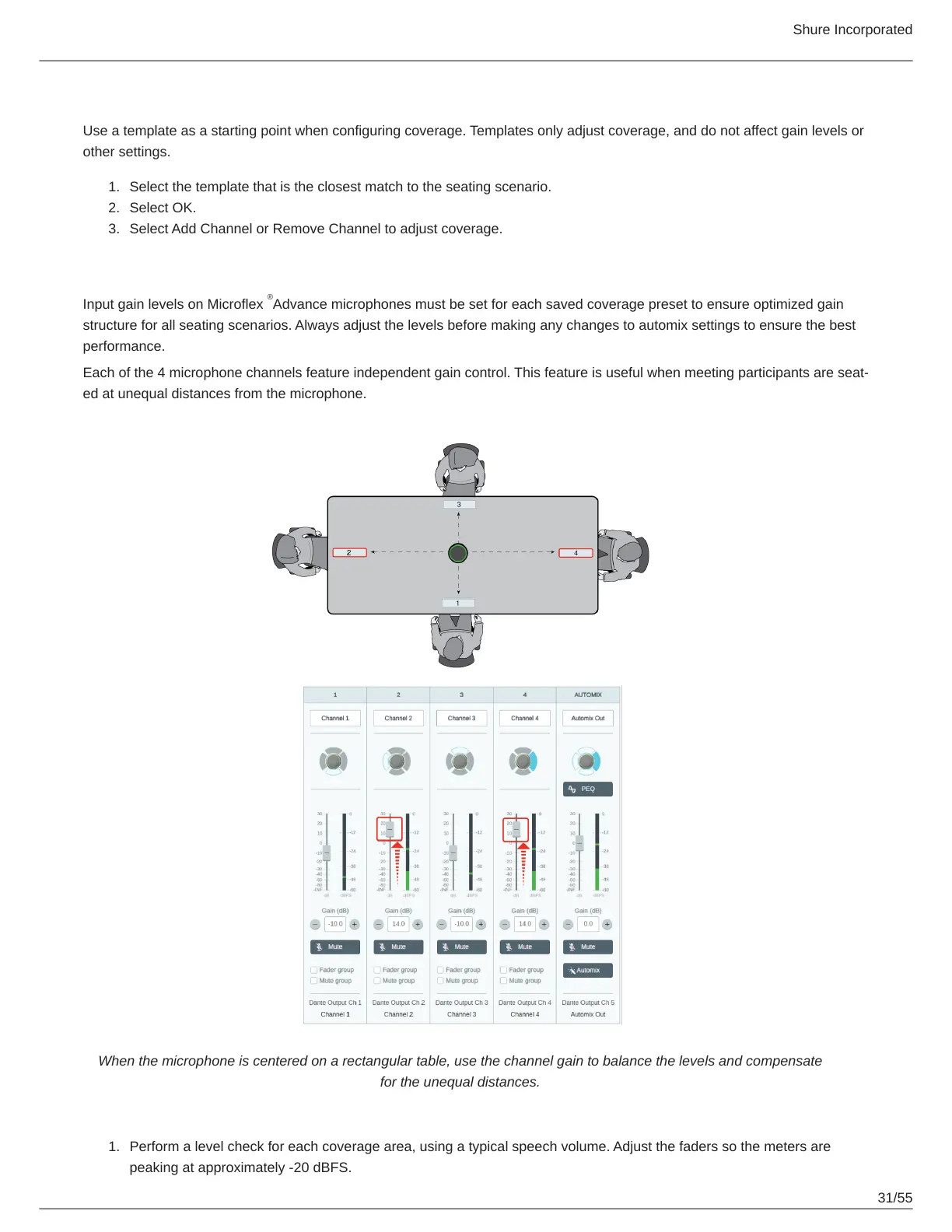
Input gain levels on Microflex Advance microphones must be set for each saved coverage preset to ensure optimized gain
structure for all seating scenarios. Always adjust the levels before making any changes to automix settings to ensure the best
performance.
Each of the 4 microphone channels feature independent gain control. This feature is useful when meeting participants are seat-
ed at unequal distances from the microphone.
When the microphone is centered on a rectangular table, use the channel gain to balance the levels and compensate
for the unequal distances.
Perform a level check for each coverage area, using a typical speech volume. Adjust the faders so the meters are
peaking at approximately -20 dBFS.
®



 To Next Page