Shure Incorporated
36/55
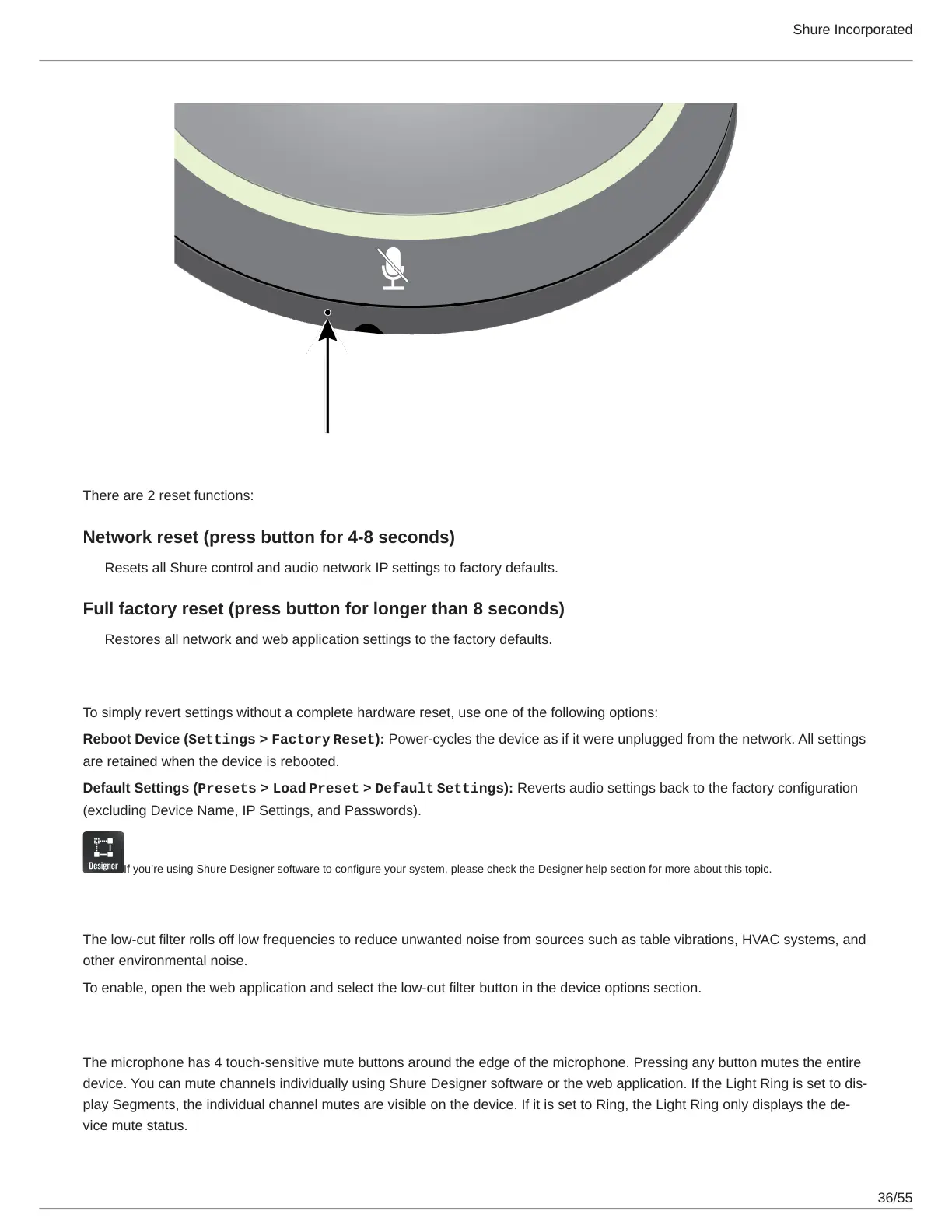
There are 2 reset functions:
Network reset (press button for 4-8 seconds)
Resets all Shure control and audio network IP settings to factory defaults.
Full factory reset (press button for longer than 8 seconds)
Restores all network and web application settings to the factory defaults.
Software Reset Options
To simply revert settings without a complete hardware reset, use one of the following options:
Reboot Device (Settings > Factory Reset): Power-cycles the device as if it were unplugged from the network. All settings
are retained when the device is rebooted.
Default Settings (Presets > Load Preset > Default Settings): Reverts audio settings back to the factory configuration
(excluding Device Name, IP Settings, and Passwords).
If you’re using Shure Designer software to configure your system, please check the Designer help section for more about this topic.
Low-cut Filter
The low-cut filter rolls off low frequencies to reduce unwanted noise from sources such as table vibrations, HVAC systems, and
other environmental noise.
To enable, open the web application and select the low-cut filter button in the device options section.
Mute Buttons
The microphone has 4 touch-sensitive mute buttons around the edge of the microphone. Pressing any button mutes the entire
device. You can mute channels individually using Shure Designer software or the web application. If the Light Ring is set to dis-
play Segments, the individual channel mutes are visible on the device. If it is set to Ring, the Light Ring only displays the de-
vice mute status.



 To Next Page