Shure Incorporated
41/87
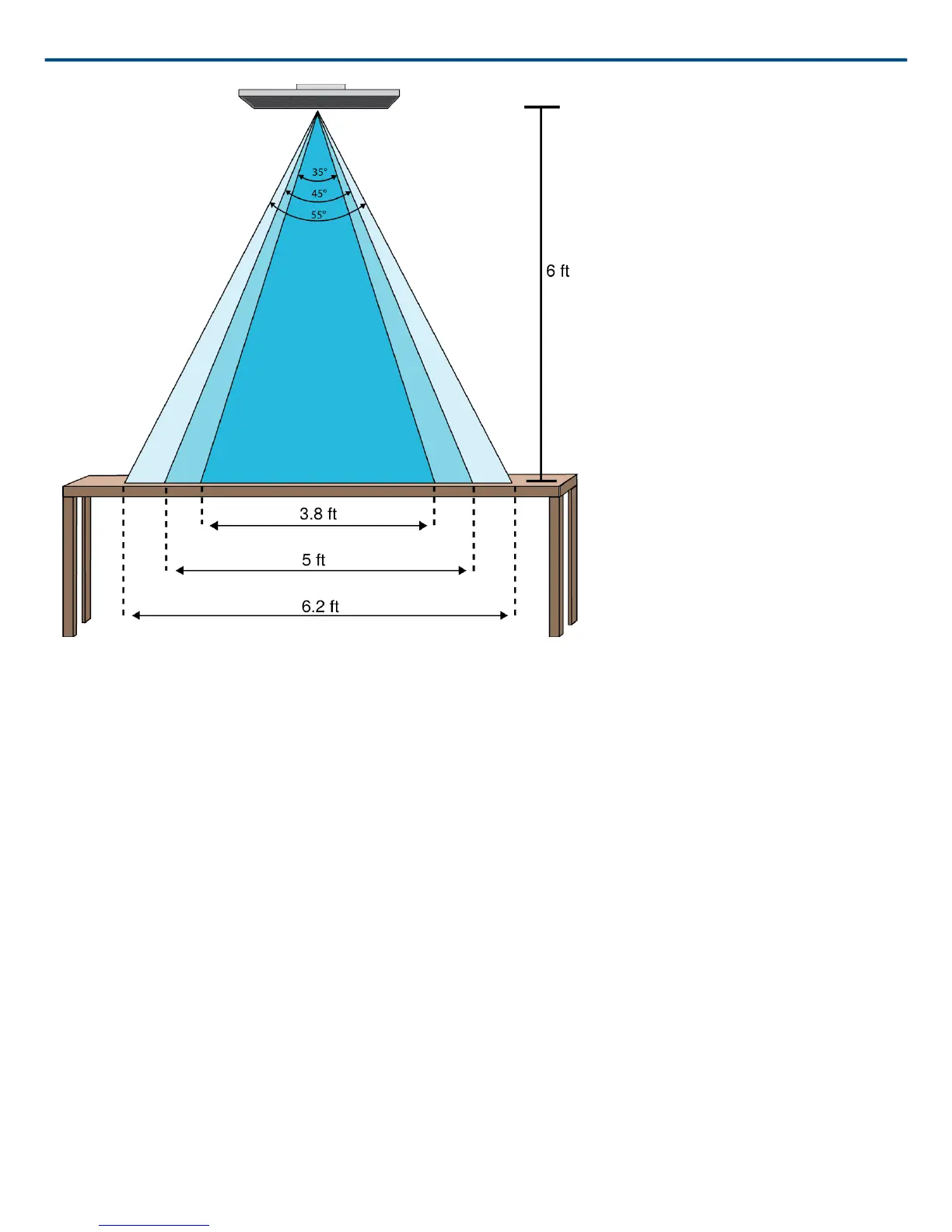
Lobe widths for the three settings with the microphone 6 feet above a table
Adjusting Levels
Gain levels on Microflex Advance microphones must be set for each saved coverage preset to ensure optimized
gain structure for all seating scenarios. Always adjust the levels before making any changes to automix settings to
ensure the best performance.
1. Perform a level check for each coverage area, using a typical speech volume. Adjust the faders so the meters
are peaking at approximately -20 dBFS.
2. Adjust the equalizer settings to optimize speech intelligibility and minimize noise (such as lowfrequency rum
ble caused by HVAC systems).
3. If equalizer settings cause a significant increase or decrease in levels, make any necessary level adjustments
according to step 1.
When to Use the Channel and Automix Gain Faders
There are 2 different gain faders that serve different purposes:
Channel Gain (Pre-Gate)
To adjust, go to Channels. These faders affect a channel's gain before it reaches the automixer and therefore af
fect the automixer's gating decision. Boosting the gain here will make the lobe more sensitive to sound sources
and more likely to gate on. Lowering gain here makes the lobe less sensitive and less likely to gate on. If you're
only using direct outputs for each channel without the automixer, you only need to use these faders.
®



 To Next Page