Chapter 3 Operating Instructions
Ranger E/D
20 SICK IVP • Industrial Sensors • www.sickivp.com • All rights reserved 8011731
Overview
3.4 Developing Applications
Once the Ranger has been configured to deliver the measurement data of the right type
and quality, you need to write an application that takes care of and uses the data. This
application is developed in for example Visual Studio, using one of the APIs that are deliv-
ered with the Ranger.
There are two APIs included with the development software for Ranger: iCon C++ for use
with C++ in Visual Studio .Net 2003/2005, and iCon C for use with C in for example Visual
Studio 6. Both APIs contain the same functions but differ in the syntax.
The APIs handle all of the communication with the Ranger, and contain functions for:
Starting and stopping the Ranger
Retrieving profiles from the Ranger
Changing Ranger configuration
Most of these functions are encapsulated in two classes:
Camera Used for controlling the Ranger.
FrameGrabber Collects the measurement data from the Ranger.
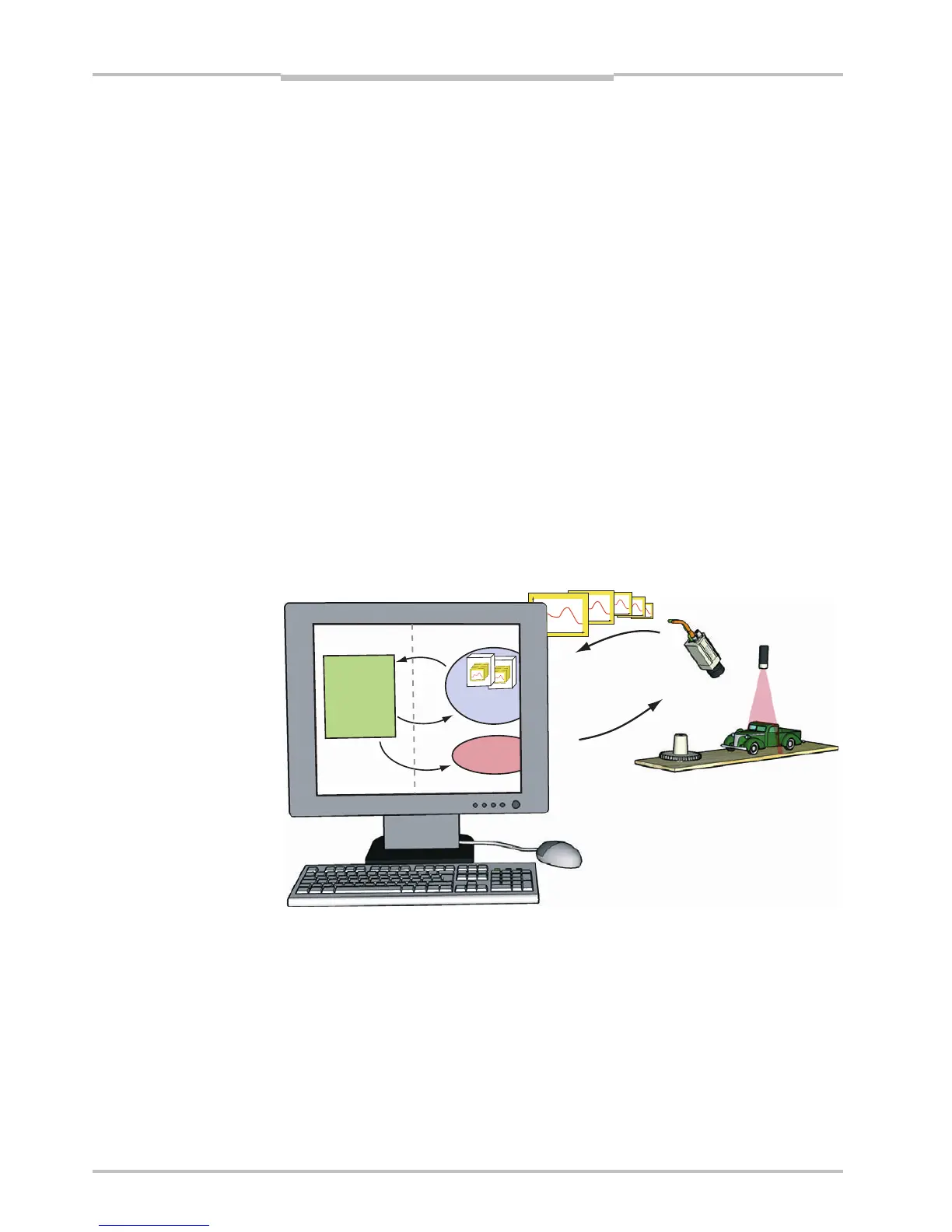
Your application establishes contact with the Ranger camera by creating a Camera object.
It then creates a FrameGrabber object to set up the PC for collecting the measurement
data sent from the Ranger. When your application needs measurement data, it retrieves it
from the FrameGrabber object.
Figure 3.10 – All communication with the Ranger is handled by the API.
When the Ranger is measuring, it will send a profile to the PC as soon as it has finished
measuring a cross-section. The FrameGrabber collects the profiles and puts them in
buffers – buffers that your application then retrieves from the FrameGrabber. Your applica-
tion can specify the size of the buffers, and it is possible to set the buffer size to 1 in order
to receive one profile at a time. However, this will also add overhead to the application,
and put extra load on the CPU.
Profiles
Control
iCon API
Application
Request
Buffers
Control
Camera
Frame
Grabber


 To Next Page