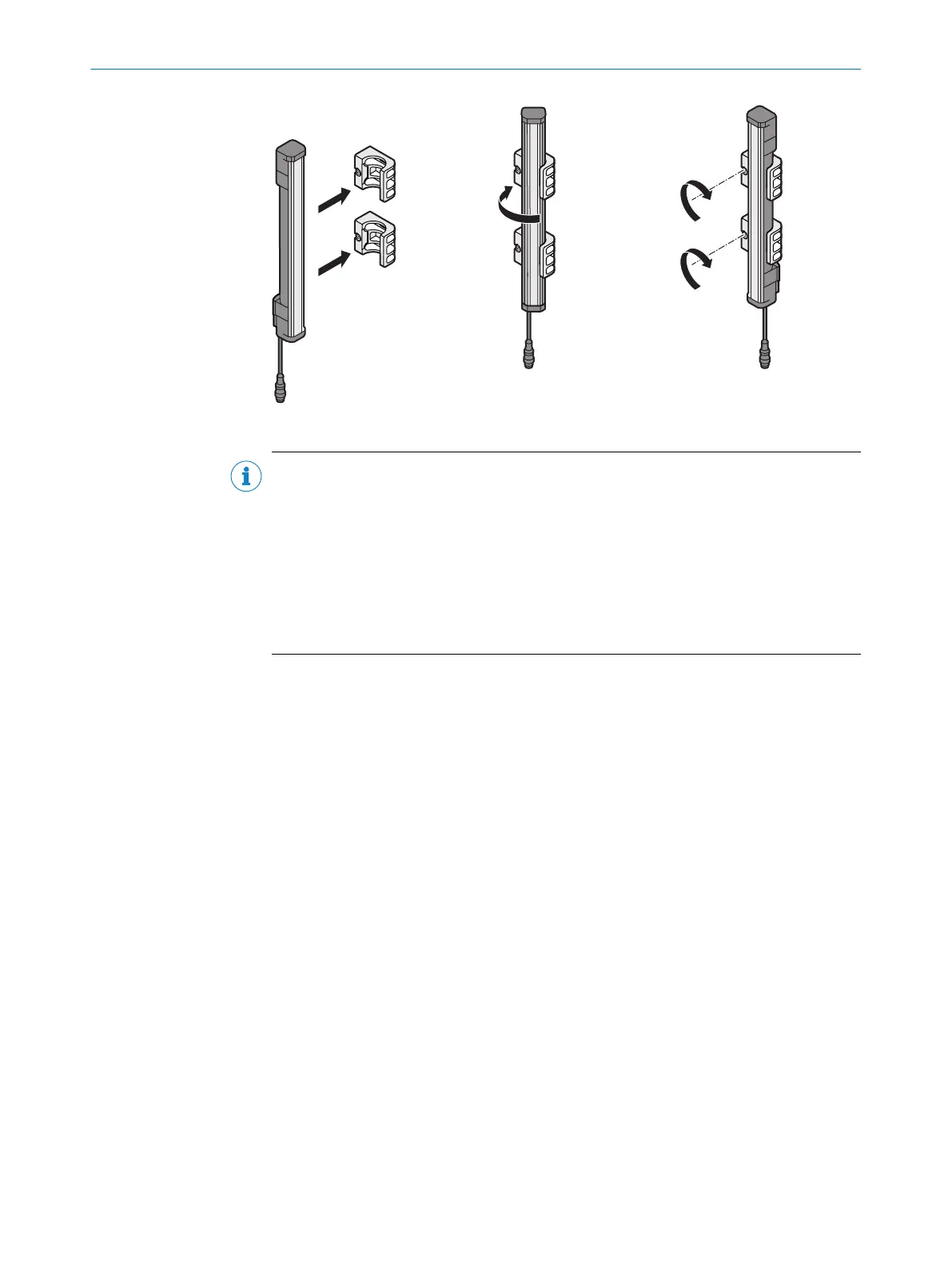
Figure 18: Inserting the multiple light beam safety device in the FlexFix brackets
NOTE
T
he protective device can only be screwed in when both FlexFix brackets are in align‐
ment.
Recommendation:
1. Only hand-tighten the screws on the FlexFix brackets at first.
2. Align the two FlexFix brackets. To do this, place a straightedge or spirit level, for
example, on the screw mounting surfaces of the FlexFix brackets that are not
being used.
3. Tighten the screws.
Further topics
•
"Sender and r
eceiver alignment", page 40
5.3.2.2 Mounting the FlexFix bracket on the back of a device column
Overview
T
he FlexFix bracket can be mounted in the device column using sliding nuts.
Use washers between the FlexFix brackets and the device column if you want to mount
the sender and receiver in the center of the device column.
Approach
1.
After assembling the FlexFix brackets, screw the sender or receiver into the FlexFix
brackets from the front.
2. Align the sender and receiver.
3. Use an M5 screw to secure the position of the sender and receiver in the FlexFix
bracket.
5 MOUNTING
34
O P E R A T I N G I N S T R U C T I O N S | deTem4 Core 8020453/14Q7/2020-04-27 | SICK
Subject to change without notice



 To Next Page