do so, the user creates an application-specific parameter set using the SOPAS ET
configuration software, or edits the parameter set later as required. The user then loads
the current parameter set into the permanent parameter memory of the device.
Memory organization for parameter set
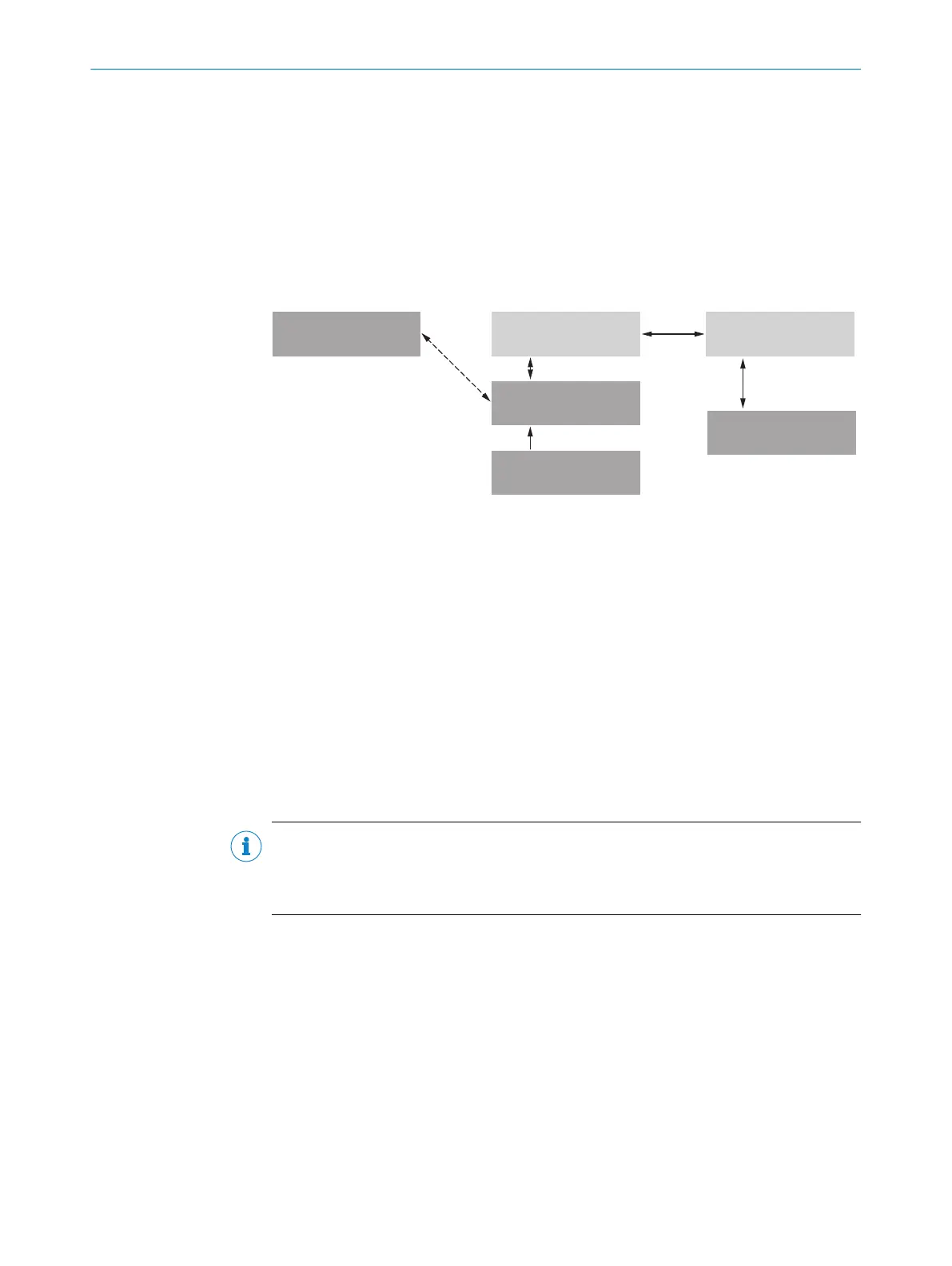
The following diagram shows the memory organization scheme for the internal and
external components involved:
Parameter set in the
main memory of the
device 6
Permanently saved
parameter set of the
device 5
Factory default setting of
the device 7
Device 2Optional: 1 Computer with SOPAS ET
Configuration Software 3
MicroSD memory card 4
Volatile memory à
Opened project file
with current parameter
set of the device 8
Volatile memory à
Non-volatile memory ß
Non-volatile memory ß
Saved project file (*.sopas)
with archived parameter
set of the device 9
Data base on e. g. hard drive
(non-volatile memory) á
Permanently saved
parameter set of the
device 5
Non-volatile memory ß
Figure 21: Configuration with SOPAS ET and saving the parameter set
1
Optional
2
Device
3
Computer with the SOPAS ET configuration software
4
microSD memory card
5
Permanently saved device parameter set
6
Parameter set in the working memory of the device
7
Factory-set defaults for the device
8
Opened project file (*.sopas) with current device parameter set
9
Saved project file with archived device parameter set
ß
Nonvolatile memory
à
Volatile memory
á
Database on the hard drive, for example (nonvolatile memory)
NOTE
As part of a data backup plan, always save the current parameter set outside the
device memory. This makes it easier, if necessary (device failure, etc.), to restore, to a
replacement device of the same type, the current parameter set used to date.
External data backup: option 1
To back up the data outside the device memory, the current parameter set can be
manually saved and archived to the computer as a project file (*.sopas file with config‐
uration data). This is the generally recommended procedure.
External data backup: option 2
The prerequisite for automatically backing up the current parameter set data outside
the device memory is to have an additional external storage medium. The device
can optionally be permanently connected to a MicroSD memory card as an external
parameter memory.
7 COMMISSIONING
42
O P E R A T I N G I N S T R U C T I O N S | GLS621 8024289/19E9/2020-10-21 | SICK
Subject to change without notice


 To Next Page