6.3 Connection diagrams
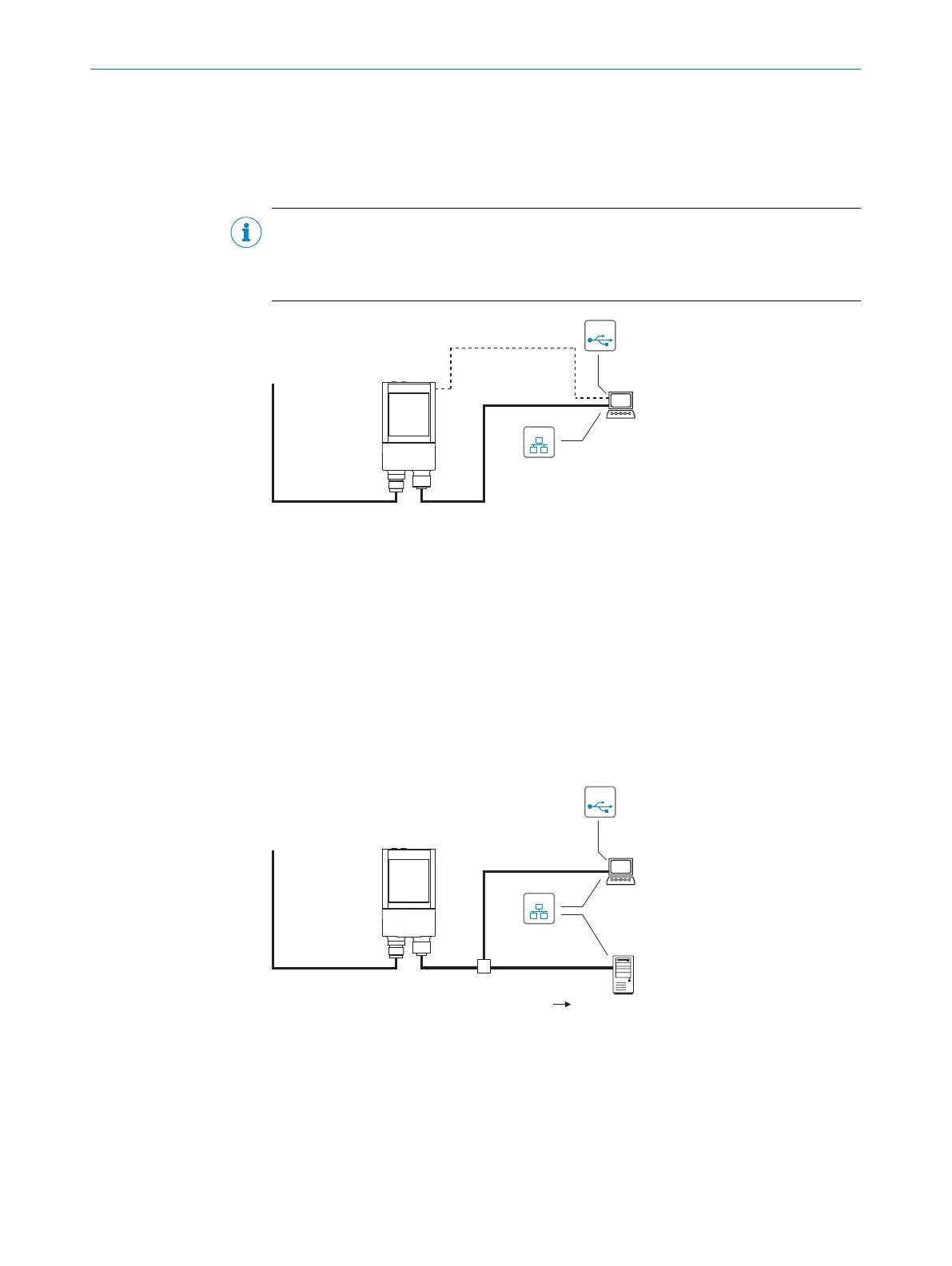
6.3.1 Service mode connection schematic
This operating mode is recommended for initial commissioning of the device.
NOTE
The USB interface of the device is used in industrial environments only as a service
interface for temporary use (e.g. for configuration, troubleshooting). Permanent use in
operational use of the system as a host interface is not intended.
GLS621
Configuration
Image display
Diagnostics
SOPASSOPAS
"Power/Serial Data/
CAN/I/O"
(Aux, Host)
V
S
1
PC
"Ethernet" (Aux,
image transfer) 4
"USB" (Aux, for
temporary use only) 2
Cable 3
EthernetEthernet
USBUSB
6
Cable 5
Cable 7
Figure 16: Connection block diagram for commissioning
1
Supply voltage V
S,
(V
S
= U
V
)
2
USB, alternative to Ethernet AUX port
USB for temporary use only as a servicing interface
3
Adapter cable (male connector, USB, Micro-B type/male connector, USB, type A)
4
Ethernet, Aux interface (alternative to USB)
5
Adapter cable (male connector, M12, 4-pin, D-coded/male connector, RJ-45, 8-pin)
6
Configuration with SOPAS ET, image display or reading diagnostics
7
Cable with open end
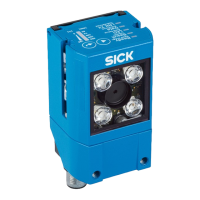
6.3.2 Connection principle for read mode
"Ethernet"
(Host)
GLS621
Image display
SOPASSOPAS
"Power/Serial Data/
CAN/I/O"
(Aux, Host)
V
S
1
HOST
PC
Further data
processing
"Ethernet" (Aux,
image transfer) 2
EthernetEthernet
USBUSB
Cable 6
3
5
Reading result 4
Figure 17: Connection block diagram for read mode
1
Supply voltage V
S,
(V
S
= U
V
)
2
Ethernet, Aux interface (image transmission)
3
Image display
4
Read result
5
Data further processing
6 ELECTRICAL INSTALLATION
34
O P E R A T I N G I N S T R U C T I O N S | GLS621 8024289/19E9/2020-10-21 | SICK
Subject to change without notice


 To Next Page