9 Troubleshooting
9.1 General faults, warnings, and errors
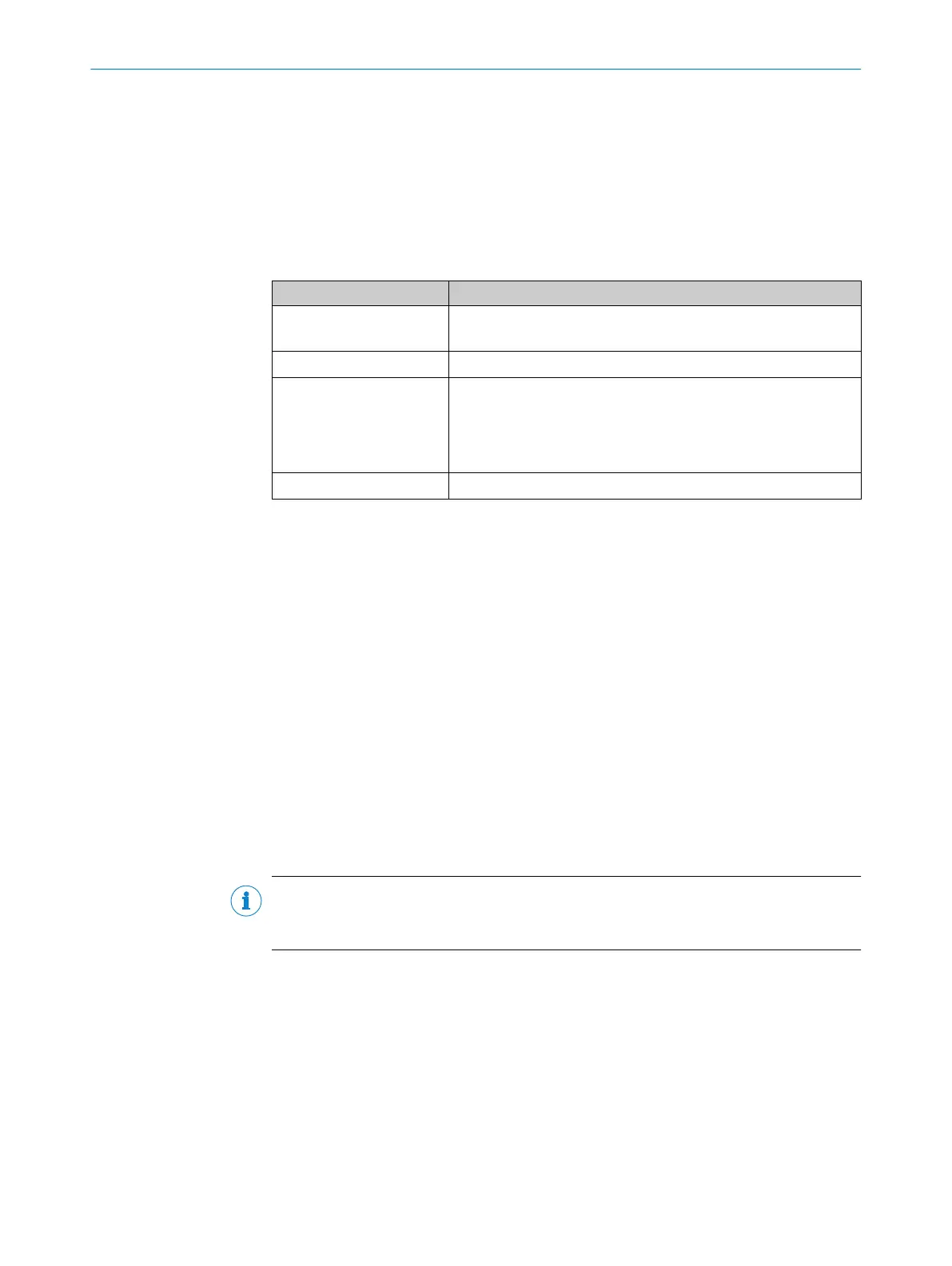
Possible faults and corrective actions are described in the table below for troubleshoot‐
ing. For faults that cannot be resolved using the information below, please contact
SICK Service. To find your agency, see the final page of this document.
Table 14: Other possible error sources
Situation Error/fault
Mounting
■
Device poorly aligned to objects with codes (e.g. glare)
■
Incremental encoder (optional) incorrectly positioned
Electrical installation
■
Interfaces of the device incorrectly wired
Configuration
■
Functions not adapted to local conditions, e.g. parameters for
the data interface not set correctly
■
Device limits not observed, e.g. reading distance, aperture
angle
■
Trigger source for reading pulse not selected correctly
Operation
■
Device faults (hardware, software)
9.2 Displaying the status log
To display the status log, connect the SOPAS ET configuration software with the device
online.
1. Connect the SOPAS ET configuration software to the device.
2. Opening the device in the project tree: SERVICE > SYSTEM STATUS > SYSTEM INFORMA‐
TION tab.
9.3 SICK service
If the fault cannot be rectified, the device may be defective.
The device may not be repaired by the user. Interference with or modification of the
device will invalidate any warranty claims against SICK AG.
Rapid replacement of a device by the user is, however, possible.
b
Where a fault cannot be rectified, make contact with the SICK Service department.
To find your agency, see the final page of this document.
NOTE
Before calling, make a note of all type label data such as type designation and serial
number to ensure faster telephone processing.
9.4 Repairs
Repair work on the device may only be performed by qualified and authorized personnel
from SICK AG. Interruptions or modifications to the device by the customer will invali‐
date any warranty claims against SICK AG.
9.5 Returns
b
Do not dispatch devices to the SICK Service department without consultation.
b
The device must be sent in the original packaging or an equivalent padded pack‐
aging.
TROUBLESHOOTING 9
8024289/19E9/2020-10-21 | SICK O P E R A T I N G I N S T R U C T I O N S | GLS621
47
Subject to change without notice


 To Next Page