0
10
(0.39)
30
(1.18)
20
(0.79)
40
(1.57)
500
(19.69)
400
(15.75)
300
(11.81)
200
(7.87)
100
(3.94)
0
y
x
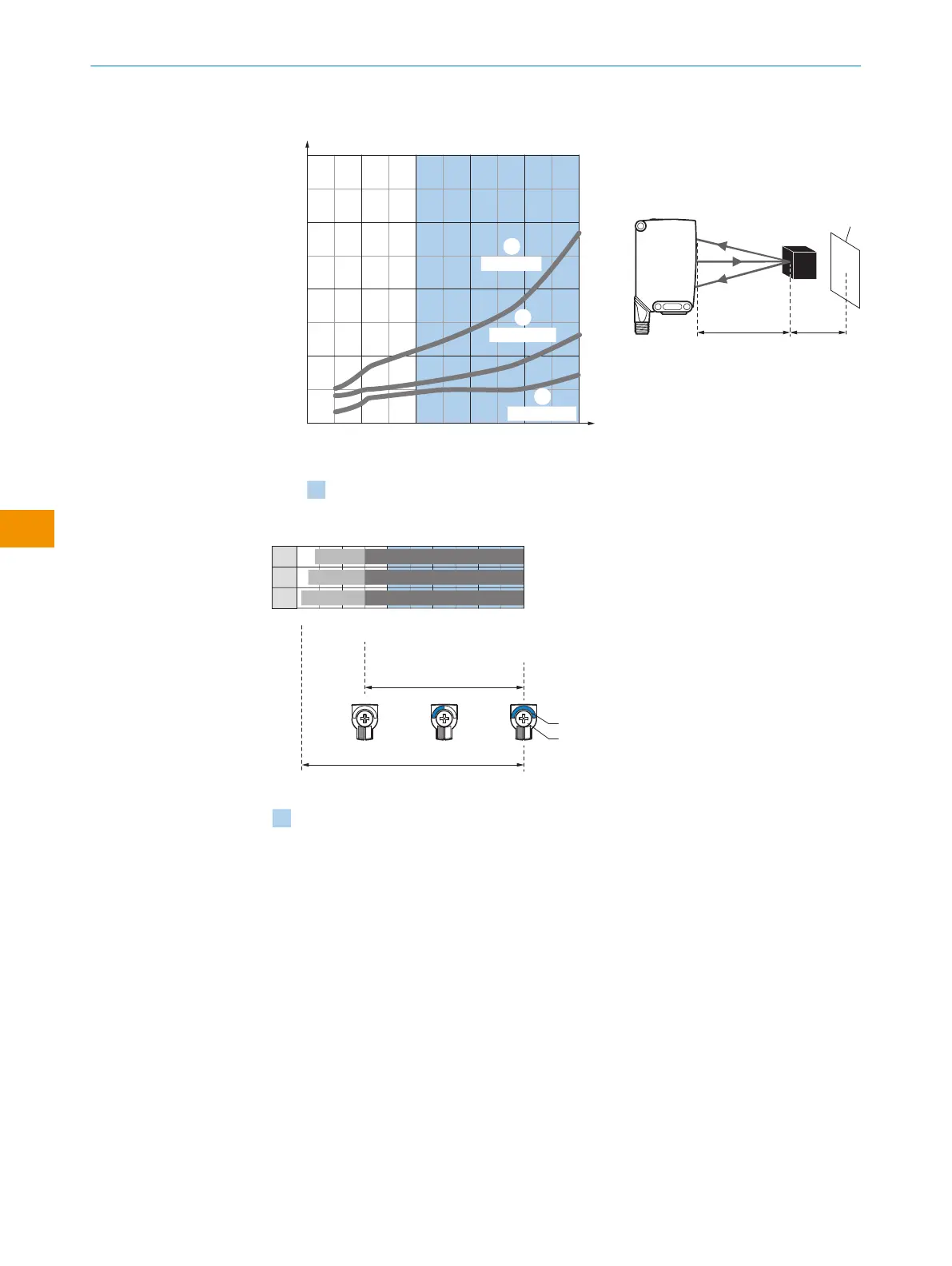
Minimum distance in mm (y) between the set sensing
range (x) and white background (90 % remission)
Distance in mm (inch)
Black object (6 % remission)
Set sensing range x = 400 mm
Needed minimum distance to white
background y = 19 mm
Example:
Safe suppression of the background
yx
White
background (90 %)
1
6 %/90 %
3
90 %/90 %
2
18 %/90 %
Recommended sensing range for the best
performance
Figure 5: Characteristic line, WTS26G
0
150
150
500
500
500
Distance in mm (inch)
1
2
3
150
D
C
A B
BluePilot
E
F
Recommended sensing range for the best performance
40
25
10
500
(19.69)
400
(15.75)
300
(11.81)
200
(7.87)
100
(3.94)
Figure 6: Bar graph, WTS26G
1
Black object, 6% remission factor
2
Gray object, 18% remission factor
3
White object, 90% remission factor
A
Sensing range min. in mm
B
Sensing range max. in mm
C
Visibility range
D
Adjustment range switching threshold
E
Sensing range indicator
F
Teach-Turn adjustment
blue
Recommended sensing range for the best performance
7.3 Sensing range setting
WTS26x-xxxxxx2xAxx with Teach-Turn adjustment:
The sensing range is adjusted by pressing the teach-in button (approx. 1-3seconds).
Depending on the requirements, the potentiometer can be used for fine-tuning (without
pressing the teach-in button).
Clockwise rotation: Sensing range increased
OPERATING INSTRUCTIONS
34
O P E R A T I N G I N S T R U C T I O N S | WTS26 8020355.1GI9/2022-07-13 | SICK
Subject to change without notice
en











 To Next Page