EasyManua.ls Logo

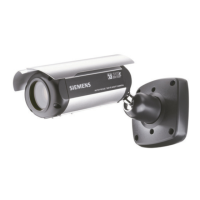
Siemens CCAW1417-LPO - User Manual

Siemens CCAW1417-LPO
34 pages
Print Icon
To Next Page IconTo Next Page
Loading...
Siemens AG
High-Resolution,
Day/Night Autofocus All-In-
One Camera with 22x Optical /
16x Digital Zoom
CCAW1417-LPO
Configuration Manual

Other manuals for Siemens CCAW1417-LPO

Questions and Answers

  • R
    ronald11Aug 11, 2025
    Why is the contrast weak on my Siemens CCAW1417-LPO?
    • D
      Danny BurgessAug 11, 2025
      If the contrast on the screen of your Siemens Security Camera appears weak, it might be due to strong light exposure. Try changing the camera's position. Also, make sure to adjust the contrast settings on your monitor.
  • L
    Lisa Mayo DVMAug 19, 2025
    What to do if the image on Siemens CCAW1417-LPO Security Camera is too dark?
    • M
      Ms. Kerry HigginsSep 12, 2025
      If the image on your Siemens Security Camera screen is too dark, the lens might be dirty. Clean the lens with a soft, clean cloth to resolve this issue.
  • C
    Crystal StephensAug 27, 2025
    Why is my Siemens Security Camera hot and not working?
    • K
      Kathleen RichardAug 27, 2025
      If your Siemens Security Camera isn't working properly and the case is hot, check whether the camera is connected to the correct power source.
  • M
    Maria EllisSep 3, 2025
    How to fix a Siemens Security Camera when nothing appears on the screen?
    • S
      Sydney Hansen PhDSep 3, 2025
      Ensure that all cables connecting your Siemens Security Camera to the monitor are properly connected.

Siemens CCAW1417-LPO Specifications

General IconGeneral
Lens TypeFixed
Focal Length2.8 mm
IR RangeUp to 30 m
Weather ProtectionYes
Resolution1920 x 1080
Video CompressionH.264
Operating Temperature-30°C to +60°C
Power Supply12V DC / PoE

Related product manuals