Hardware Overview
1-18
SIMATIC PCS 7 OSx 4.0.0 Hardware (PA RISC)
1.9 Connecting Input Devices
Be sure that power to the system unit is turned off before you connect the
mouse/trackball and keyboards. A rocker switch on the back of the operator
keyboard allows you to select the current operational keyboard. The
standard pointing devices supplied with the system are PS/2 compatible.
!
CAUTION
Plugging
or unplugging the pointing device with system power on results in the
pointing device being inoperable until you power cycle the computer
.
T
urn off all power to the system before you plug or unplug the pointing device.
!
CAUTION
Plugging and unplugging a keyboard into the system unit with power on can
result in damage to the system unit and/or keyboard.
T
urn off all power to the system before you plug in the keyboard or unplug it.
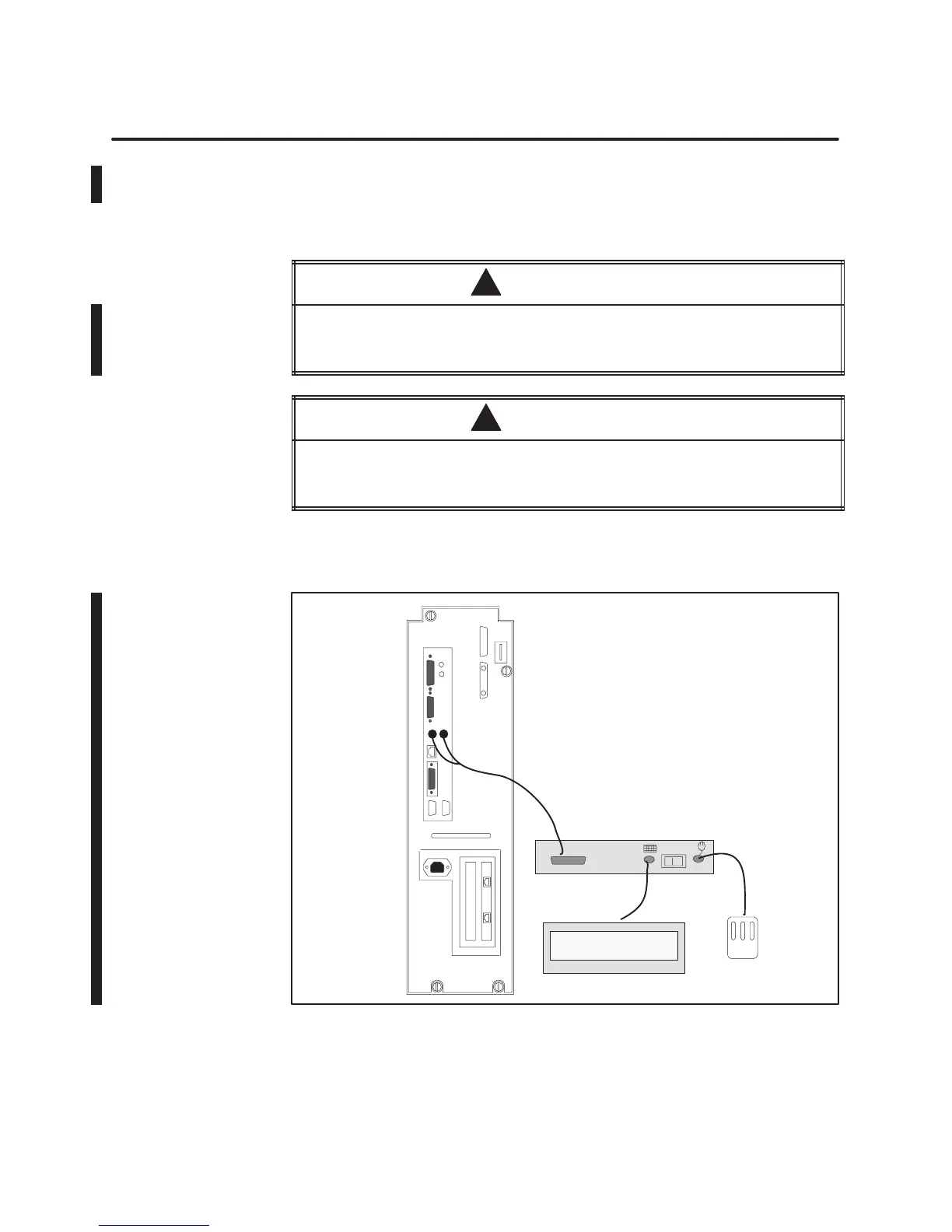
Figure 1-3
shows how to install the cables to connect the pointing device
and the operator and engineering keyboards to the system unit.
Pointing
Device
12
Engineering Keyboard
Operator Key
-
board
(Back View)
O
E
Figure 1-3 Installing the Engineering and Operator Keyboards
Installing the
Keyboar
ds and
Pointing Device



 To Next Page
 Loading...