Procedure
1. Use a 3 mm Allen key to loosen the safety catch.
2. Unscrew the cover.
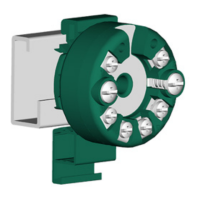
3. Remove the display from the holder.
Figure 4-6 Remove the display
4. Rotate the display in 90° increments to the desired position.
5
. Mount the display once again at the desired position.
6. Screw the cover back on as far as it will go.
7. Use a 3 mm Allen key to secure the safety catch.
4.6 Mounting the SITRANS TF dual chamber housing
4.6.1 Mounting device to a pole with mounting bracket
Introduction
The mounting holes in the bracket ② and the device enclosure ① determine the permitted
mounting positions.
Installing/mounting
4.6 Mounting the SITRANS TF dual chamber housing
SITRANS TH100/TH100Slim/TH320/TH420/TR320/TR420/TF320/TF420
36 Compact Operating Instructions, 07/2021, A5E41865021-AE



 To Next Page
 Loading...