
 To Next Page
J
Jeremy WardAug 1, 2025
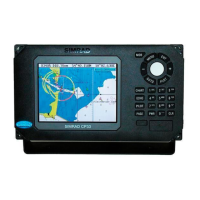
Why is my Simrad CP33 GPS not updating its position?
- KKevin ClarkAug 1, 2025
If your Simrad GPS is not updating its position, the suggested solution is to replace the antenna or cable.

Why is my Simrad CP33 GPS not updating its position?
If your Simrad GPS is not updating its position, the suggested solution is to replace the antenna or cable.
What to do if my Simrad CP33 GPS display screen has no picture?
If there is no picture on the display screen of your Simrad GPS, first press the [PWR] key on the keypad. If that doesn't work, replace the fuse, ensuring you use only a 4.0A slow type fuse.
What to do if my Simrad CP33 has no normal picture or key operation?
If your Simrad GPS shows no normal picture or key operation, try turning the unit off and on again. If the issue persists, disconnect the power and then reconnect it. Also, remove the C-MAP chart if you suspect it is defective.
How to adjust the brightness on my Simrad GPS if the picture is too dark or bright?
If the picture on your Simrad GPS display screen is too dark or too bright, press [PWR], adjust the light/contrast settings, and then press [ENT].
Why is the screen update on my Simrad CP33 GPS extremely slow?
If the screen update on your Simrad GPS is extremely slow, turn off ‘Course line’ for each stored route and turn off ‘Display track’.
What to do if all data is deleted on my Simrad GPS after turning it off and on?
If all data is deleted after turning your Simrad GPS unit off and back on, it is likely due to the internal battery needing replacement. The expected battery lifetime is a minimum of 5 years.
Important safety precautions and guidelines for operating the unit.
Details the primary functions and their corresponding keys.
Information on accessing and using the built-in world chart and C-MAP charts.
Details on how the current position is displayed and configured.
Options for resetting the unit to factory default configurations.
Details on connecting power, antennas, and other peripherals.
Common problems and their solutions for the chartplotter.
 General
| Type | GPS Chartplotter |
|---|---|
| Enclosure Rating | IPX6 |
| Display Type | LCD |
| Connectivity | NMEA0183 |
| Operating Temperature | -15°C to +55°C |
| Humidity | 95% |
| Compass Safe Distance | 0.3 m (1 ft) |