10
z
x
c
v
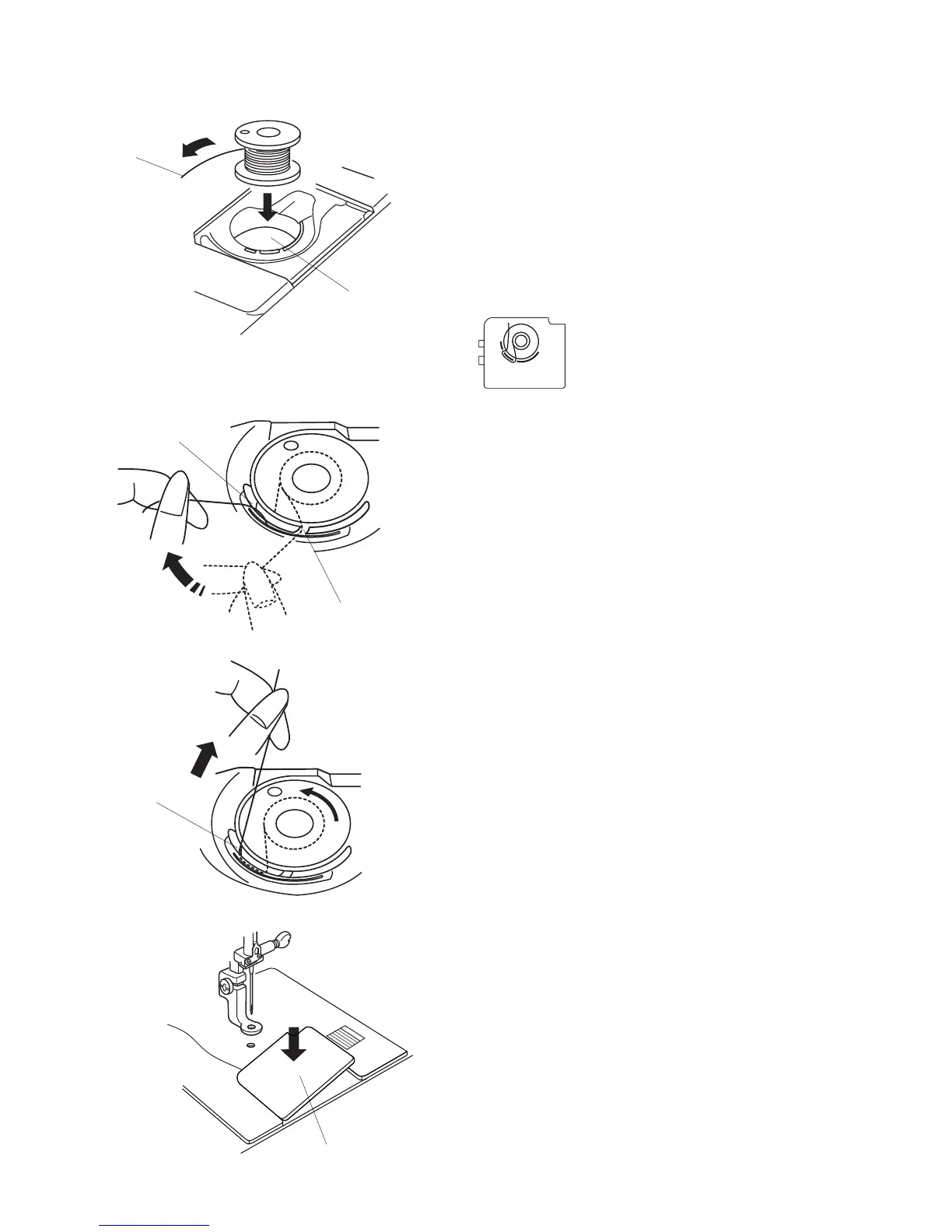
Inserting the Bobbin
Step
z
Push the bobbin case cover release button to the
to release bobbin case cover. Place the bobbin in
the bobbin case. Lightly pull the bobbin thread
to ensure that the bobbin turns in a counter
clockwise direction. If it turns in a clockwise
direction, remove the bobbin and replace it so that it
turns in a counter clockwise direction.
q
Thread
w
Bobbin case
* The bobbin case cover has a helpful
picture for reference when threading.
q
w
r
r
t
e
Step
x
Guide the thread into the notch on the front of
the bobbin case.
Draw the thread to the left, sliding it between the
tension spring blades.
e
Front of the slot
Step
c
Continue to draw the thread lightly until the thread
slips into the side slot.
Pull out about 4˝ of thread to the rear.
r
Back of the slot
Step
v
Reattach the bobbin case cover.
t
Bobbin case cover plate



 To Next Page