e
q
t
r
w
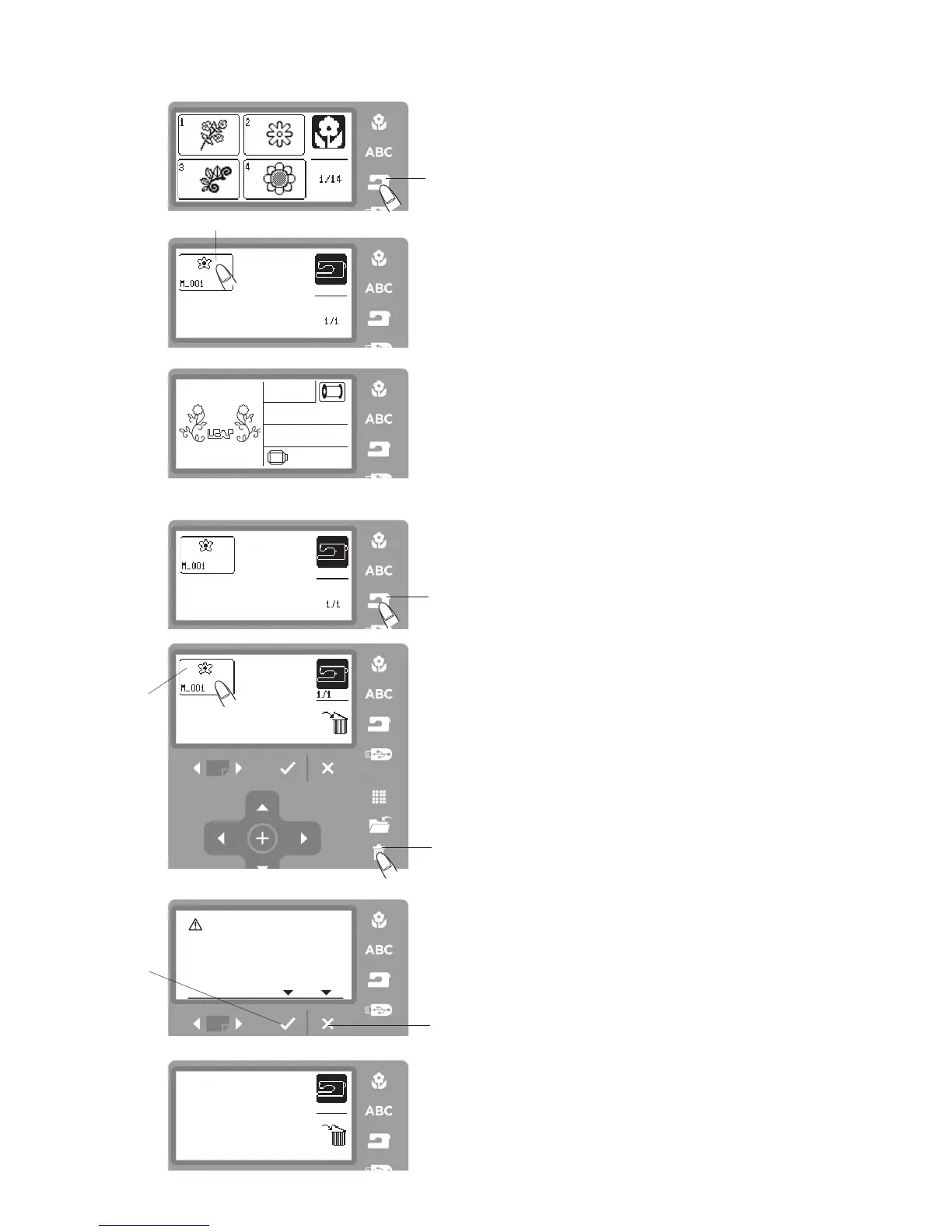
Opening a File from the Internal Machine Memory
To open the saved files, press the internal memory but-
ton and the open file window will open.
Step
z
Press the internal machine memory button
q
.
Deleting a File
You can delete a file no longer needed.
Step
z
Press the internal memory button
q
.
q
Internal memory button
Step
x
Files stored will be displayed.
Step
c
Select the file
e
you wish to delete.
Press the delete button
w
.
Step
v
The confirmation window will appear. Press the OK
√
button
r
to delete the selected file.
Press the exit X button
t
to return to the previous
screen without deleting the file.
r
OK
√
button
t
Exit X button
Step
x
File stored will be displayed.
Press the icon
w
to open the file you wish to sew.
Step
c
The screen will display the ready to sew window of
the saved design. Lower the presser foot and start
sewing.
z
xc
v
z
x
c



 To Next Page