6
q
w
e
r
t
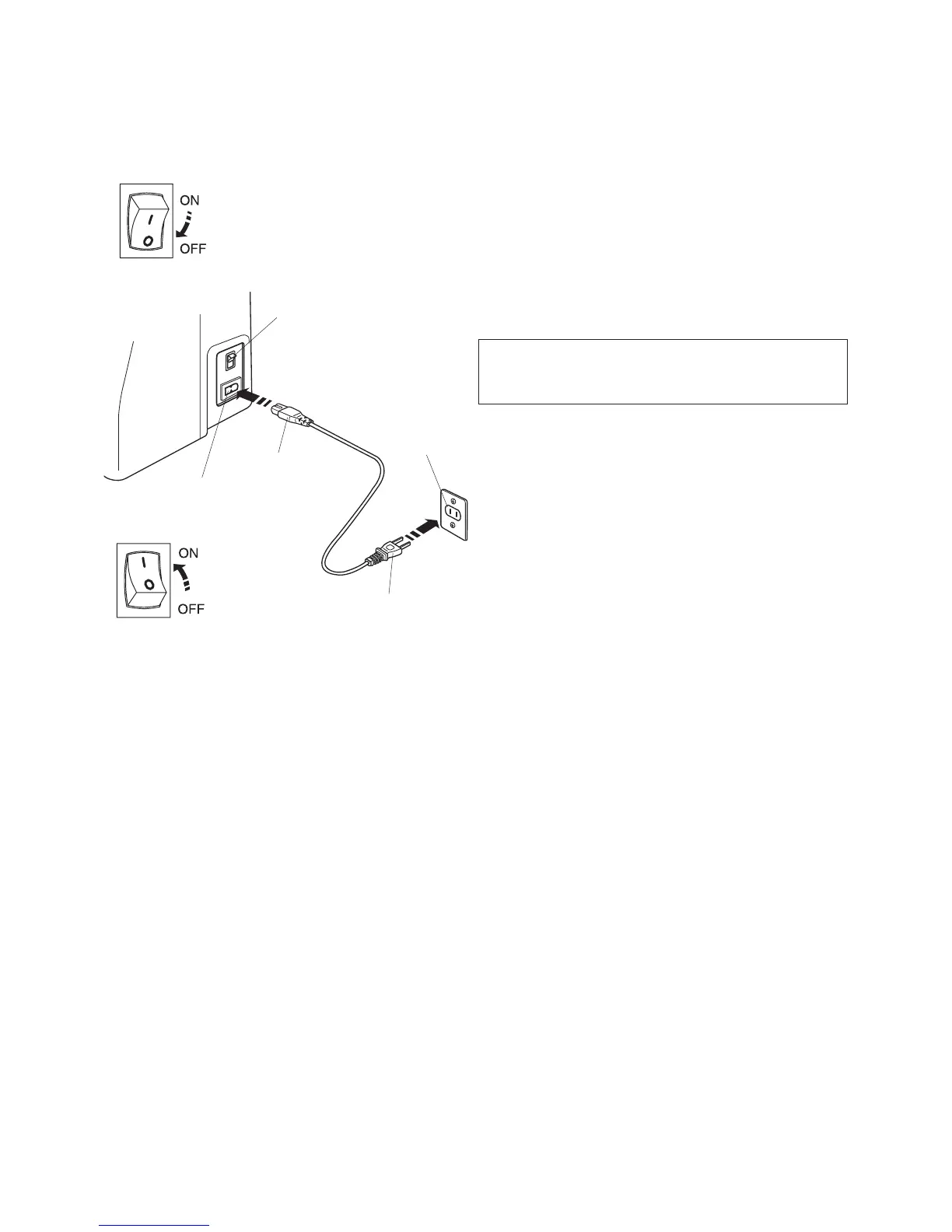
Connecting the Power Supply
Turn off the power switch and insert the machine plug
into the machine socket.
Insert the power supply plug into the wall outlet and turn
the power switch on.
q
Power switch
w
Machine plug
e
Machine socket
r
Power supply plug
t
Wall outlet
NOTE
When power swith is turned on, it takes approximately
ten seconds for the machine screen to come on.
For Your Safety
When your machine is embroidering do not leave the
machine unattended.
Keep the sewing area around your machine clutter free.
When watching the machine sew keep your hands away
from any moving parts such as the thread take up lever,
the handwheel and the needle.
Always turn off the power switch and unplug the power
supply:
- when leaving the machine unattended.
- when attaching or removing parts.
- when cleaning the machine.
Polarized Plug (for U.S.A and Canada only)
The symbol “O” of a switch indicates the “off” position of
a switch.
For appliances with a polarized plug (one blade wider
than the other). To reduce the risk of electric shock, this
plug is intended to fit in a polarized outlet only one way. If
it does not fit fully in the outlet, reverse the plug. If it still
does not fit, contact a qualified electrician to install the
proper outlet. Do not modify the plug in any way.
GETTING READY TO SEW



 To Next Page