q
e
w
r
t
t
w
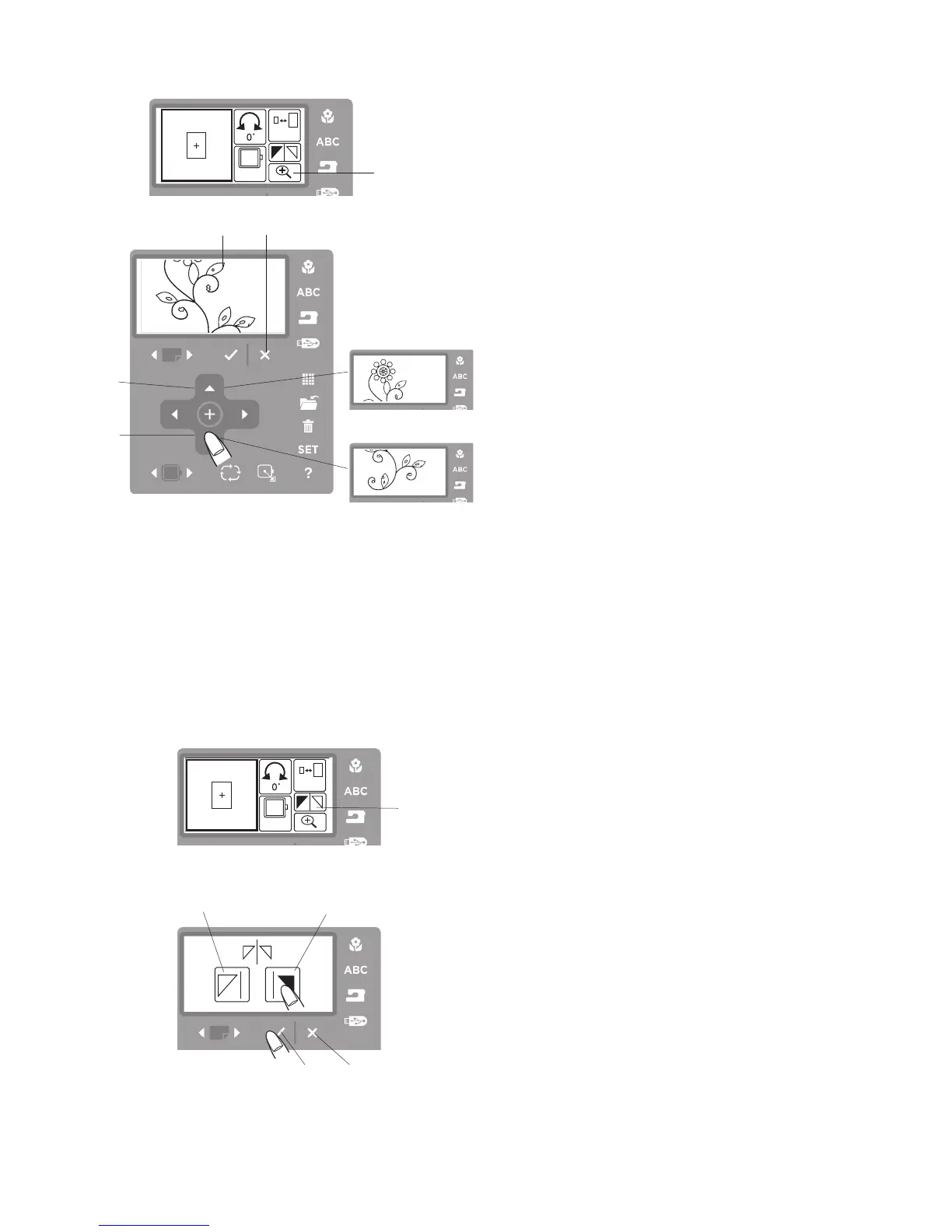
Magnifier Icon
Step
z
Press the magnifier icon to view the design image of
the selected pattern.
q
Magnifier icon
Mirror Imaging the Pattern
You can flip the embroidery pattern horizontally.
Step
z
Press the mirror image icon. The flip window will open.
q
Mirror image icon
Step
x
Press the mirror image to the right icon
e
.
w
Mirror image to the left icon
e
Mirror image to the right icon
r
OK
√
button
t
Exit X button
Step
c
Press the OK
√
button
r
to mirror image the selected
pattern. Press the exit X button
t
to exit the mirror
image window without any change.
e
r
Step
x
The center of the magnified image will be displayed.
w
Center part of the magnified image
Step
c
Press the positioning arrow button (up) to scroll up
the image.
e
Positioning arrow button (up)
Step
v
Press the positioning arrow button (down) to scroll
down the image.
r
Positioning arrow button (down)
Press the exit X button to return to the editing window.
t
Exit X button
z
z
x
x
c
v



 To Next Page