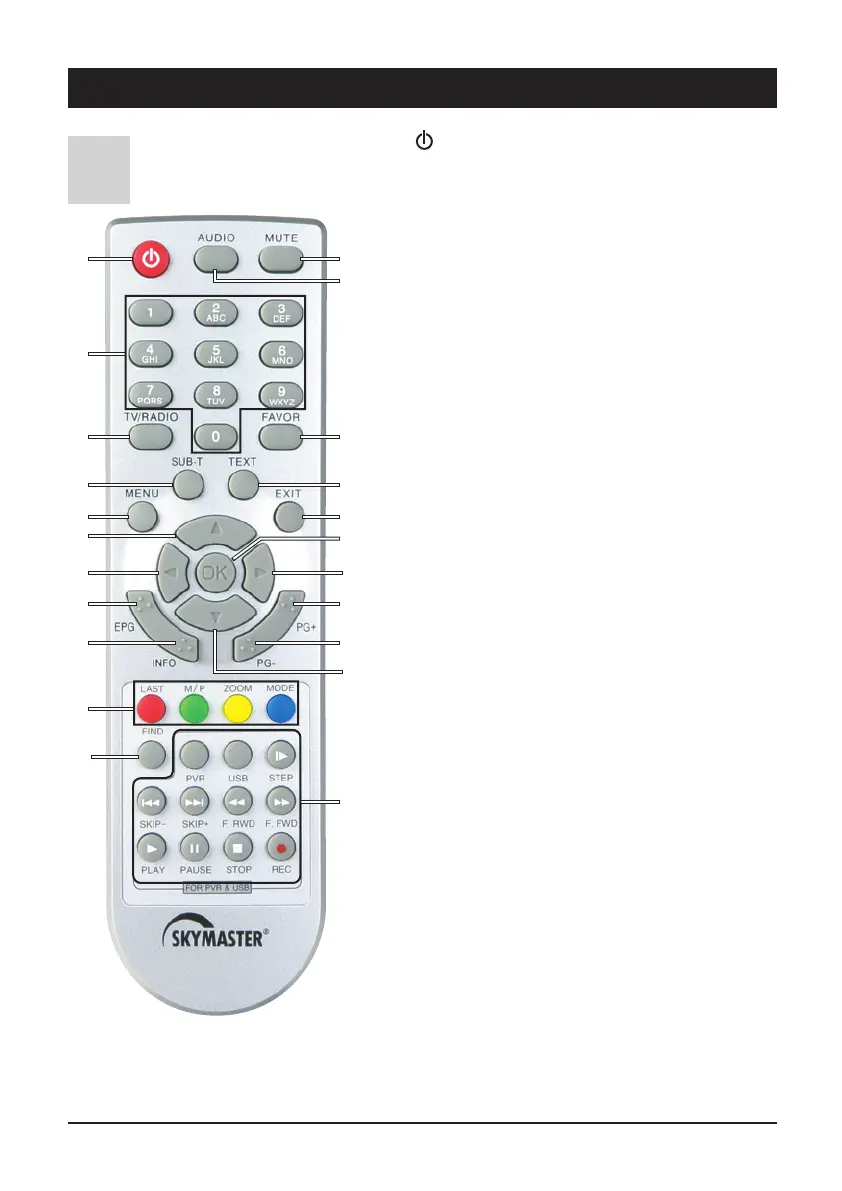
4. Remote control
GB 6
C
1:To switch the device on or off (standby).
2 Number buttons 0 - 9: Use these buttons to switch to a
certain channel or to enter numeric values and passwords
or to change channel names and favourites lists
3 TV/Radio mode: Toggles between TV and radio mode
4 SUB-T: Displays subtitles for the current programme
5 MENU: Access to the menu of the selected device.
6 왖/왔/왗/왘: For navigating within the OSD
(up/down/left/right)
7 EPG: Electronic Program Guide.
8
INFO: Displays programme information.
9 Fast Text Function (coloured buttons).
LAST: Toggles between the current and the previously set
channel
M/P: Opens the multi-picture preview. An overview of
9 images can be displayed in a preview.
ZOOM: to enlarge image. Use the cursor keys to navigate
within the picture.
MODE: Display and/or select the available on-screen
settings (screen, video etc.) for devices such as satellite
receivers etc.
10 FIND: To search for channels from the programme list
using the buttons 0-9/A-Z.
11 MUTE: Mutes the sound. Press again to reactivate the
sound.
12 AUDIO: Displays all the available audio channels.
13 FAVOR: Favourite channels.
14 TEXT: Opens teletext pages.
15 EXIT: Closes the current OSD and displays the higher-level
menu or the TV picture.
16 OK: To confirm executed changes.
18 For use as PVR and with USB:
PVR: Opens the list of all recordings on the connected
data carrier.
USB: Opens an overview of all image and music files on
the connected data carrier.
왎
왘 STEP: Jogs by single pictures when replaying recor-
dings.
왎
왗왗 SKIP-: Jumps back by adjustable time intervals, or to
the next bookmark.
왘왘
왎
SKIP+: Jumps forwards by adjustable time intervals,
or to the next bookmark.
왗왗 F.RWD: Fast rewind during replay. The speed can be
adjusted by pressing several times.
왘왘 F.FWD: Fast forward during replay. The speed can be
adjusted by pressing several times.
왘 PLAY:
Replay of multimedia files and recordings.
왎왎
PAUSE: Pauses the TV picture, multimedia files or the
replay of recordings. For further details, please refer to
“Timeshift”.
왎 STOP: Stops replay or recording.
쎲 REC: Immediately records a TV or radio programme.
Please always observe correct polarity when inserting batteries!
Correct polarity is displayed in the battery compartment.
Batteries: 2 x AAA, UM-4, Micro or R03.
Used batteries are considered hazardous waste – always
dispose of them correctly! Range approx. 6 m.
111
2
3 13
144
155
66
17
16
9
18
10
17
6
7
8
6
12



 To Next Page