8. The OSD Menu – Tools
GB 39
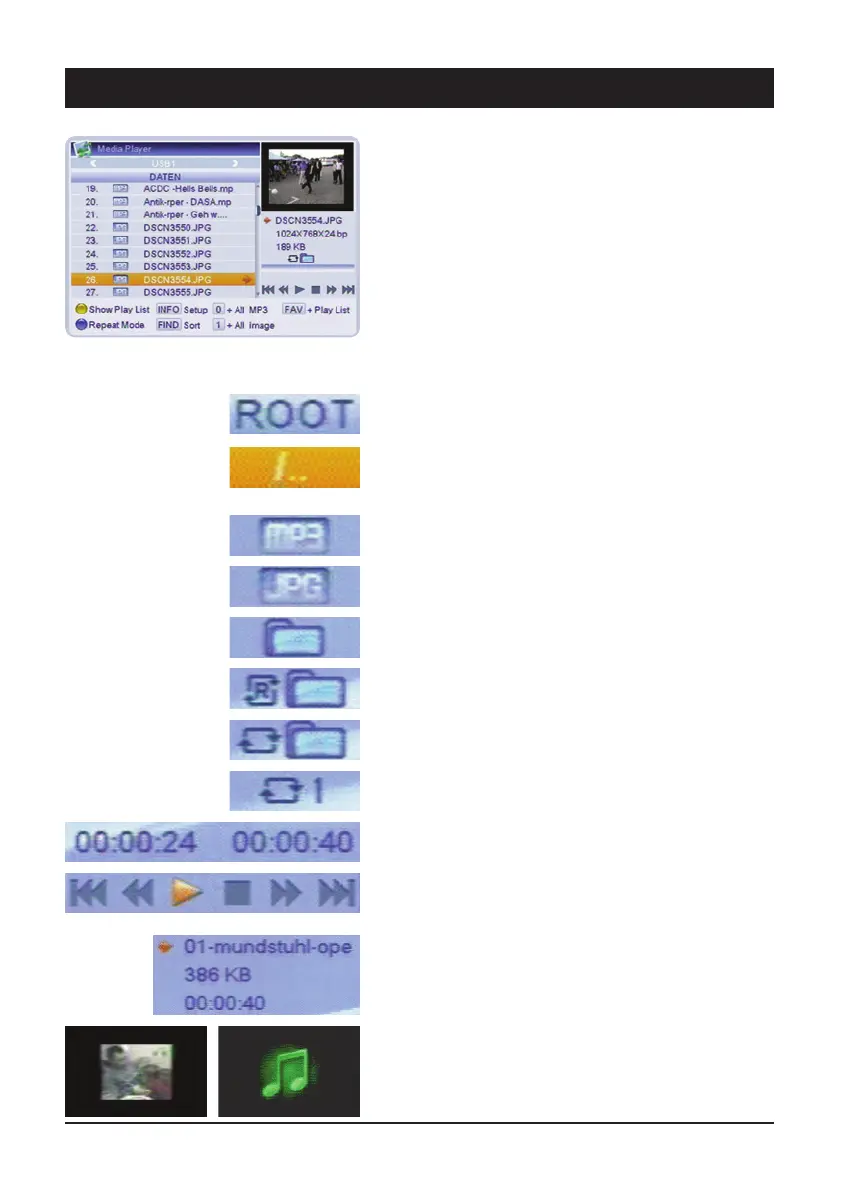
4.6 USB
After a readable storage media has been connected, a
window opens, which displays the current files on the
hard drive in a folder structure similar to on a PC.
This menu can be called up by pressing the USB key on
the remote control. Please note that only MP3 and JPG
files can be played back.
The symbols used in this overview have the following
meanings:
Indicates that you are in the main directory of the data
carrier.
Indicates that you are in a sub-directory If this item is
enabled (press the OK key), the receiver switches to the
next higher directory.
Indicates that this is an MP3 audio file.
Indicates that this is a JPG image file.
Indicates that there is a further sub-directory at this
point.
The current folder is played continuously in a random
sequence.
The current folder is played continuously in sequence.
The current song is continuously repeated.
Elapsed and remaining time of the current title.
Control elements for audio files are the same as the keys
on the remote control.
Name of song, size and duration for audio titles.
File name, size and image information for image files.
Preview window for image files, this image is displayed
with audio titles.



 To Next Page