8. The OSD menu – Channels
GB 22
1. Edit Channel List
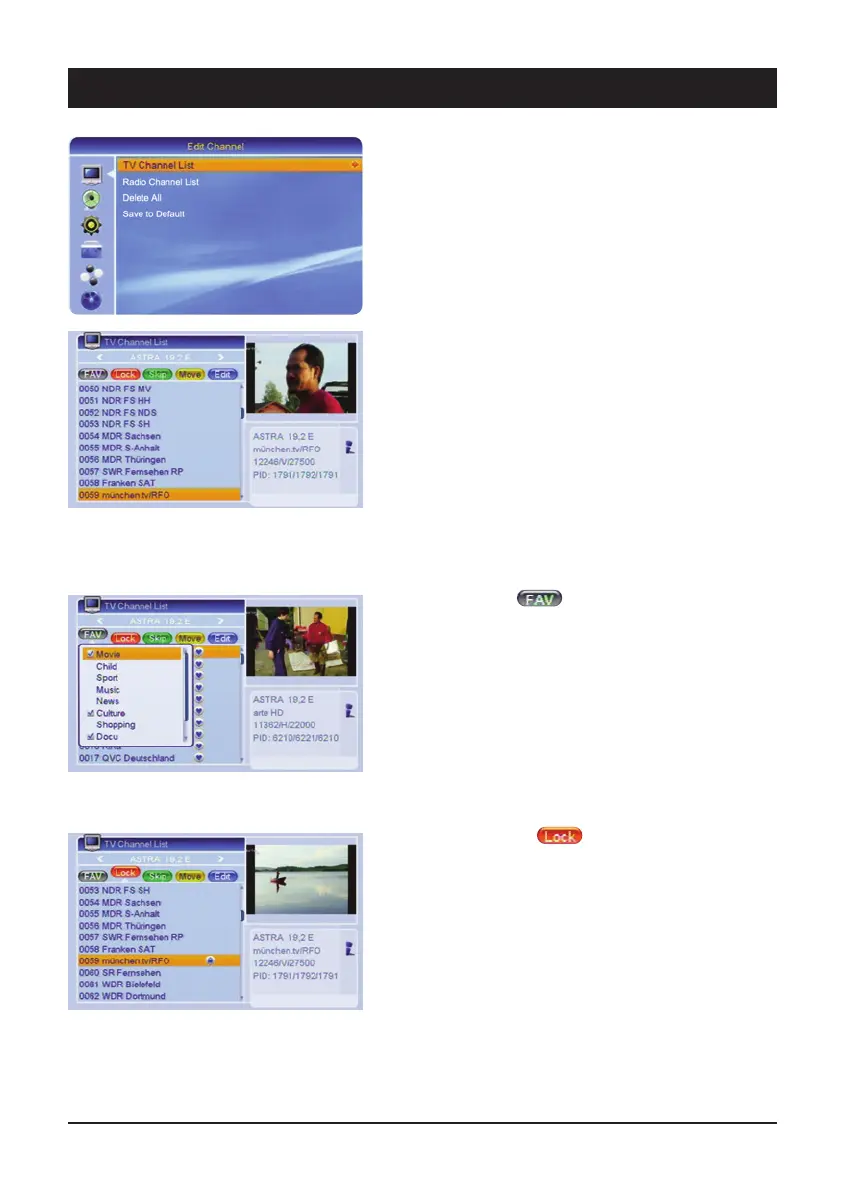
For editing the available TV channels and radio stations.
1.1 TV Channel List – (Radio Channel)
TV channels can be accepted, moved, locked, sorted
and edited in FAV lists. Use the [
왗왘] buttons to select
the satellites. Use the [PG-/PG+] buttons to navigate
page-by-page through the channel list.
After exiting via the [Exit] button, a safety query appears
asking whether you wish to save the changes.
Press the coloured buttons to execute the following
functions:
1.1.1 Favourites
It is possible to place your favourite channels in a
separate list. Use the [FAVOR] button to quickly access
your favourite channels.
Select the desired channel and press the [FAVOR] but-
ton. Press the [OK] button to insert the channel into one
or several FAV lists. Channel deleting is carried out in the
same way.
1.1.2 Parental lock
It is possible to lock unauthorized access to certain
channels, e.g. with contents which are inappropriate for
young viewers. They can then only be accessed by
entering a password. Press the [red] button and highlight
the channels you wish to lock via the [OK] button. Note:
In order to activate the parental lock, you have to switch
on the parental lock in the “Child Protection” menu.



 To Next Page