25
User Manual M65 / M85 / M25 Getting to know
Registering the handset at the base station
To be able to register the handset at a base station, an extension must have been set up for it on that
base. Please refer to the manual of the base station on how to set up the extension.
Note: All display screenshots are from the M65 handset. The same symbols are used
on the M85 and M25 displays, but their location may dier slightly.
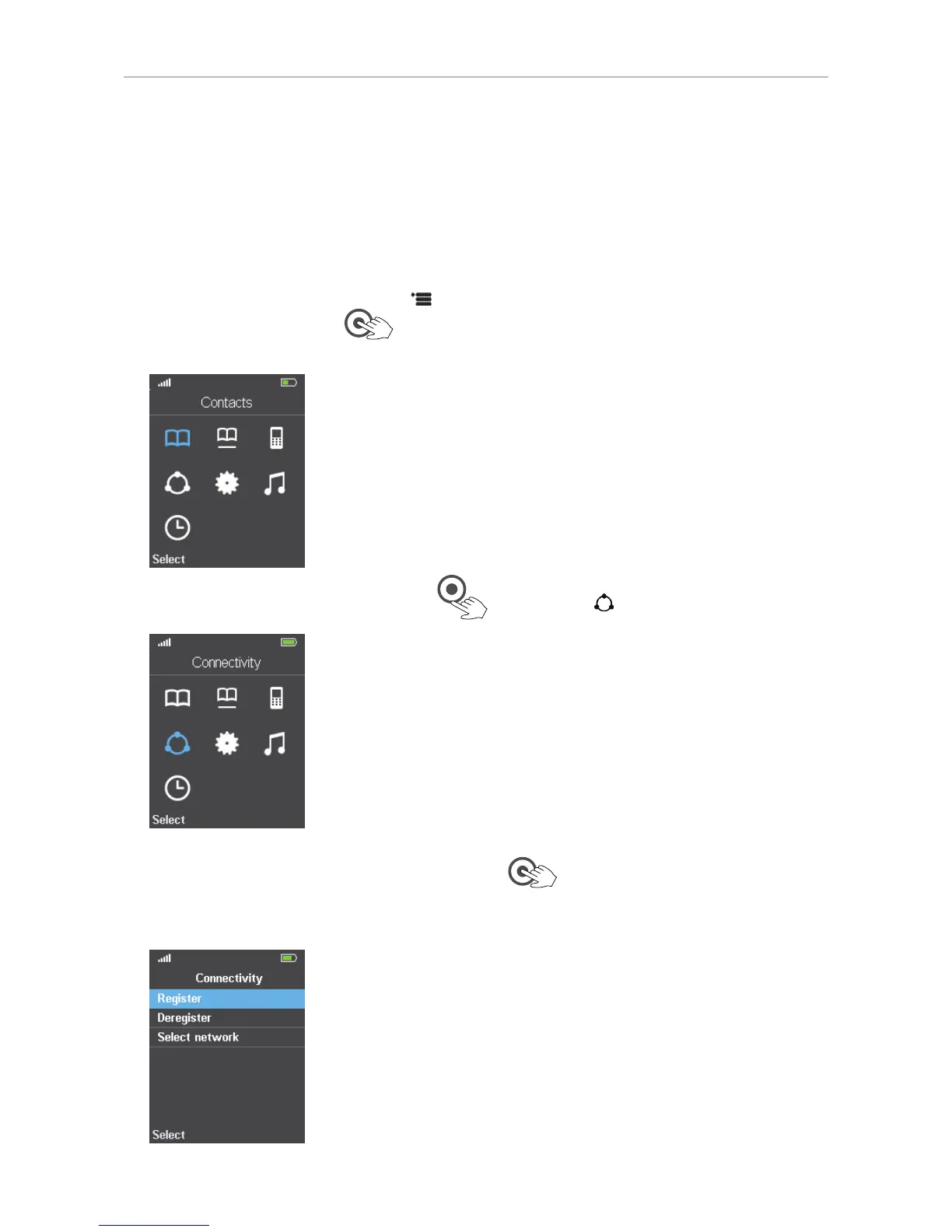
1. On the M65/M85, press the menu key
on the handset; on the M25, press the OK key in the
center of the navigation key
. The top menu opens; the symbol highlighted in blue is the
one currently selected (Fig. 1).
Fig. 1
2. Press the lower rim of the navigation key
once to select Connectivity (Fig. 2).
Fig. 2
3. Press the OK key in the center of the navigation key . The Connectivity menu opens (Fig. 3).
The blue bar highlighting one of the the options indicates that this is the currently selected one.
To register the handset at the base, "Register" must be selected.
Fig. 3



 To Next Page