2. 2. Inverter Near-field Control
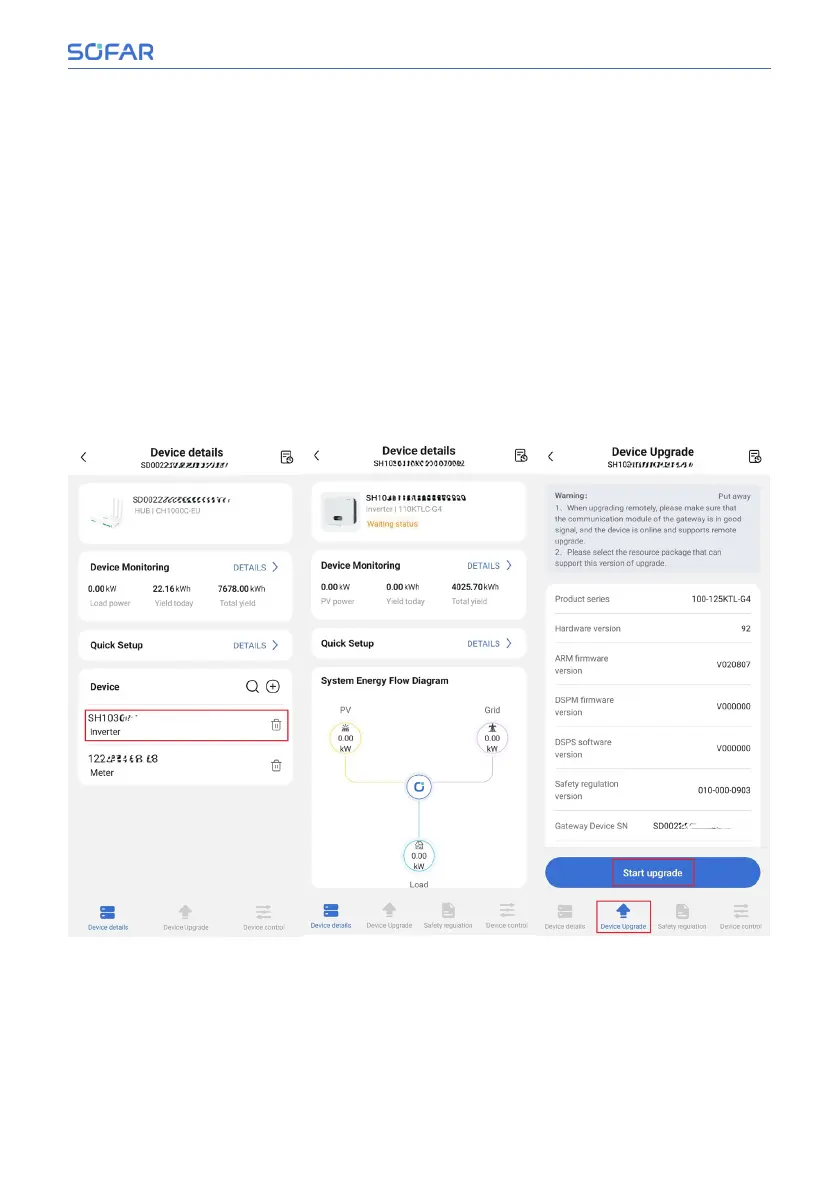
On the CH1000 device details page, click at inverter SN to view the inverter
device details.
On the inverter device details screen, View information such as inverter status.
This is shown in the following figure.
View the current firmware version of the inverter on the Inverter Upgrade page.
If you want to upgrade, click “Select Firmware” to select the new firmware ver-
sion, and then click “Start Upgrade”. As shown in the figure below.
In the inverter safety management page, set the safety parameters of the
inverter, import safety regulations and other operations. As shown in the figure
below.
In the inverter device control page, perform remote power on/off and input
channel settings for the inverter. As shown in the figure below.
Installation and User Manual 63/92
SOFAR Cloud /APP Operation



 To Next Page