Sol-Ark Battery Integration Guide | SK140-0026-005 27
Battery IDs and connections
1. Set the DIP switches on each battery according to the manufacturer’s manual.
2. Connect all top modules (if in parallel) together with RJ45 cable between their “Link A” and “Link B”
ports. It does not matter which port is connected to which.
3. Power on the battery units by turning on each module from the bottom to the top, followed by that
stack’s top module.
Inverter programming and connections
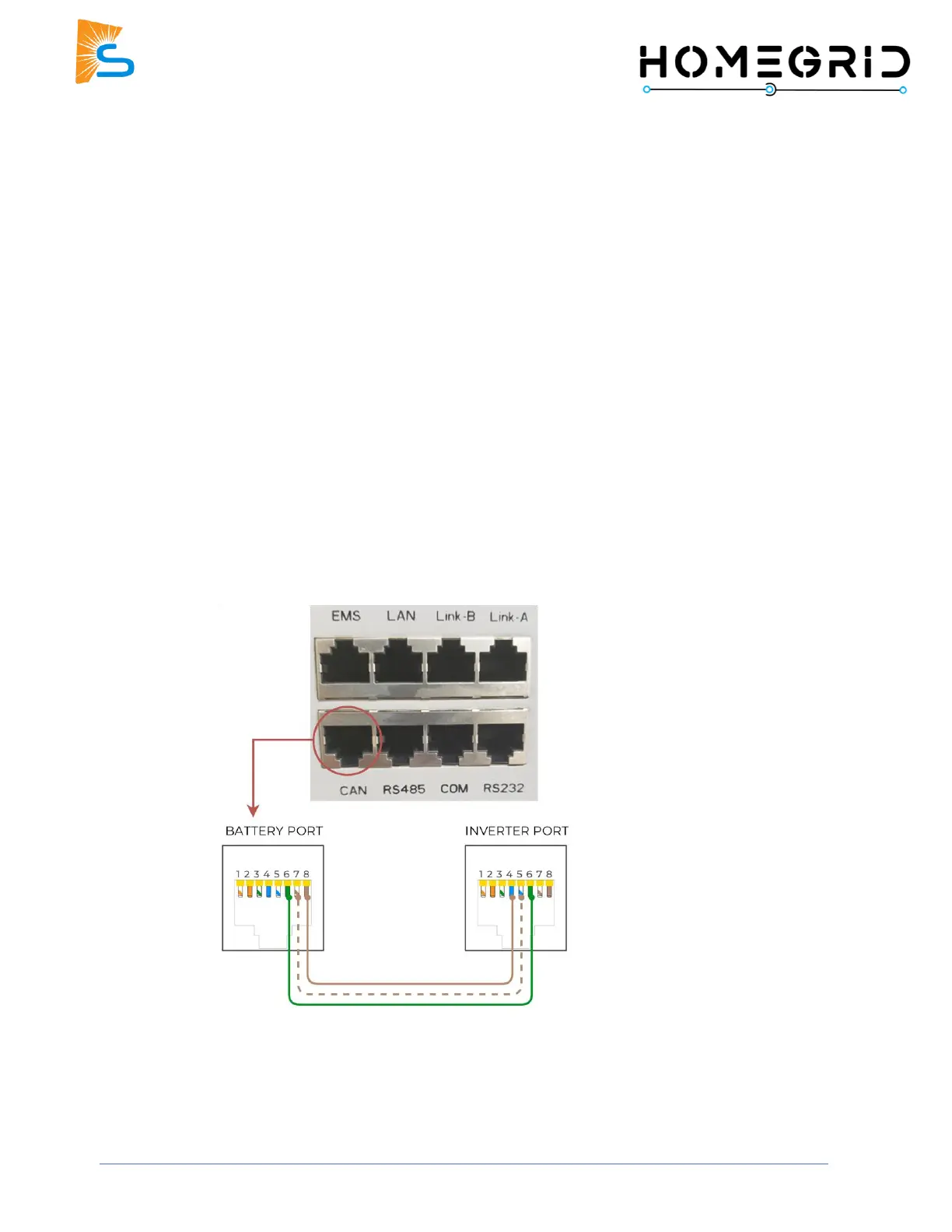
1. Connect the cable between the master battery’s top module and the inverter’s “Battery CANBus”
(outdoor-rated models) or “CAN” (indoor-rated models) port.
2. Program the inverter with this battery's appropriate charge/discharge settings.
3. Enable “BMS Lithium Batt” and set this value to “00”.
4. (Optional) Turn on “BMS_Err_Stop” if you want the system to fault on battery communications loss.
5. If communication still needs to be established, contact HomeGrid to ensure that the unit is on the
latest firmware and configured for communication with Sol-Ark inverters.



 To Next Page