Sol-Ark Battery Integration Guide | SK140-0026-005 29
Battery IDs and connections
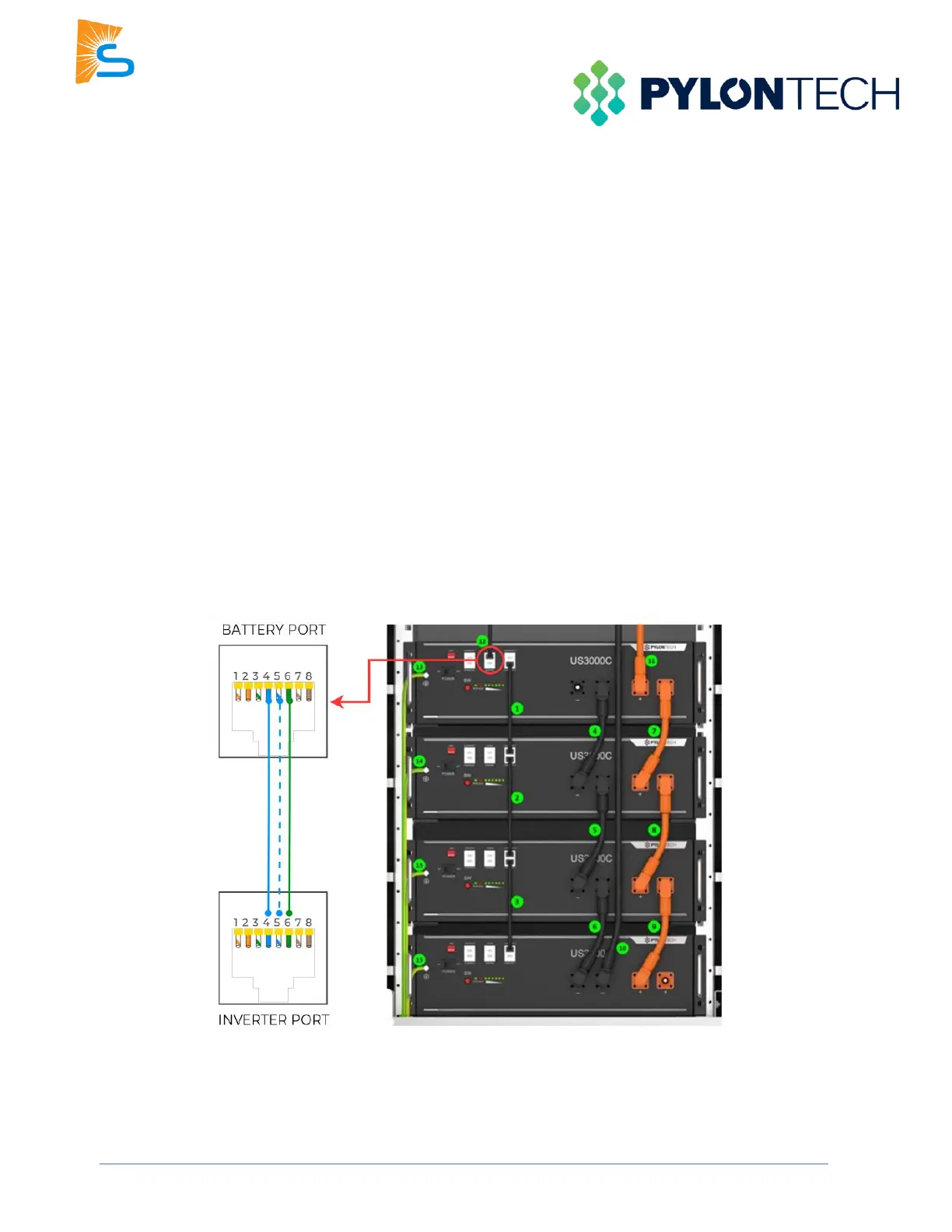
1. Connect all batteries with the RJ45 cable from Link Port 1 to Link Port 0. The first battery with Link Port 0
empty would be the master battery. (Can use up to 16 batteries with 1 master battery and 15 slave
batteries)
2. Set the ADD switch according to the battery manual if more than one string of batteries is in the battery
bank.
Inverter programming and connections
1. Connect the cable to the “A/CAN” port on the Pylontech master battery and the “Battery CANBus” port
(outdoor-rated models) or the “CAN” port (indoor-rated models) on the Sol-Ark.
2. Program the inverter with the appropriate charge/discharge settings according to the specific battery
manual.
3. Enable “BMS Lithium Batt” and set its value to “00”.
4. (Optional) Turn on “BMS_Err_Stop” if you want the system to fault on the loss of battery
communications (Pylontech recommend leaving the “BMS_Err_Stop” on to protect their batteries).



 To Next Page