36
7.4.7 Other Settings (optional)
One may do the following settings, according to the situations
and/or local regulations.
Settings other than the following, may also be available, but
should be under the suggestions or assistance of
distributors/manufacturer.
Procedure:
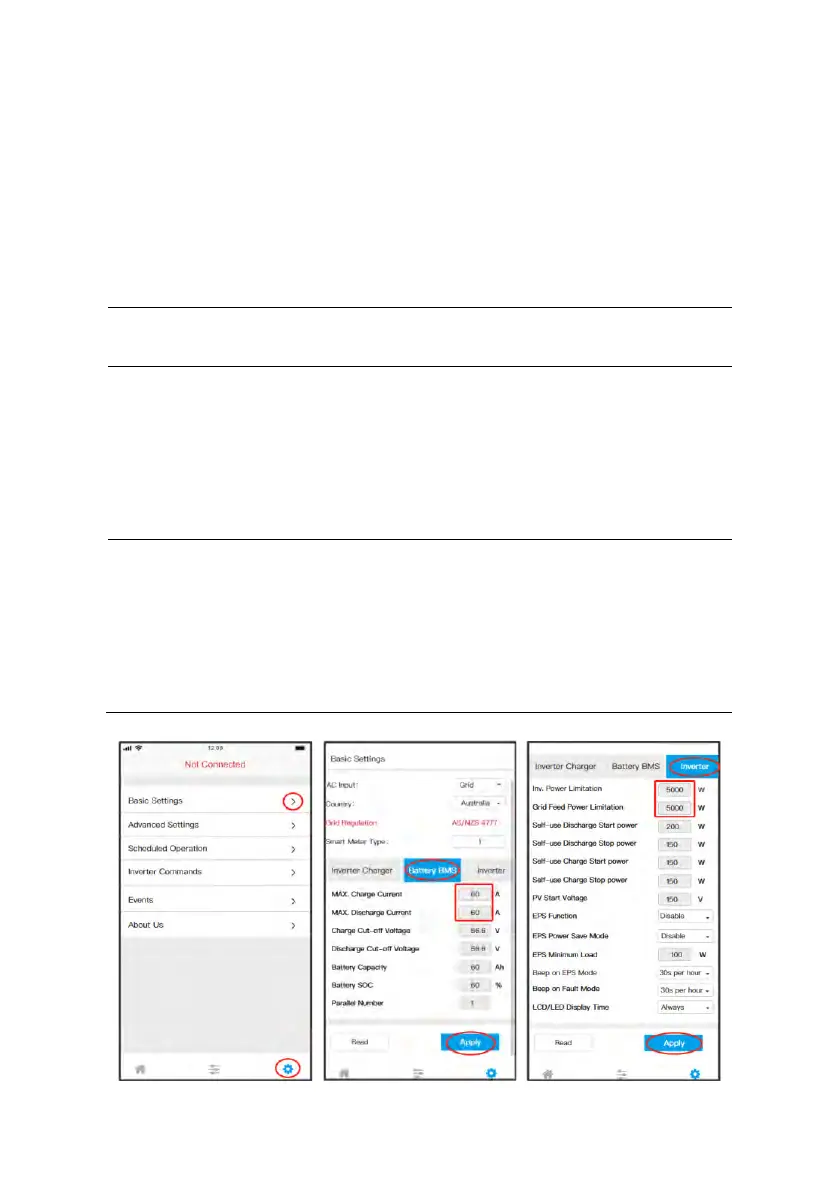
STEP 1: Enter the Setting interface
• Turn to Settings interface, click the “Basic Settings”.
STEP 2: Max. Charge/Discharge Current
• Click the “Battery BMS”;
• Set the max. charge/discharge current according to
requirement, which should not exceed the limitation of
battery;
• Click “Apply”, to save the settings.
STEP 2: Inverter Power Limitation
• Click “Inverter”;
• Set the power limitation, according to your situation
and/or local regulations;
• Click “Apply”, to save the settings.



 To Next Page