16
EN - GDK installation and operating guide - SOMFY
Programming
>
Case 2: 3Ú¦ÀÿáòÓÀ·½ÿȵȶĪö½ªöÿđÀªáÚÿÀÚĄáĄöÓėɓɕÿ½ª¦òÀĐªÀöđÀÿÀÚ·¶áòĄÿáȯïòá·òÙÙÀÚ·
(case during installation).
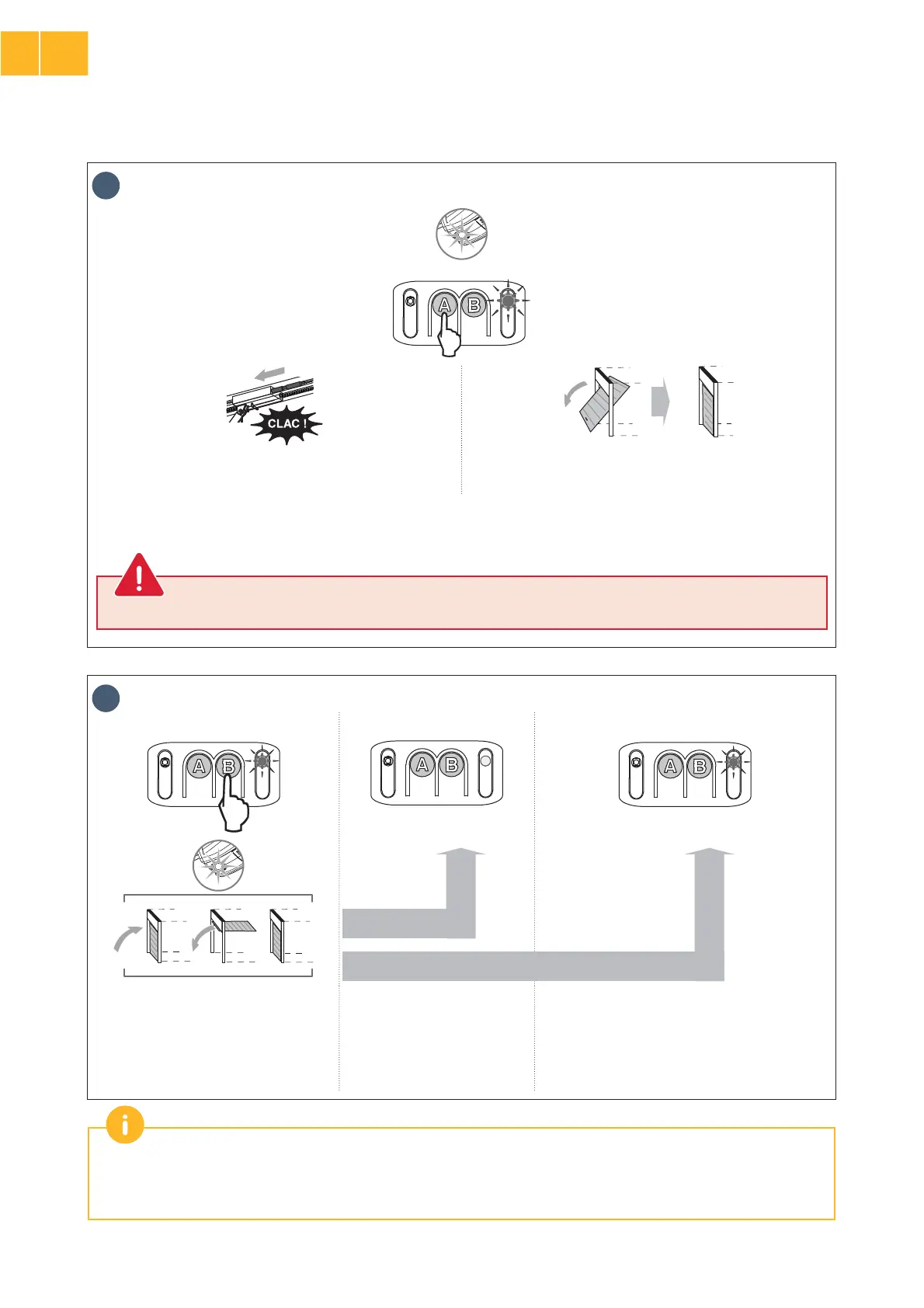
3
x 2
• Control the motor using button “A” (continuous pressure)
so that the transmission shuttle is engaged on the carriage.
• Maintain button “A” depressed to bring the door to closed
position.
Jș3¶ĄÿÿáÚȵȶÀöòªÓªöª¦Șÿ½ªö½ĄÿÿÓªöÿáïöȗ3¶ĄÿÿáÚȵȶÀöЪïÿ¦ªïòªööª¦·ÀÚȘÿ½ªö½ĄÿÿÓªÙáĐªöÀÚÿ½ªáïïáöÀÿª¦ÀòªÿÀáÚ
to the previous movement.
Release button “A” before the motor exerts too much pressure on the door.
4
x 2 x 2
• Press button “B”
to launch the auto-
programming cycle.
The door performs a complete
Opening-Closing cycle.
If the auto-programming is
correct, indicator light “B”
goes out.
If the auto-programming cycle was not
successful, indicator light “B” Īö½ªöÿđÀª.
In this case, start a new auto-programming cycle
using ĄÿÿáÚɃ“B”.
During the auto-programming cycle: If the door is moving, the movement is stopped and auto-programming is interrupted
if any of the buttons are pressed.
Jáÿªșn½ªÙáÿáòÀö·ÀÚđÀÿÀÚ·Ąÿáȯïòá·òÙÙÀÚ·ȩöªªöªÚáȗǥȯĩ·ĄòªǦȪȗ
EN
2



 To Next Page