21
EN - GDK installation and operating guide - SOMFY
Programming
1 2
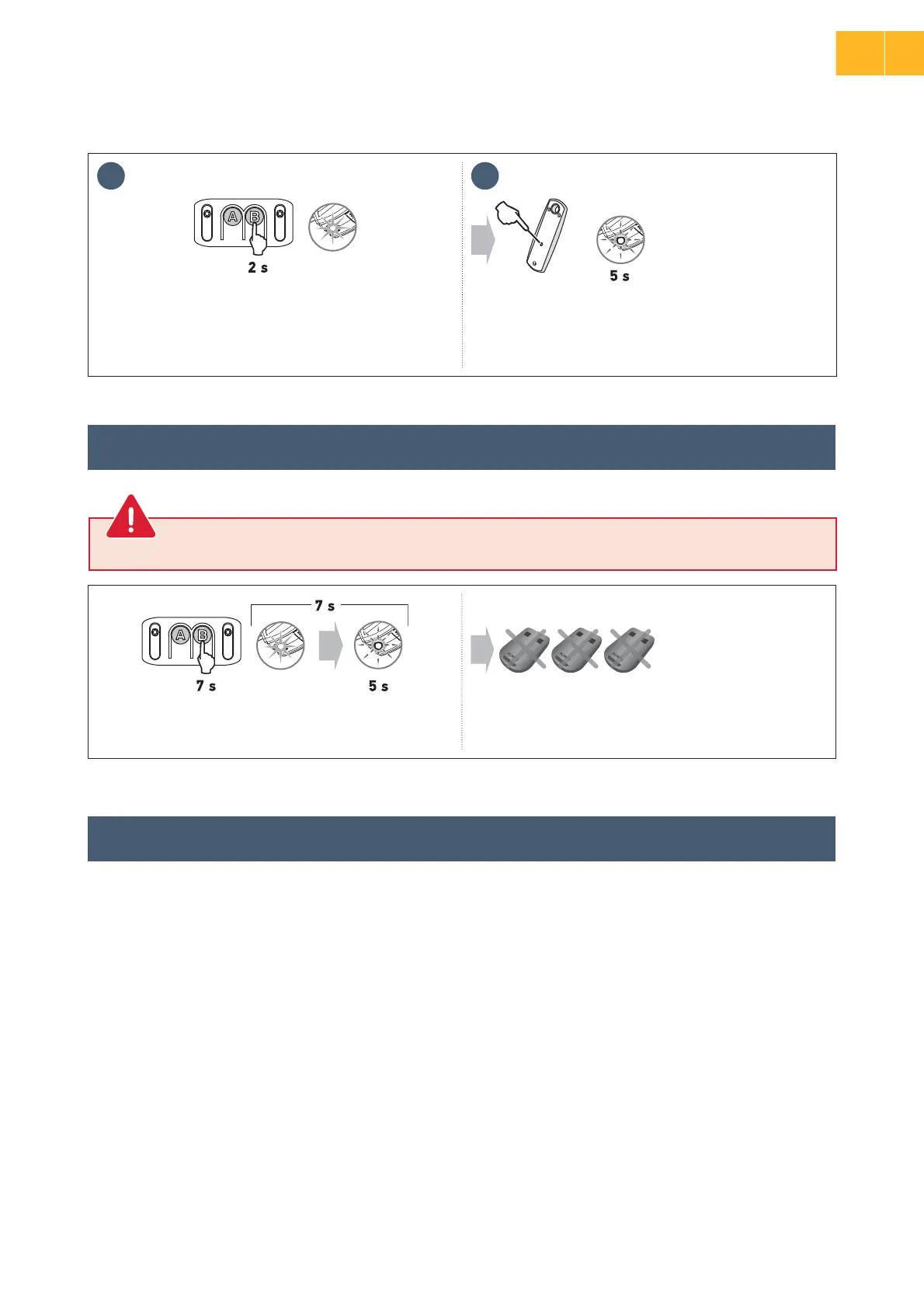
• Press ĄÿÿáÚɃ“B” for 2 seconds.
The integrated lighting comes on.
• Using a thin implement, press the “prog ”button” on the
back of the remote control.
• n½ªÀÚÿª·òÿª¦ÓÀ·½ÿÀÚ·Īö½ªö¶áòǨöªáÚ¦öȗ
The remote control has been memorised.
>
Memorising a Telis type remote control or similar (not supplied in the kit)
• Press ĄÿÿáÚɃ“B” for 7 seconds. The integrated lighting
áÙªöáÚÿ½ªÚª·ÀÚöÿáĪö½ȩǨɃöªáÚ¦öȪȗ
All the remote controls and all the settings are now cleared.
2.5 Clearing the remote controls
2.6 Reinitialising the settings
This procedure causes all memorised remote controls to be cleared.
To reinitialise all settings, simply run a new auto-programming process (see page 15).
2
EN




 To Next Page