18
EN - GDK installation and operating guide - SOMFY
Programming
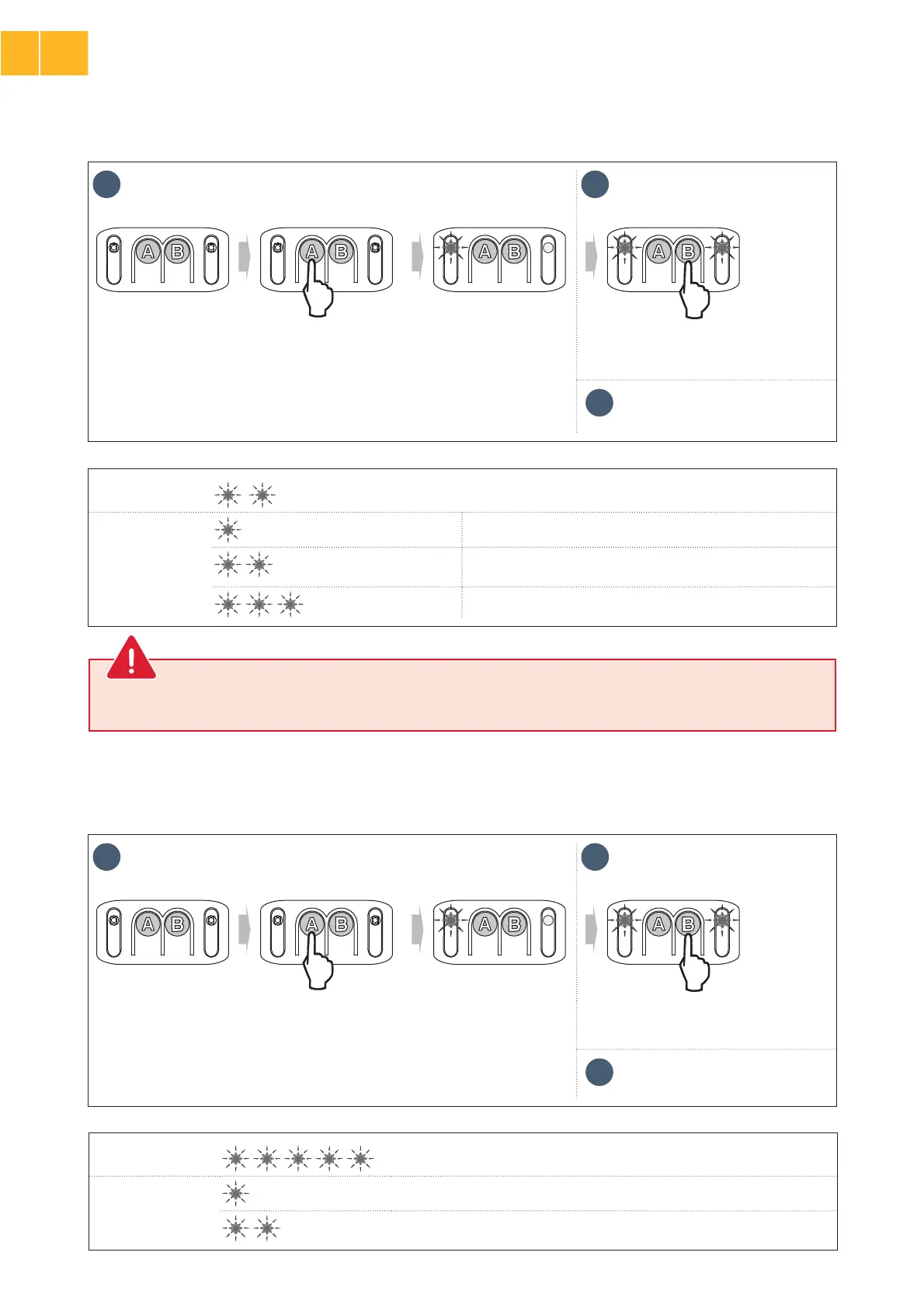
Indicator light A
Docking zone when closing
Indicator light B
No slowing No reduction in speed at the end of closing.
Short slowing (default
value)
The speed is reduced during the last 20 centimetres.
Long slowing The speed is reduced during the last 50 centimetres.
>
Choice of docking zone when closing
1 2
x 2 N x 2 N
• Press buttonɃȵA” repeatedly until
ÀÚ¦ÀÿáòÓÀ·½ÿɃ“AȶĪö½ªötwice. “Docking zone when closing” mode is
activated.
• The number of times “N” that indicator light “BȶĪö½ªöÀÚ¦Àÿªöÿ½ªĐÓĄªá
the parameter, see table below).
• Press button “B” to change the value of
the parameter.
3
Press the buttonɃȶA” four times to
exit the settings menu.
>
Choice of type of power supply
Indicator light A Power supply type
Indicator light B
Mains power supply (default type of power supply)
Solar power
1 2
x 5 N x 5 N
• Press buttonɃȵA” repeatedly until
ÀÚ¦ÀÿáòÓÀ·½ÿɃ“AȶĪö½ªöĩĐªÿÀÙªö. “Type of power supply” mode is activated.
• The number of times “N” that indicator light “BȶĪö½ªöÀÚ¦Àÿªöÿ½ªĐÓĄªá
the parameter, see table below).
• Press button “B” to change the value of
the parameter.
3
Press the buttonɃȶA” once to exit
the settings menu.
If this parameter is changed, it is essential to check that the obstacle detection complies with appendix A of standard EN 12
453. Failure to follow this instruction may result in serious injury, e.g. due to crushing by the gate.
WARNING
EN
2



 To Next Page