MIC-10 / MIC-30 – USER MANUAL
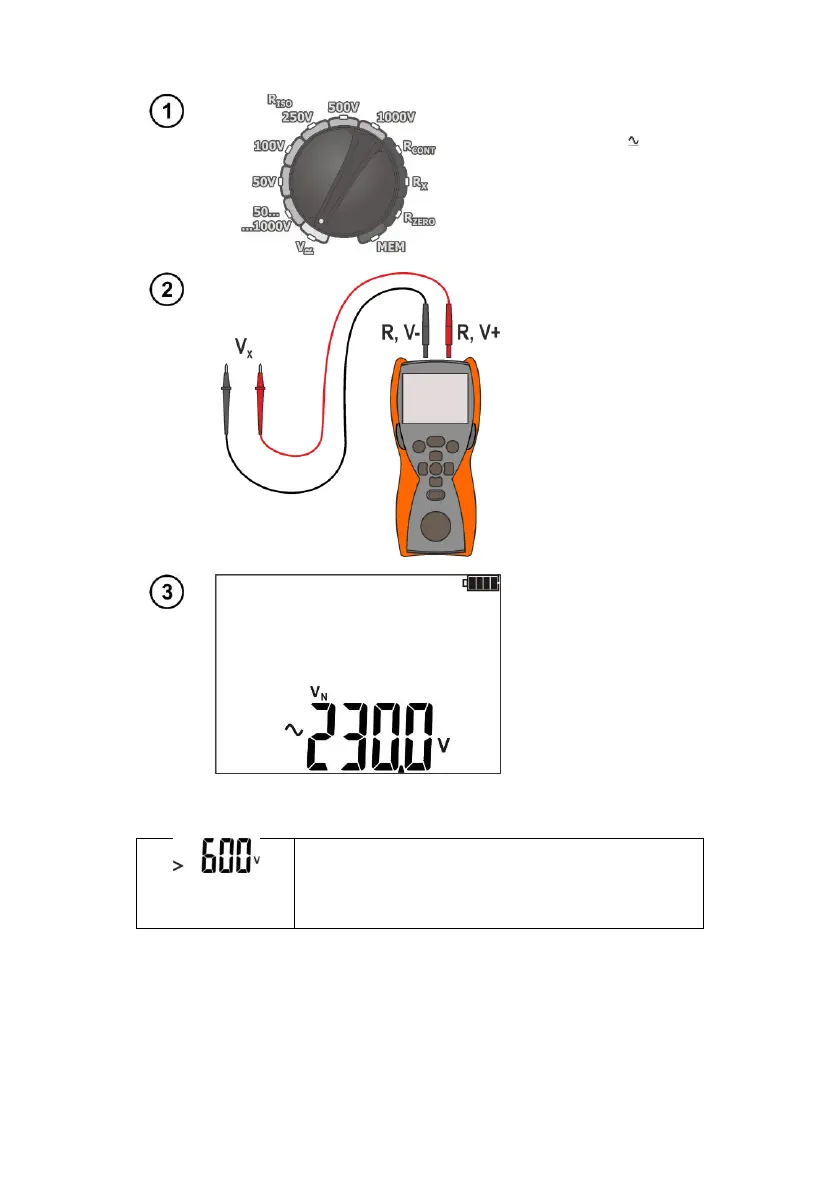
3.3 Voltage measurement
Set the rotary switch of
function selection at V
position.
Connect the meter to a
voltage source.
Measurement is
performed in a
continuous manner.
Additional information displayed by the meter
LED is lit in red,
two-tone acoustic
signal
Voltage is higher than acceptable.
Immediately disconnect the test leads.
3.4 Remembering the last measurement result
Result of the latest measurement is remembered by the meter until a next measurement is started
or measurement settings are changed or the measuring function is changed by means of the rotary
switch. When you go to the initial screen of a given function (e.g. by using ESC button), you can recall
this result automatically after pressing ENTER. Similarly, you can view the latest measurement result
after turning off and then turning on the meter (if the position of function selector has not been changed).



 To Next Page