MIC-10 / MIC-30 – USER MANUAL
2 Meter configuration
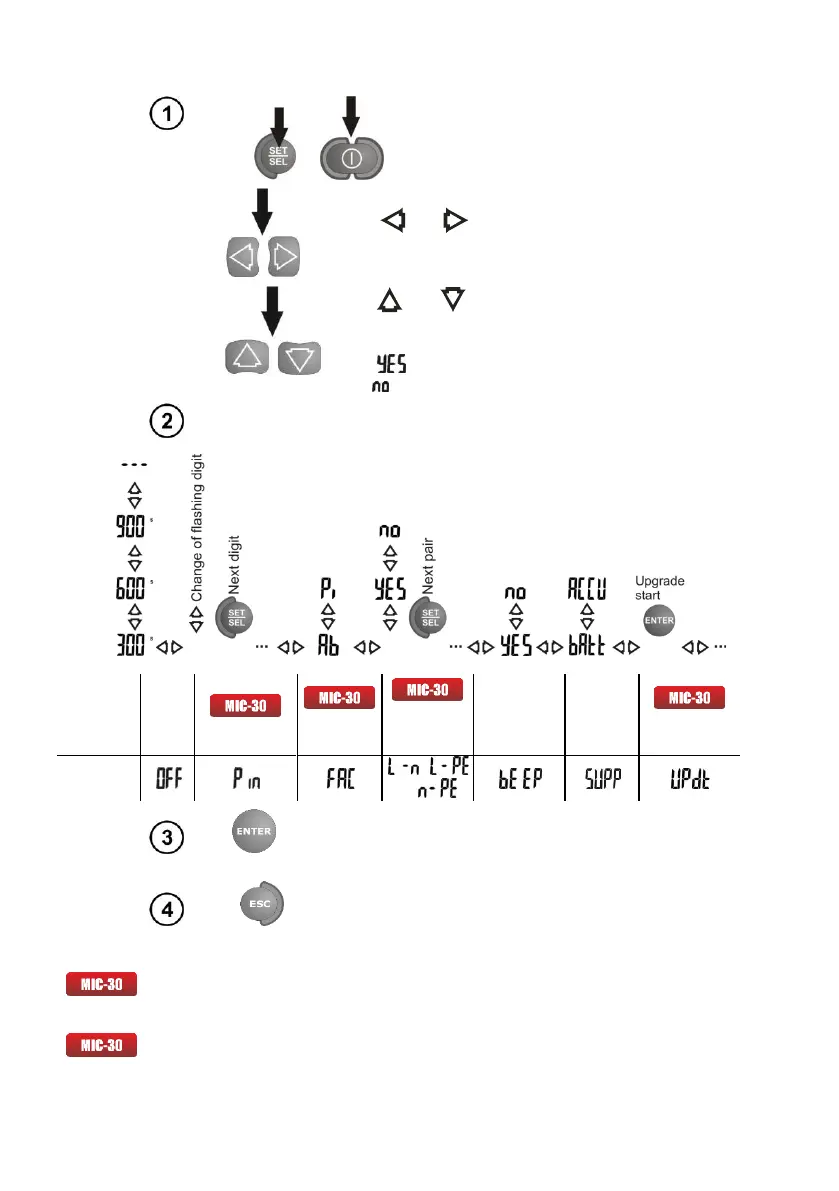
Turn on the meter by pressing and
keeping SET/SEL button pressed.
Use and buttons to go to the next
parameter.
Use and buttons to change the
parameter value. The value or symbol to be
changed is flashing.
The symbol indicates an active parameter,
the - symbol indicates an inactive one.
Set the parameters according to the following algorithm:
Beep
signalling
pressed
push-button
Selection
of
power
supply
source
Press ENTER to validate the last change and go to
the measurement function,
or
Press ESC to go the measurement function
without validating the changes.
Notes:
- Each change DAR PI <-> Ab1Ab2 will set standard times t1, t2 and t3:
- for PI and DAR t1=30s, t2=60s, t3=none,
- for Ab1 and Ab2 t1=15s, t2=60s, t3=none.
- Description of a firmware update is presented in the chapter 6.



 To Next Page