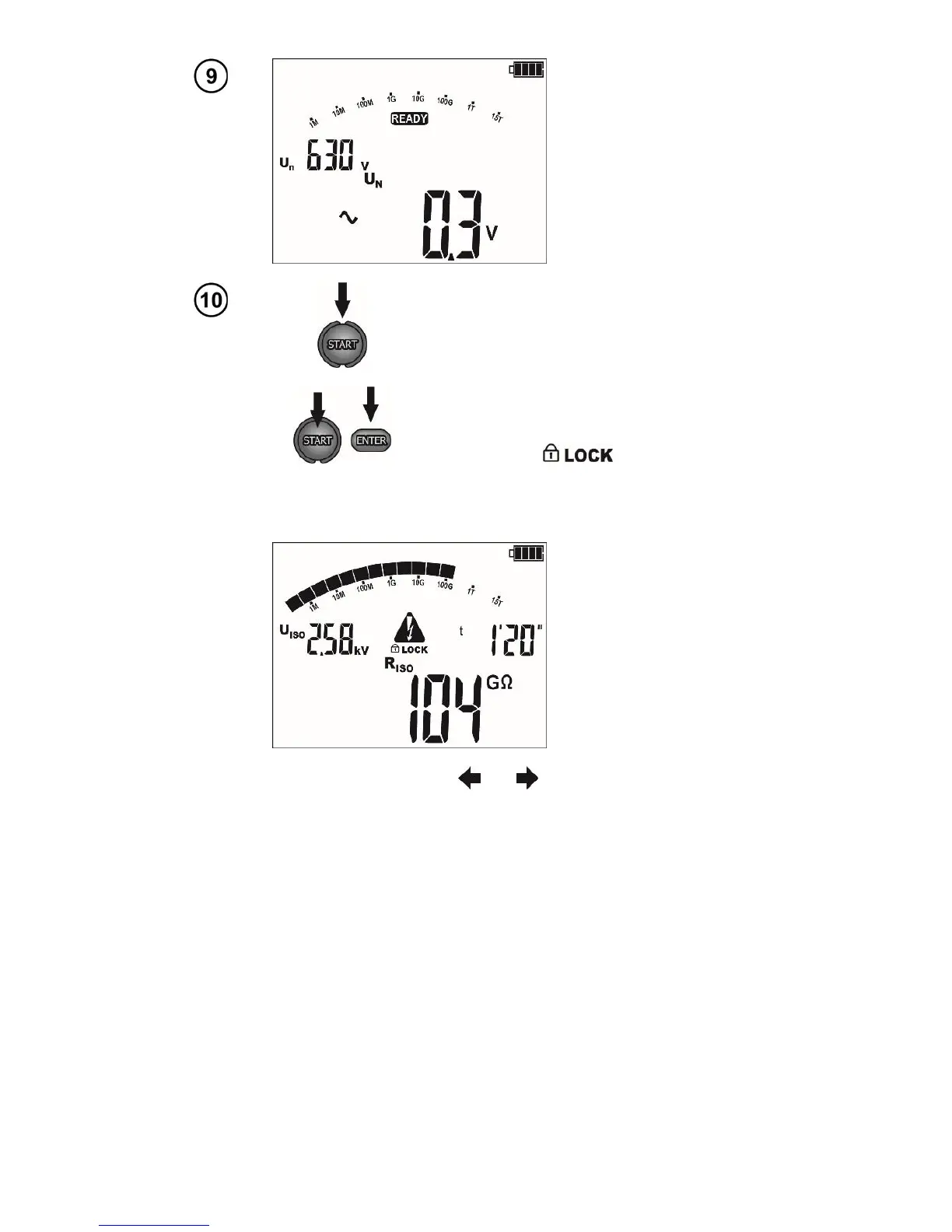
Press and hold START push-button.
The measurement is performed continuously
until you release the button or the pre-set time
is reached.
In order to maintain (block) the measurement,
press ENTER while holding the START -
push-button pressed - the following symbol
will be displayed , then release the
button. In order to interrupt the measurement
in this mode, press START again or press
ESC.
During measurements controlled using the and
buttons the display of the test current U
ISO
for the I
L
leacage current may be changed.
The meter is equipped with an advanced digital filter for result stabilisation in difficult and unstable
measurement conditions. When the F1 button is pressed before or during the measurement the meter
will make calculations which will stabilise the fluctuations of the measurement results. The meter dis-
plays a filtered value of measurements for a specified time period. The filter is selected by pressing the
F1 button i.e. after the first press the result shall be displayed as a filtered value from the last 10 s, after
the second press from the last 30 s, then for 60 s and finally the filter is turned off "- -". The filter setting
is circulating. The filter setting is erased automatically after the meter has been turned off or when the
measurement function is changed using the rotary selector.
The ability to set the filter depends on the set t measurement time, for example when t=20 s it is
only possible to set the filter for 10 s.



 To Next Page