A-Scan Operation and Clinical Use Section 3
WARNING
The PacScan assumes a keratometer index of
refraction of 1.3375 for converting K readings.
If entering K readings in millimeters which were
obtained using a keratometer with a different
index, the values must first be manually
converted to Diopters and then entered.
Apply a drop of topical anesthetic to the eye that
is to be measured prior to performing the
A-scan.
DIRECT CONTACT MEASUREMENTS
The patient should be seated in a comfortable,
upright position preferably in an examination
chair with a headrest. If the scan is to be
performed using the "hand-held" method, the
headrest should be positioned comfortably
behind the patient's head in order to minimize
movement away from the probe.
If an applanating device is to be used, bring the
patient's forehead into contact with the cross bar
and rest the chin on the chin support. Adjust the
chin support so that the patient's eyes are
approximately 1" to 2" below the cross bar.
NOTE: When using an applanating device for
this procedure, it is not recommended that the
head strap be utilized.
WATER IMMERSION TECHNIQUE
The patient should be seated with their head
tilted slightly back. An ordinary chair is usually
all that is needed, although in certain difficult
cases, both patient and user will benefit from the
use of a regular examination chair with headrest.
Place a towel on the patient’s shoulder. Consult
the instructions supplied with the immersion
shell for further directions regarding use of the
shell.
Following entry of user and patient information,
A-scan measurements may be obtained. Select
the [ MEASURE ] button from any screen to
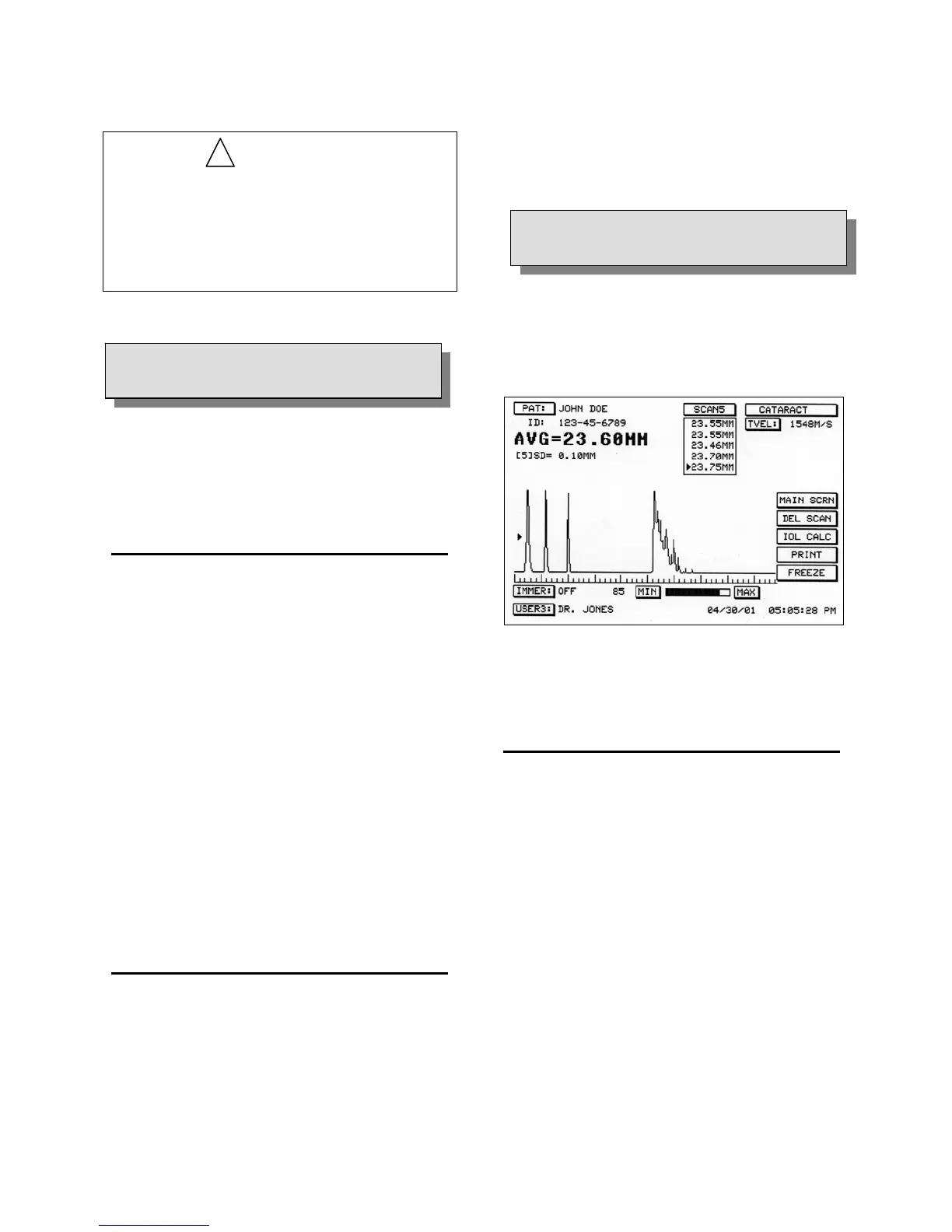
display the Measure Screen (see Figure 3-5).
Figure 3-5. Measure Screen Display
!
3.5
PATIENT EXAMINATION
3.4
PATIENT PREPARATION
DIRECT CONTACT SCANNING IN
AUTOMATIC CAPTURE MODE
The PACSCAN™ is able to recognize an
acceptable A-scan pattern and automatically
capture the image, depending upon the type of
measurement to be made.
1. Examination Mode. Ensure the correct
examination mode is selected as indicated by
the mode button in the upper right corner of
the Measure Screen. The examination mode
may be changed by touching the mode
button until the desired mode is shown. The
following automatic capture examination
modes are available:
¾ Cataract
¾ Dense Cataract
3 - 4 Doc # 0300-A-1901-3D



 To Next Page