Working Instruction, Mechanical
3/000 21-1/FEA 209 544/129 A
Company Internal
©
Sony Ericsson Mobile Communications AB
12(34)
Front Cover Assembly continued
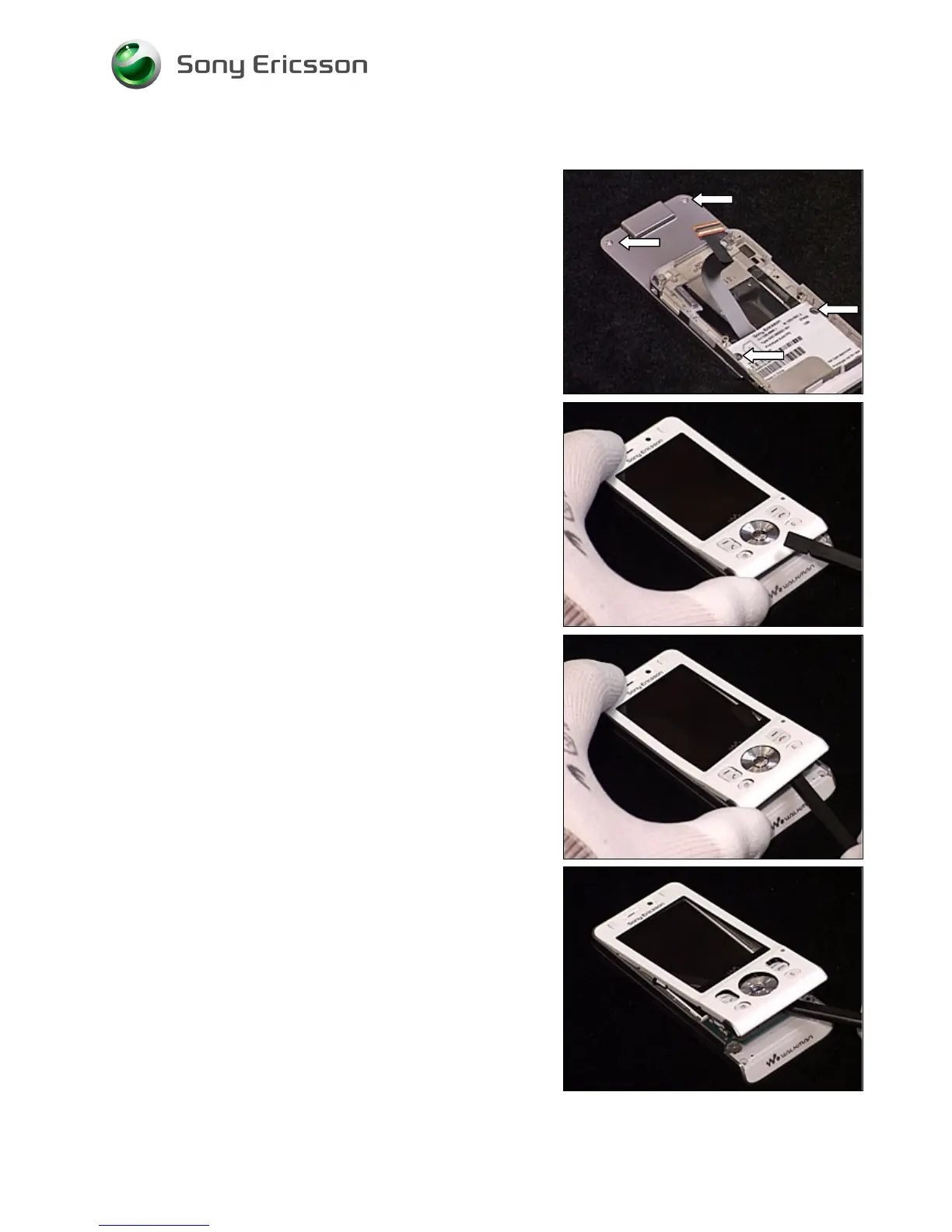
Remove the two upper screws and the two lower screws
(Torx T6).
B
E CAREFUL NOT TO SCRATCH THE
LCD
OR DAMAGE THE
N
AVIGATION
K
EY
FPC
Carefully lift the lower end of the Front Cover Assembly.
B
E CAREFUL NOT TO SCRATCH THE
LCD
OR DAMAGE THE
N
AVIGATION
K
EY
FPC
Carefully insert the orange stick between the Front Cover
Assembly and the Navigation Key FPC. By carefully
pushing the orange stick towards the right side and the top
of the phone, the Front Cover will release.
B
E CAREFUL NOT TO SCRATCH THE
LCD
OR DAMAGE THE
N
AVIGATION
K
EY
FPC
Repeat previous step to release the left side of the Front
Cover as well.













 To Next Page