Connecting
.to
an·
HOMI
jack·
If
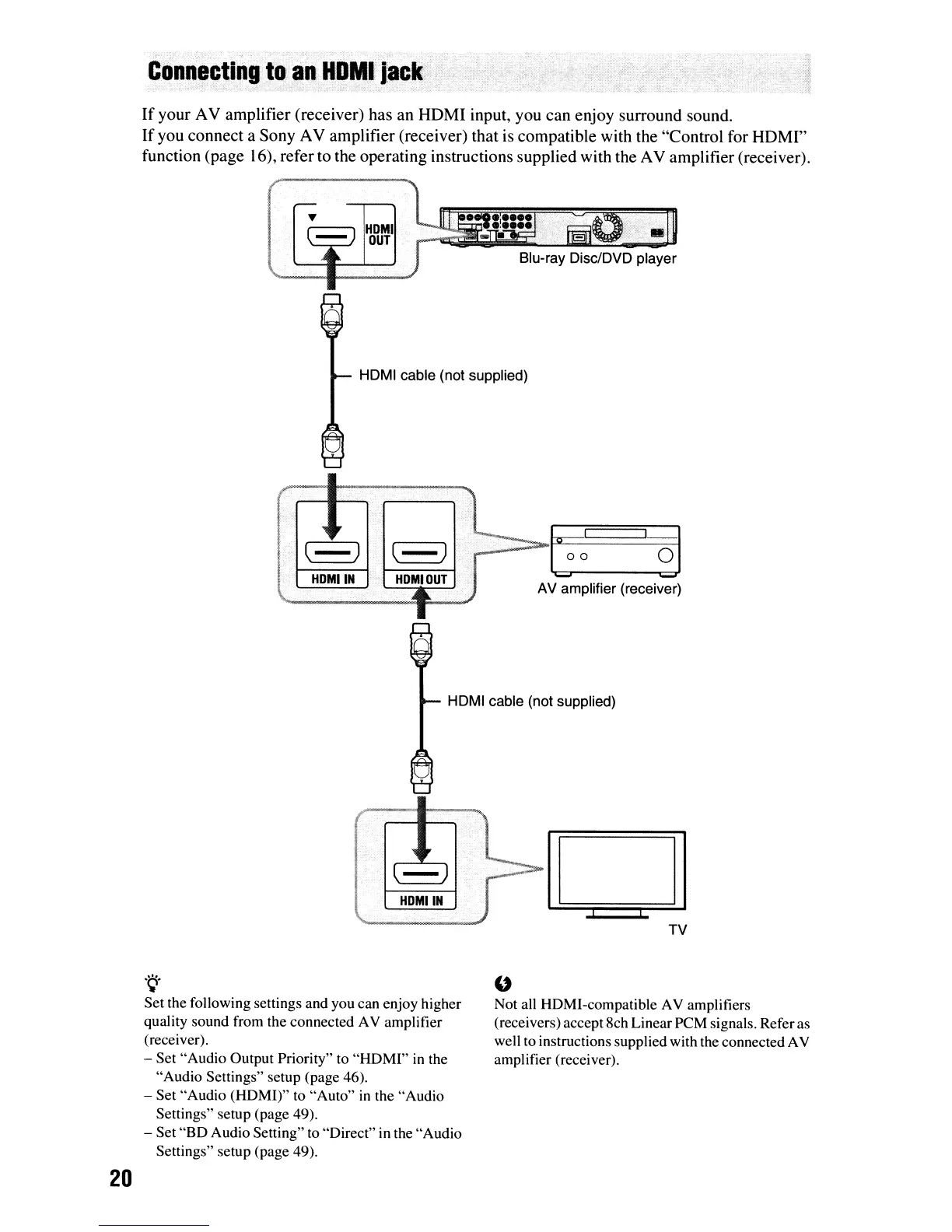
your AV amplifier (receiver) has an HDMI input, you can enjoy surround sound.
If
you connect a Sony AV amplifier (receiver) that is compatible with the "Control for HDMI"
function (page 16), refer to the operating instructions supplied with the AV amplifier (receiver).
HOMI cable (not supplied)
~.,.;,-.-_~_I
__
I
.......
S=i1
AV amplifier (receiver)
HOMI cable (not supplied)
20
.~.
Set the following settings and you can enjoy higher
quality sound from the connected AV amplifier
(receiver).
- Set "Audio Output Priority" to "HDMI"
in
the
"Audio Settings" setup (page 46).
- Set "Audio (HOMI)" to "Auto"
in
the "Audio
Settings" setup (page 49).
- Set "BO Audio Setting" to "Direct" in the "Audio
Settings" setup (page 49).
"
Not all HOMI-compatible AV amplifiers
(receivers) accept 8ch Linear
peM
signals. Referas
well to instructions supplied with the connected AV
amplifier (receiver).













 To Next Page