•
,..--~===:4-
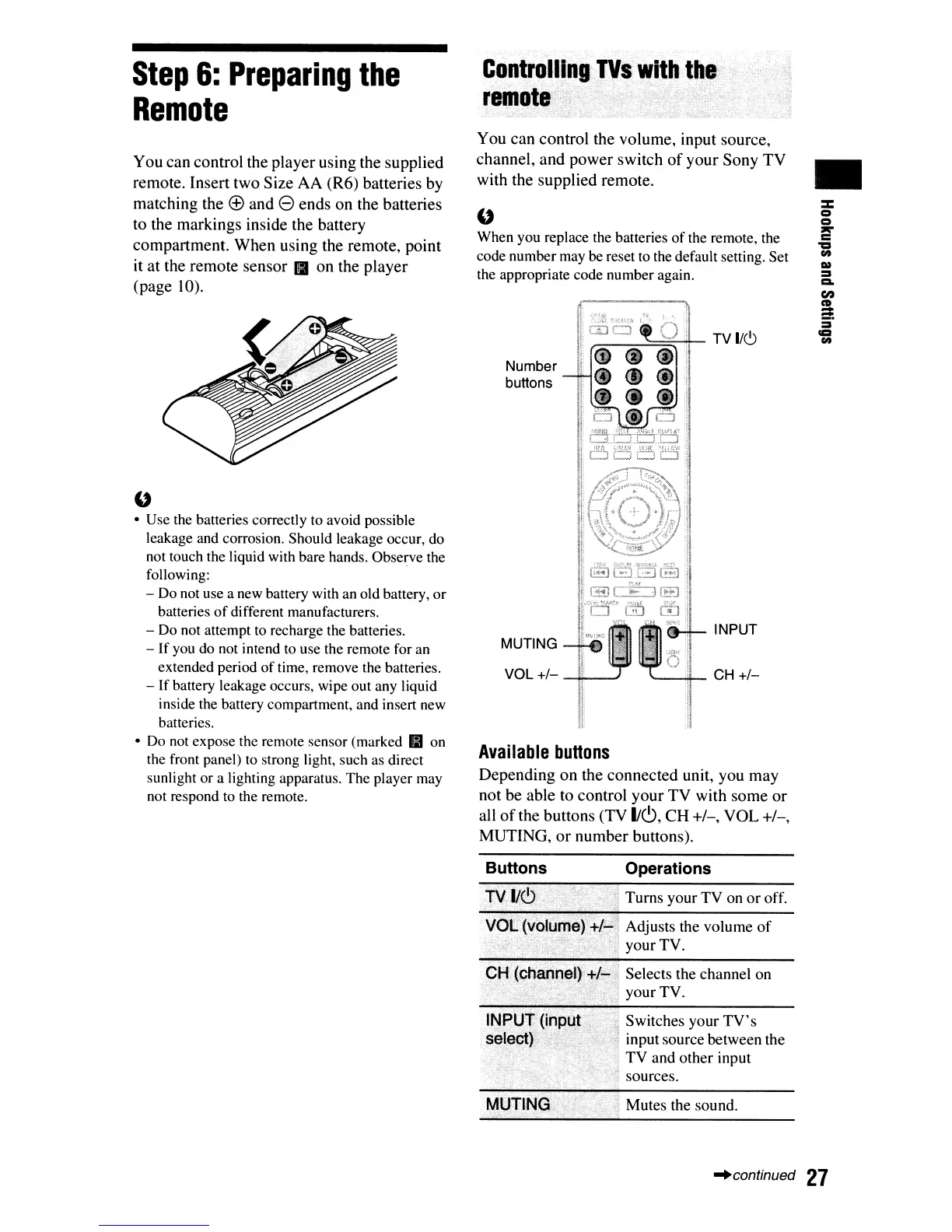
TV
I/C,)
Number
buttons
MUTING
Available
buttons
Depending
on
the
connected
unit,
you
may
not
be
able
to
control
your
TV
with
some
or
all
of
the
buttons
(TV
1Jc9,
CH
+/-,
VOL
+/-,
MUTING,
or
number
buttons).
Controll.~l1gJVS
with
the'
remote·""Li~
..
You
can
control
the
volume,
input
source,
channel,
and
power
switch
of
your
Sony
TV
with
the
supplied
remote.
U
When you replace the batteries
of
the remote, the
code number may be reset
to
the default setting. Set
the appropriate code number again.
u
• Use the batteries correctly to avoid possible
leakage and corrosion. Should leakage occur, do
not touch the liquid with bare hands. Observe the
following:
- Do not use a new battery with
an
old battery,
or
batteries
of
different manufacturers.
-
Do
not attempt to recharge the batteries.
- If you do not intend
to
use the remote for
an
extended period
of
time, remove the batteries.
-
If
battery leakage occurs, wipe out any liquid
inside the battery compartment, and insert new
batteries.
•
Do
not expose the remote sensor (marked
IfB
on
the front panel) to strong light, such as direct
sunlight or a lighting apparatus. The player may
not respond to the remote.
You
can
control
the
player
using
the
supplied
remote.
Insert
two
Size
AA
(R6)
batteries
by
matching
the
(±)
and
e
ends
on
the
batteries
to
the
markings
inside
the
battery
compartment.
When
using
the
remote,
point
it
at
the
remote
sensor
II
on
the
player
(page
10).
Step
6:
Preparing
the
Remote
Buttons
Operations
TV
I~C>
"1
Turns your
TV
on
or
off.
VOL
(volume)':':/;;:,.)
Adjusts the volume
of
.
'"
'J
your TV.
CH
(chann~lr+/;;..,'
Selects the channel on
:,,)]':,;,.;
your TV.
INPUT(inpot:.: "
'~
Switches your
TV's
s~lect).,
'
,.;
input source between the
TV
and other input
sources.
'~
Mutes the sound.
"continued
27













 To Next Page