EasyManua.ls Logo

Sony BDP-S550 - Picture and Sound Adjustment Guide; Video Equalizer Settings Explained

Sony BDP-S550
94 pages
Print Icon
To Next Page IconTo Next Page
To Previous Page IconTo Previous Page
Loading...
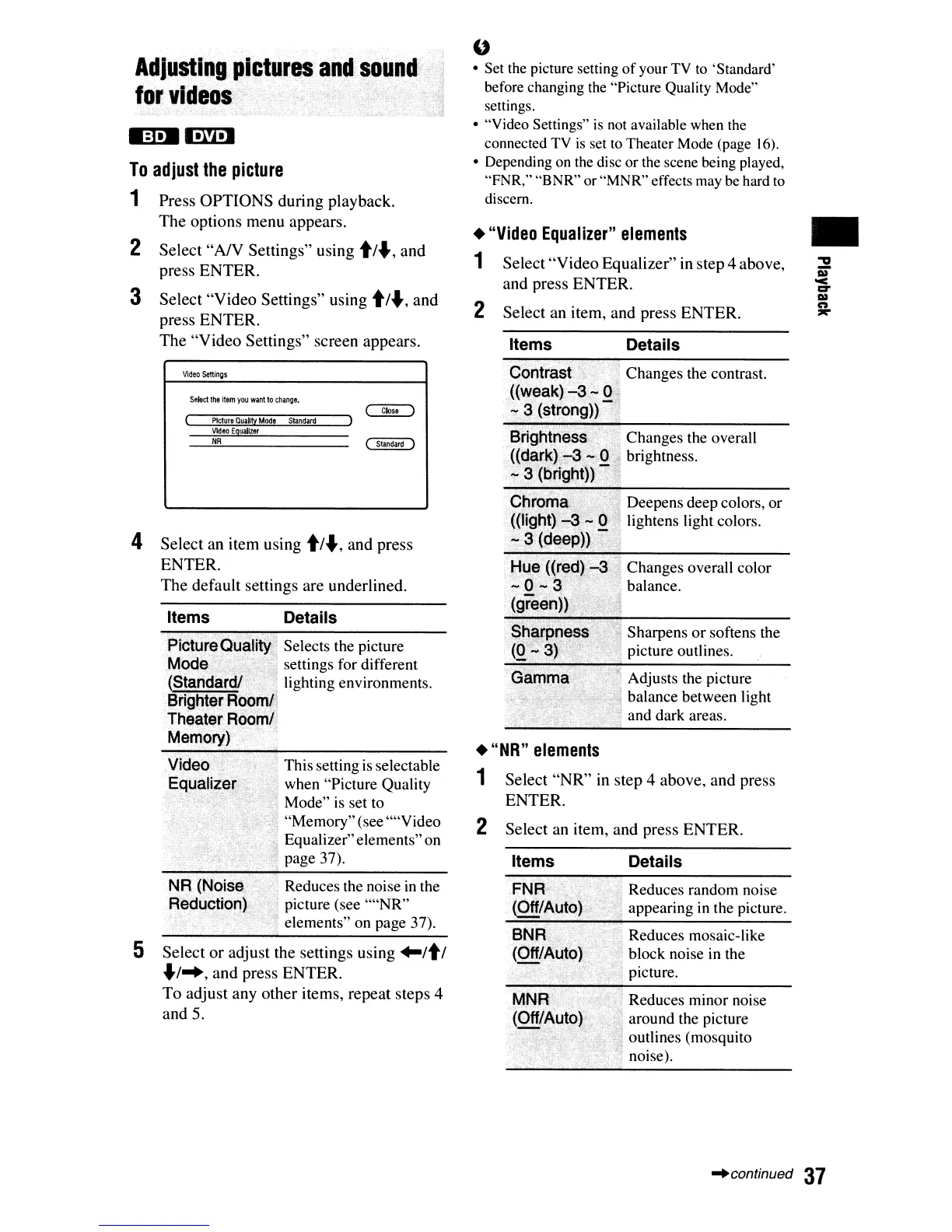
Reduces minor noise
around the picture
outlines (mosquito
noise).
Reduces random noise
appearing
in
the picture.
Reduces mosaic-like
block noise
in
the
picture.
Details
Adjusts the picture
balance between light
and dark areas.
Deepens deep colors, or
lightens light colors.
Sharpens
or
softens the
picture outlines.
Changes overall color
balance.
Changes the overall
brightness.
Changes the contrast.
Details
Items
Select
an
item,
and
press
ENTER.
Select
"NR"
in
step
4
above,
and
press
ENTER.
Select
"Video
Equalizer"
in
step
4
above,
and
press
ENTER.
Select
an
item,
and
press
ENTER.
Items
Contra'
((we
.7,3"(
2
"NR"
elements
1
2
"Video
Equalizer"
elements
1
"
Set the picture setting
of
your
TV
to
'Standard'
before changing
the
"Picture Quality Mode"
settings.
"Video Settings"
is
not
available when
the
connected
TV
is
set
to
Theater
Mode
(page
16).
Depending
on
the
disc or the scene being played,
"FNR," "BNR" or "MNR" effects
may
be
hard
to
discern.
Reduces the noise
in
the
picture (see
""NR"
elements" on page 37).
This setting
is
selectable
when "Picture Quality
Mode" is set to
"Memory"(see ""Video
Equalizer"elements"on
page 37).
Selects the picture
settings for different
lighting environments.
Details
Press
OPTIONS
during
playback.
The
options
menu
appears.
Select
"AN
Settings"
using t/.,
and
press
ENTER.
Select
"Video
Settings"
using t/.,
and
press
ENTER.
The
"Video
Settings"
screen appears.
Video
settings
Select
the
item
you
want
to
change.
Picture
Qualty
Mode
Standard
Vkleo
Equalizer
Adiustlng.pi~tures;Cln~!.soll
for
videos}
....
NR
5
Select
or
adjust the settings using
"It
I
./~,
and
press
ENTER.
To
adjust
any
other
items, repeat
steps
4
and
5.
4
Select
an item using
t/.,
and
press
ENTER.
The
default
settings are underlined.
2
3
To
adjust
the
picture
1
~continued
37

Other manuals for Sony BDP-S550

Related product manuals