EasyManua.ls Logo

Sony BDP-S550 - 7.1 Channel Surround Sound Connection

Sony BDP-S550
94 pages
Print Icon
To Next Page IconTo Next Page
To Previous Page IconTo Previous Page
Loading...
r.
•••.
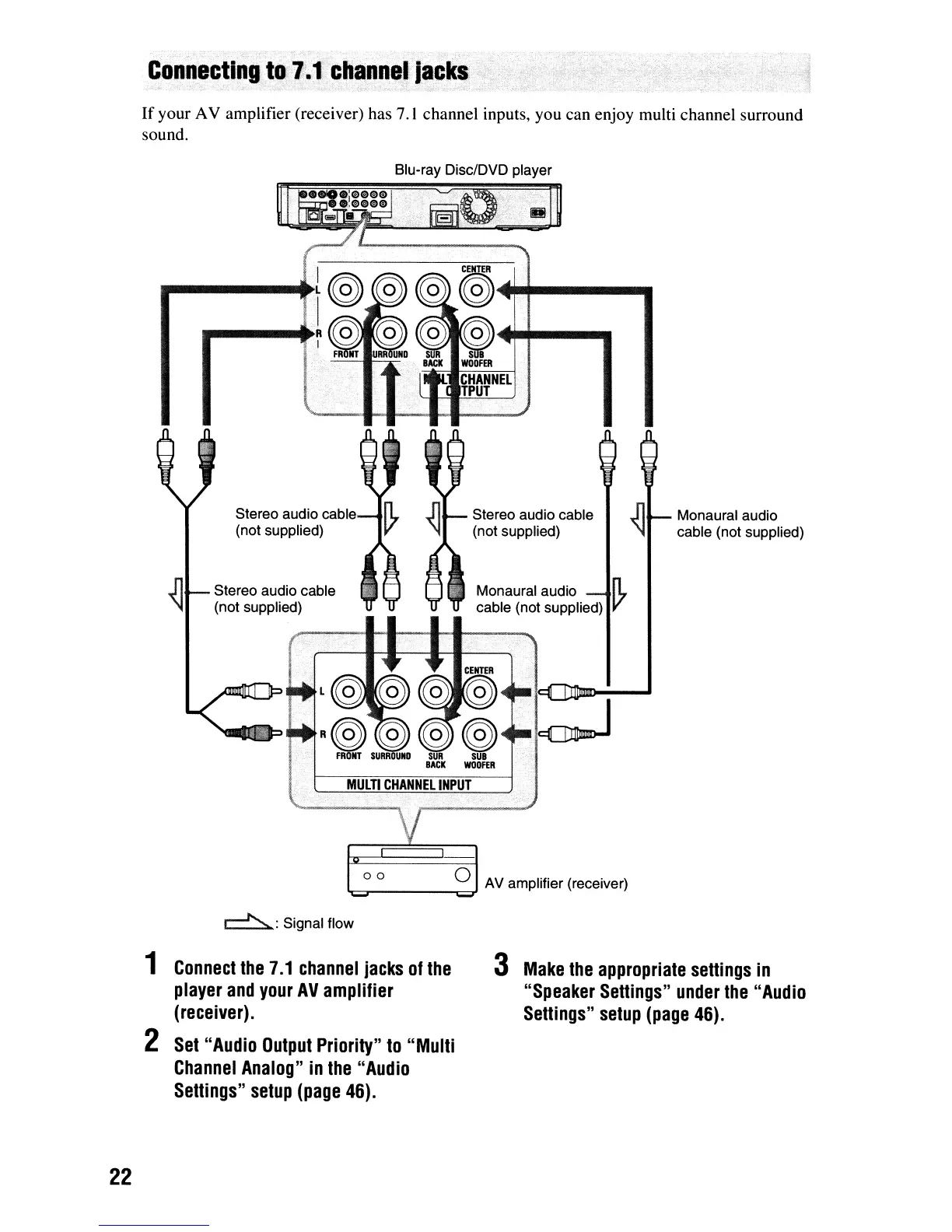
Conn,ectlngto.l.1.
channe,1
jacks
If
your
AV
amplifier (receiver) has 7.1 channel inputs, you can enjoy multi channel surround
sound.
Blu-ray Disc/DVD player
Monaural audio
cable (not supplied)
Monaural audio
n..
cable (not supplied) V
Stereo audio cable
(not supplied)
Stereo audio cable
(not supplied)
Stereo audio cable
(not supplied)
00
0 AV amplifier (receiver)
r==">..:
Signal flow
1
Connect
the
7.1
channel
jacks
of
the
player
and
your
AV
amplifier
(receiver).
2
Set
"Audio
Output
Priority"
to
"Multi
Channel
Analog"
in
the
"Audio
Settings"
setup
(page
46).
3
Make
the
appropriate
settings
in
"Speaker
Settings"
under
the
"Audio
Settings"
setup
(page
46).
22

Other manuals for Sony BDP-S550

Related product manuals