•
U
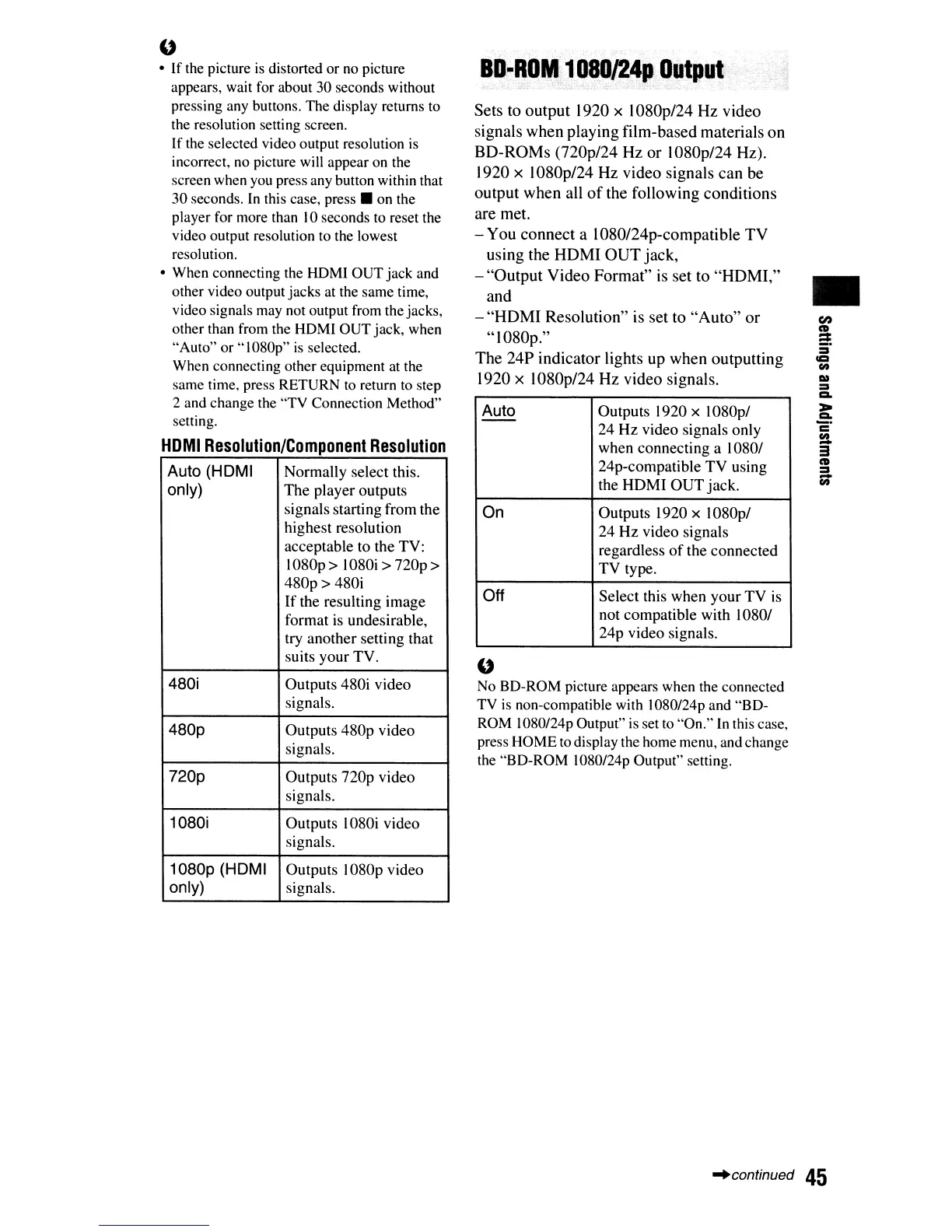
No BD-ROM picture appears when the connected
TV
is
non-compatible with 1080/24p and "BD-
ROM
1080124p
Output"
is
set to "On."
In
this case,
press HOME to display the home menu, and change
the "BD-ROM 1080/24p Output" setting.
ID-ROM,
1
OBO/24pOutput
..
' ,
Sets
to
output
1920
x
1080p/24
Hz
video
signals
when
playing
film-based
materials
on
BO-ROMs
(720p/24
Hz
or
1080p/24
Hz).
1920 x 1080p124
Hz
video
signals
can
be
output
when
all
of
the
following
conditions
are
met.
-
You
connect
a
1080/24p-compatible
TV
using
the
HOMI
OUT
jack,
-
"Output
Video
Format"
is
set
to
"HOM
I,"
and
-
"HDMI
Resolution"
is
set
to
"Auto"
or
"1080p."
The
24P
indicator
lights
up
when
outputting
1920 x
1080p/24
Hz
video
signals.
Auto
Outputs 1920 x 1080p/
--
24
Hz
video signals only
when connecting a 1080/
24p-compatible
TV
using
the
HOMI
OUT
jack.
On
Outputs 1920 x 1080p/
24
Hz
video signals
regardless
of
the connected
TV
type.
Off
Select this when your
TV
is
not compatible with 1080/
24p video signals.
Auto (HDMI
Normally select this.
only)
The
player outputs
signals starting from the
highest resolution
acceptable to the TV:
I
080p
> I080i >
nop
>
480p>
480i
If
the resulting image
format is undesirable,
try another setting that
suits your TV.
480i
Outputs 480i video
signals.
480p
Outputs
480p
video
signals.
720p
Outputs
nop
video
signals.
1080i
Outputs 1080i video
signals.
1080p
(HDMI
Outputs 1080p video
only)
signals.
u
•
If
the picture
is
distorted or no picture
appears, wait for about 30 seconds without
pressing any buttons. The display returns to
the resolution setting screen.
If
the selected video output resolution is
incorrect,
no
picture will appear on the
screen when you press any button within that
30 seconds.
In
this case,
press.
on the
player for more than
10
seconds to reset the
video output resolution to the lowest
resolution.
• When connecting the HDMI OUT jack and
other video output jacks at the same time,
video signals may not output from the jacks,
other than from the HOMI OUT jack, when
"Auto" or "1080p"
is
selected.
When connecting other equipment at the
same time, press RETURN
to
return
to
step
2 and change the
'TV
Connection Method"
setting.
HOMI
Resolution/Component
Resolution
~continued
45













 To Next Page